Workspace updates from June 2015
36 Workspace updates were tracked in June 2015.
-
2015-06-23Comms & Meetings
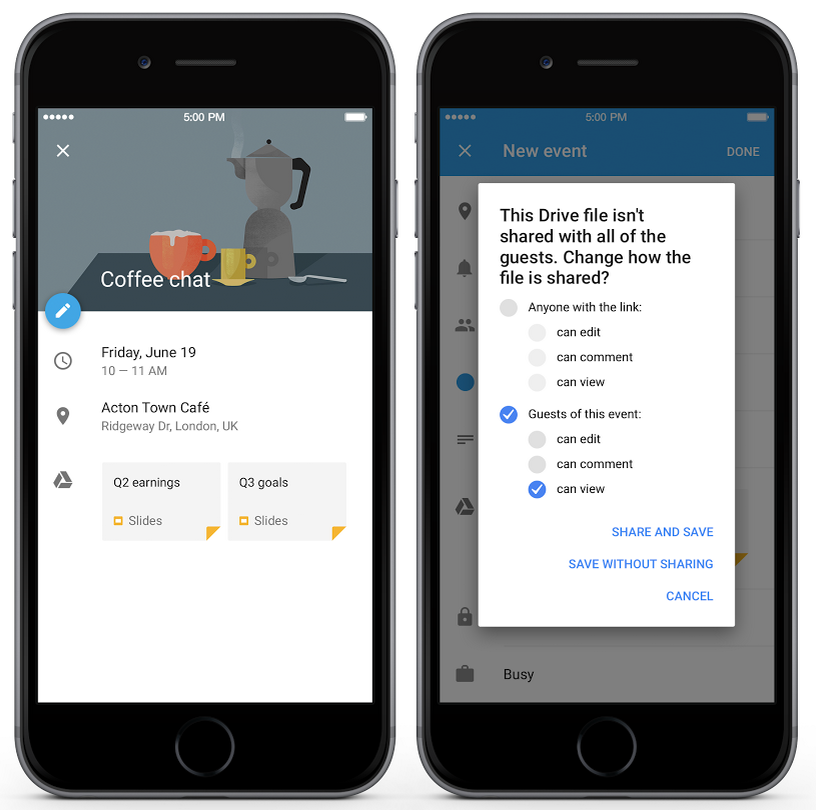
Google Drive file attachments now supported in Google Calendar app for iPhone
Users can now add Google Drive files to events within the Google Calendar app for iPhone. For domains with Drive enabled, the app will automatically check if all event invitees have access to the files and prompt the user to add access if they do not.
Release: Both • Rapid: 2015-06-23 • Scheduled: 2015-06-23 -
2015-06-23Comms & Meetings
Event attachment improvements for Google Calendar web and API
Google Calendar web now supports event attachments by default, allowing users to attach Google Drive files to events. Drive will also automatically check if event invitees have access to attached files and prompt the user to grant access if necessary. Additionally, developers can now add Drive files to Google Calendar events via the Calendar API.
Release: Both • Rapid: 2015-06-23 • Scheduled: 2015-07-07 -
2015-06-22Content & Collaboration
Expanded image type support for file conversion in Google Docs, Sheets, and Slides.
Google has expanded the image types supported during the conversion of Microsoft Office files to Google Docs, Sheets, and Slides. In addition to JPEG, PNG, EMF, and WMF, users can now successfully import and export larger images, less common formats like TIFF, and images with non-RGB color profiles such as CMYK.
Release: Both • Rapid: 2015-06-22 • Scheduled: 2015-06-22 -
2015-06-19Content & Collaboration
Full launch of the new Google Drive UI
The new Google Drive user interface is being fully launched to Google Apps customers, and the option to revert to the old UI will be removed. The rollout begins for Rapid release customers on June 23, 2015, followed by Scheduled release customers on July 7, 2015. Users are advised to upgrade to supported browsers as older versions (Chrome 23, Firefox 23, IE9, and Safari 6) are not compatible.
Release: Both • Rapid: 2015-06-23 • Scheduled: 2015-07-07 -
2015-06-17Other
Google Apps Password Sync 1.4 is now available.
Google Apps Password Sync (GAPS) version 1.4 has been released to fix an issue where the application would silently crash after failing to retrieve the email address attribute for an account from Active Directory. While this issue was primarily observed on Windows Server 2003, the update is recommended for all Windows Server versions.
Release: Both • Rapid: 2015-06-17 • Scheduled: 2015-06-17 -
2015-06-16Content & Collaboration
Insert images into Google Sheets while offline
Users can now insert images into Google Sheets when working offline in the Chrome browser, provided that offline access has been enabled. Any images inserted while offline will be synced once the user regains internet connectivity.
Release: Both • Rapid: 2015-06-16 • Scheduled: 2015-06-16 -
2015-06-15Content & Collaboration
Introduction of protected cell warnings to prevent accidental edits.
To facilitate safer collaboration, Google Sheets now allows owners to set warnings for individuals who attempt to edit certain cells, reducing unintended changes like typos without requiring complex permission settings.
Release: Both • Rapid: 2015-06-15 • Scheduled: 2015-06-15 -
2015-06-15Content & Collaboration
Pivot table enhancements with calculated fields and GETPIVOTDATA function.
Google Sheets has introduced calculated fields to pivot tables, allowing users to apply formulas to pivot table data, and the GETPIVOTDATA function to retrieve specific data from a pivot table.
Release: Both • Rapid: 2015-06-15 • Scheduled: 2015-06-15 -
2015-06-15Content & Collaboration
New data analysis tools including formula previews and conditional filtering.
Users can now preview formula results and errors instantly as they type and filter rows and columns based on specific conditions such as 'less than', 'greater than', 'text contains', and 'date after'.
Release: Both • Rapid: 2015-06-15 • Scheduled: 2015-06-29 -
2015-06-15Content & Collaboration

Enhanced chart customization options in Google Sheets.
Google Sheets now offers more ways to visualize data with the addition of data labels to display exact values of bars and points, custom shapes and symbols for data points in line and scatter charts, and improved functionality for moving and resizing charts.
Release: Both • Rapid: 2015-06-15 • Scheduled: 2015-06-29 -
2015-06-11Content & Collaboration
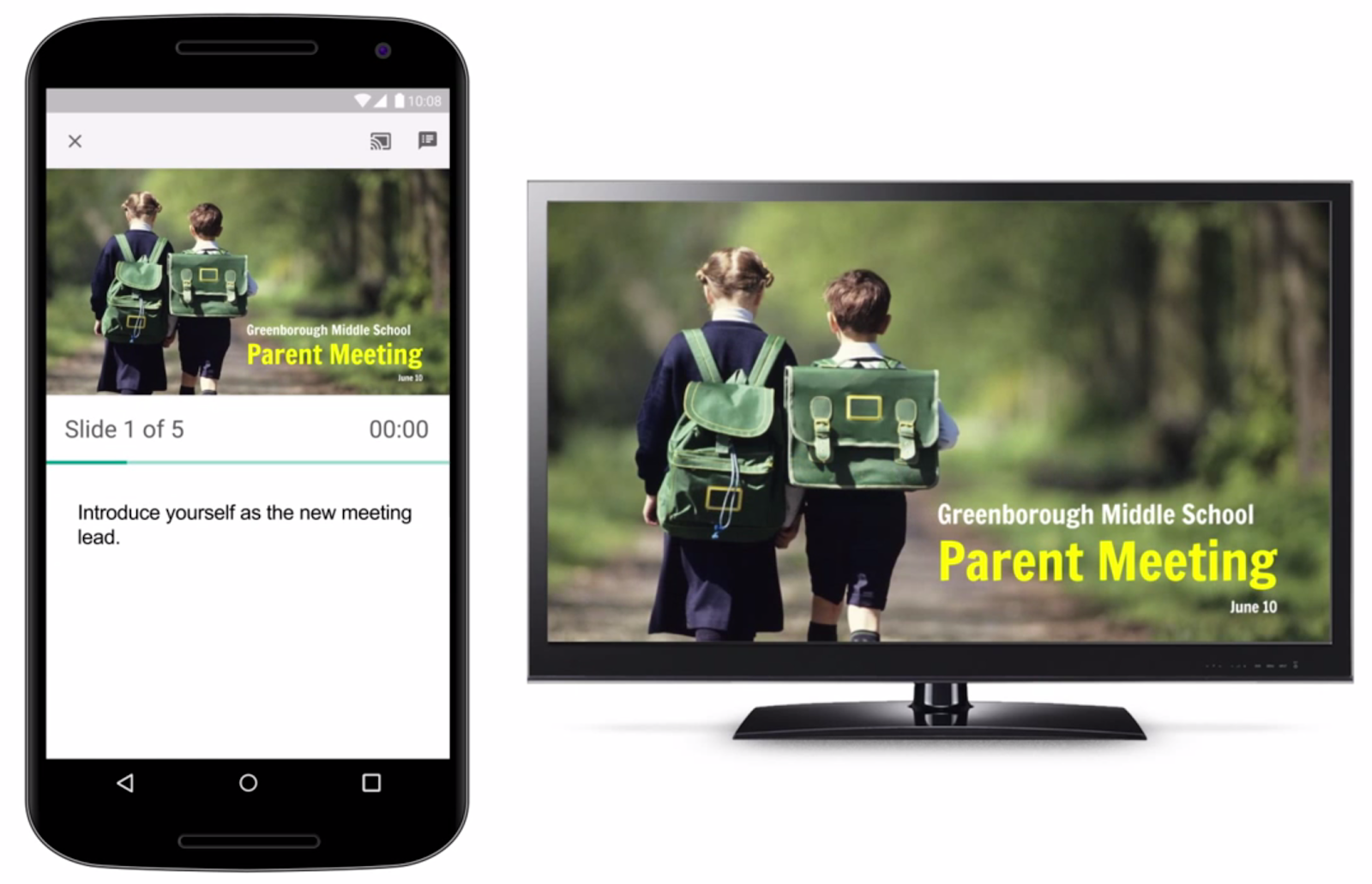
Google Slides app now supports Chromecast and AirPlay.
The Google Slides app has been updated to enable users to present their presentations on big screens using Chromecast or AirPlay from a phone or tablet. While presenting, the mobile device can be used as a remote to advance slides, view speaker notes, and monitor a timer.
Release: Both • Rapid: 2015-06-11 • Scheduled: 2015-06-11 -
2015-06-11Comms & Meetings
Full-view screen sharing for Google Hangouts
Google Hangouts is launching full-view screen sharing, which allows shared content to occupy as much of the visible screen area as possible. In 'Present to everyone' mode or when a participant is pinned, attendee thumbnails will overlay the content at the bottom by default, and a new button in the control bar allows participants to hide these thumbnails.
Release: Both • Rapid: 2015-06-11 • Scheduled: 2015-06-11 -
2015-06-10Comms & Meetings
OAuth support for Yahoo and Microsoft accounts in the Gmail app for Android.
The Gmail app for Android now supports OAuth for all Yahoo and Microsoft accounts. By authenticating these non-Gmail accounts directly with their respective providers, users can now utilize enhanced security features, including two-step verification and account recovery.
Release: Both • Rapid: 2015-06-10 • Scheduled: 2015-06-10 -
2015-06-09Other

Introduction of iOS Account Wipe (Selective Wipe) for corporate data.
Google Apps admins can now use iOS Account Wipe (Selective Wipe) to safely delete an employee's corporate account and data from an iPhone or iPad without affecting the employee's personal data, such as photos. This is distinct from the existing Remote Wipe functionality which wipes the entire device.
Release: Both • Rapid: 2015-06-09 • Scheduled: 2015-06-09 -
2015-06-09Other
Updated Google Apps Device Policy app to display more Work Profile information.
The Google Apps Device Policy app for Android has been updated to provide admins with more detailed information when an employee is using a Work Profile, including the status of unknown sources, developer options, and the domain names of other accounts added to the Work Profile.
Release: Both • Rapid: 2015-06-09 • Scheduled: 2015-06-09