Workspace updates from October 2019
31 Workspace updates were tracked in October 2019.
-
2019-10-22Admin & Security

G Suite and Google Cloud Identity Premium now support password vaulted apps for single sign-on.
Google has introduced password vaulting for G Suite and Cloud Identity Premium, allowing administrators to enable single sign-on (SSO) for applications that do not support modern authentication standards like SAML or OIDC. This feature allows admins to centrally manage credentials, secure shared access based on group membership, and access usage reports, while providing end users with a new dashboard for one-click access to their apps.
Release: Both • Rapid: 2019-10-22 • Scheduled: 2019-10-22 -
2019-10-21Comms & Meetings

Gmail profile pictures are being combined with Google account profile photos for G Suite users.
Google is unifying the profile picture settings for G Suite users by combining the Gmail photo with the Google account profile photo. When users attempt to change their picture in Gmail, they will now be directed to the 'About me' section of their Google profile settings. This change ensures a consistent profile image across all Google apps and gives administrators greater control over photo editability within their domain.
Release: Both • Rapid: 2019-10-21 • Scheduled: 2019-10-21 -
2019-10-18Other
Updated 'What’s new in G Suite?' Help Center article with filterable and searchable launch lists.
Google has updated the 'What’s new in G Suite?' Help Center article to include a comprehensive list of all G Suite launches from the past six months. The updated article allows users to filter by product or search by keyword to easily find and learn about specific updates.
Release: Both -
2019-10-16Admin & Security

Custom reporting alerts are moving to the Security rules section of the Admin console.
Google is consolidating the management of custom reporting alerts by moving them from the Reporting section to the Security rules section of the Admin console. These alerts will now be listed with the 'Reporting' rule type, providing admins with a more centralized view of rules and alerts within their domain to make management easier.
Release: Both • Rapid: 2019-10-16 • Scheduled: 2019-10-16 -
2019-10-15Content & Collaboration

Directly click on chart elements to move and delete them in Google Sheets
Google Sheets has introduced new features allowing users to easily customize charts by clicking directly on data labels, chart titles, or legends to drag and reposition them, or delete them using the delete or backspace keys. Additionally, the update includes keyboard navigation support (using Tab, Enter, Escape, and Arrow keys) and screen reader verbalization for chart elements to improve accessibility.
Release: Both • Rapid: 2019-10-15 • Scheduled: 2019-10-28 -
2019-10-15Other

USB-C Titan Security Keys are now available in the United States.
Google is expanding 2-Step Verification (2SV) options by offering USB-C Titan Security Keys in the United States. These phishing-resistant two-factor authentication (2FA) devices support FIDO standards and are compatible with Android, Chrome OS, macOS, and Windows. They are available for all G Suite and Cloud Identity editions and can be used within the Advanced Protection Program for enterprise to protect high-risk users.
Release: Both • Rapid: 2019-10-15 • Scheduled: 2019-10-15 -
2019-10-14Content & Collaboration
Customize text size and position for captions in Google Slides
Users can now personalize the text size and position of captions while presenting in Google Slides. This allows presenters to make captions easier to read for audience members in large rooms or reduce the text size to maximize the number of words visible on the screen at once.
Release: Both • Rapid: 2019-10-14 • Scheduled: 2019-11-04 -
2019-10-09Content & Collaboration

Goal Seek add-on now available for Google Sheets
The Goal Seek add-on for Google Sheets is now available for download and installation from the G Suite Marketplace. This tool allows users to calculate the required value of a cell to achieve a desired value in another cell, which is particularly useful for conducting break-even analysis or sensitivity calculations.
Release: Both • Rapid: 2019-10-01 • Scheduled: 2019-10-01 -
2019-10-09More
Admins can now view Cloud Search usage information via charts in the Admin console and using the Stats API.
Previously, admins only had limited visibility into the usage of Cloud Search within their domains. Now, they have greater insight into things like how often applications are being used and whether all the content they need indexed is accessible.
Release: GA • Rapid: 2019-10-09 • Scheduled: 2019-10-09 -
2019-10-09Other
Admins can now view Cloud Search usage reports in the Admin console and via the Stats API.
Google has introduced Cloud Search usage reports, providing administrators with greater visibility into how Cloud Search is utilized within their domains. Admins can now access charts in the Admin console or use the Stats API to monitor metrics such as active users, query volume, and the total number of searches to ensure content is properly indexed and accessible.
Release: Both • Rapid: 2019-10-09 • Scheduled: 2019-10-09 -
2019-10-09Admin & Security
Admins can now save filter views in the alert center.
Admins can now save frequently used filter combinations in the alert center to quickly return to specific views without reapplying individual filters each session. Saved filters are individual to each user, although the applied filter URL can be shared with colleagues.
Release: Both • Rapid: 2019-10-09 • Scheduled: 2019-10-09 -
2019-10-09Admin & Security

Admins can now leave comments on alerts in the alert center.
Admins with alert center privileges can now leave comments on alerts, which appear in the 'Alert history' section. This feature facilitates collaboration during investigations and provides a record of resolution actions. Comments can be deleted only by the user who created them.
Release: Both • Rapid: 2019-10-09 • Scheduled: 2019-10-09 -
2019-10-08Admin & Security
Google is adding a diagnostics page in the Admin console to validate MTA-STS configurations.
Google Workspace is introducing a new diagnostics page within the Admin console that allows administrators to validate their MTA-STS and TLS reporting configurations. If any domains are not configured correctly, the page will provide suggested configurations to make it easier for admins to set up new MTA-STS settings. This feature is available to all G Suite editions.
Release: Both • Rapid: 2019-10-08 • Scheduled: 2019-10-08 -
2019-10-07Content & Collaboration
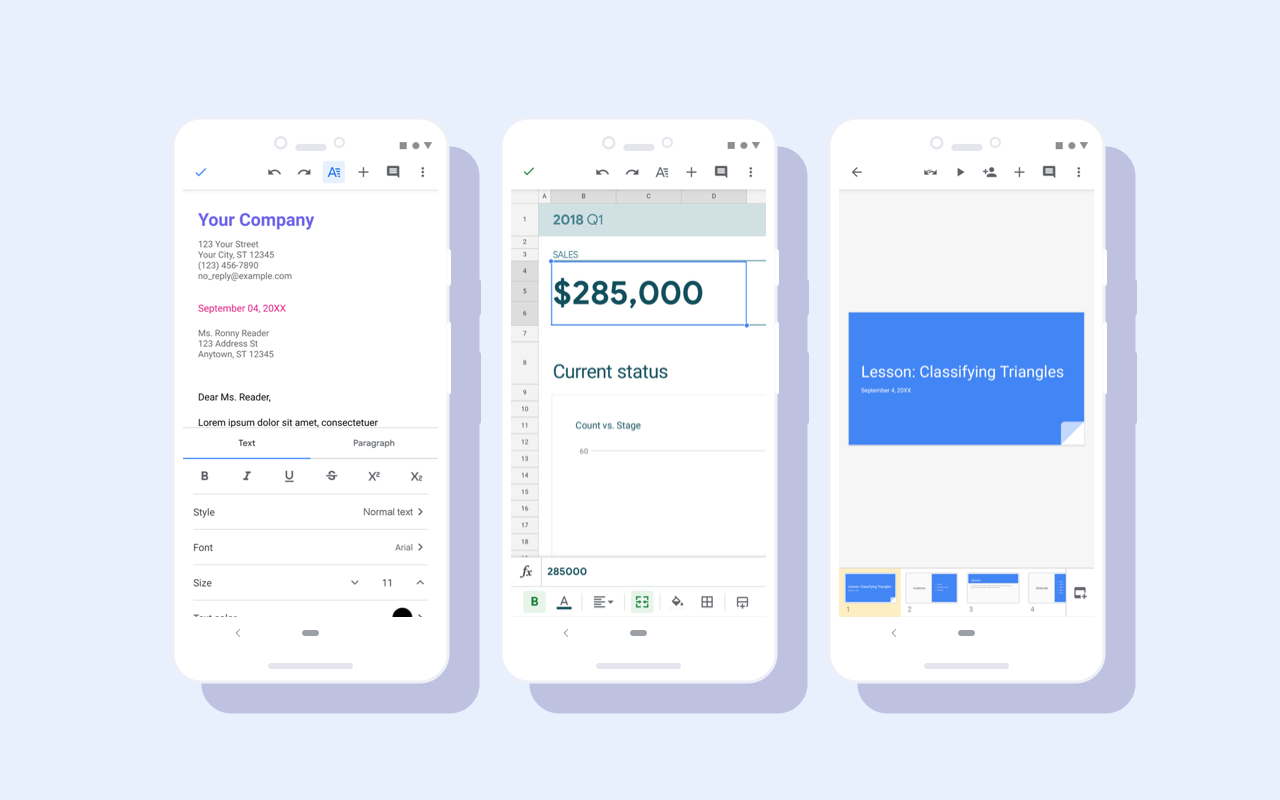
Material redesign for Google Docs, Sheets, and Slides Android apps
Google Docs, Sheets, and Slides Android apps have received a visual update as part of a Material redesign. While functionality remains the same, users will see visual improvements including a restyled document list, highly-legible typefaces, consistent controls, and updated iconography to bring consistency and ease-of-use to G Suite apps.
Release: Both • Rapid: 2019-10-07 • Scheduled: 2019-10-07 -
2019-10-03Other
Google Device Policy app ending support for iOS 9.0
The Google Device Policy app will no longer support mobile devices running iOS version 9.0 or lower after the end of 2019. Users with advanced mobile device management (MDM) enabled must upgrade to iOS version 10.0 or higher to access new MDM features or to download the Device Policy app for the first time. Support will be officially removed in the first release of the app in 2020.
Release: Scheduled