Workspace updates from March 2020
25 Workspace updates were tracked in March 2020.
-
2020-03-30Other
Suspension of the turn-off for less secure app (LSA) access to G Suite accounts.
Google has suspended the scheduled turn-off of less secure app (LSA) access to G Suite accounts, which was originally planned for June 15, 2020. This suspension is intended to minimize disruptions for organizations managing remote workforces during the COVID-19 pandemic. Google recommends that administrators migrate to OAuth authentication and assures that a 12-month window will be provided once the turn-off timeline is restarted.
Release: Scheduled -
2020-03-30Other
Less secure app turn-off suspended until further notice
Suspending the less secure app (LSA) turn-off until further notice. All previously announced timeframes no longer apply.
Release: Scheduled -
2020-03-26Content & Collaboration

Create pointers to any file or folder in Google Drive with shortcuts
Shortcuts in Drive make it easier to organize content and point users to relevant information and files across various drives.
Release: Both • Rapid: 2020-03-26 • Scheduled: 2020-04-15 -
2020-03-26Content & Collaboration
Google Drive is transitioning to a single-location file model.
Starting September 30, 2020, it will no longer be possible to place a file in multiple folders in My Drive. All files already living in multiple locations will be gradually migrated to shortcuts to ensure every file resides in a single location.
Release: Both • Rapid: 2020-09-30 • Scheduled: 2020-09-30 -
2020-03-26Content & Collaboration
Create pointers to any file or folder in Google Drive with shortcuts
Shortcuts in Drive make it easier to organize content and point users to relevant information and files across various drives.
Release: Both • Rapid: 2020-03-26 • Scheduled: 2020-04-15 -
2020-03-19Comms & Meetings
Participants cannot re-join nicknamed meetings after the final participant has left.
To enhance teacher control, participants will no longer be able to re-join a meeting once the final participant has left if the meeting was created using a short link (e.g., g.co/meet/nickname), via the 'Join or start a meeting' field at meet.google.com, or via the Meet app using a nickname. This prevents students from joining a meeting without a teacher present.
Release: Both • Rapid: 2020-03-19 • Scheduled: 2020-03-19 -
2020-03-19Comms & Meetings
Only meeting creators and calendar owners can mute or remove other participants in Education meetings.
For G Suite for Education and G Suite Enterprise for Education customers, Google Meet is updating permissions so that only the meeting creator, Calendar event owner, or the person who creates a meeting on an in-room hardware device can mute or remove other participants. This ensures that teachers cannot be removed or muted by students during a session.
Release: Both • Rapid: 2020-03-19 • Scheduled: 2020-03-19 -
2020-03-19Comms & Meetings
Hangouts Meet improvements for remote learning
Making several improvements to improve the remote learning experience for teachers and students using Hangouts Meet. Only meeting creators and calendar owners can mute or remove other participants in a meeting. Meeting participants will not be able to re-join nicknamed meetings once the final participant has left
Release: Both -
2020-03-12Admin & Security

New interface for domain management in the Admin console
Updated the interface used to manage primary domain, secondary domains, and domain aliases with a more complete information, grouped action buttons, and a new side panel.
Release: Both -
2020-03-12Admin & Security
New interface for domain management in the Admin console.
Google has updated the interface used to manage primary domains, secondary domains, and domain aliases in the Admin console. The new interface provides more complete information and descriptions of domain states, introduces grouped action buttons for tasks such as verifying domains and setting up MX records, and adds a side panel for managing domains registered through Google, including renewals and advanced DNS settings.
Release: Both • Rapid: 2020-03-12 • Scheduled: 2020-03-12 -
2020-03-11Content & Collaboration
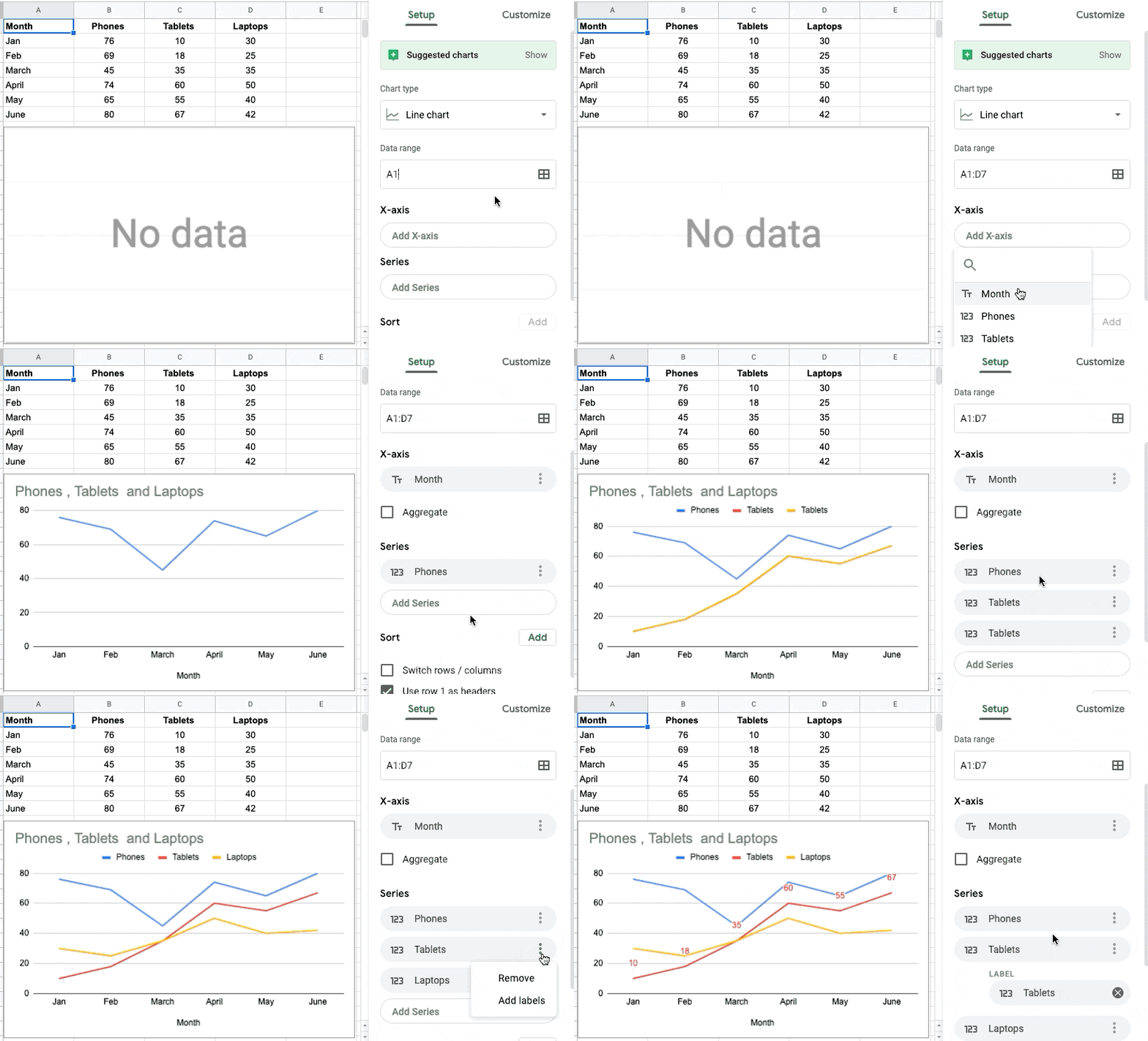
Set custom table ranges for charts in Google Sheets
Google Sheets is improving the way data is suggested and selected when creating charts. Users can now specifically select which columns to use for the chart axis and series, rather than having all data ranges on a table automatically used. This allows for quicker customization of charts to display the most relevant data when working with datasets containing slicers, pivot tables, and other elements.
Release: Both • Rapid: 2020-03-10 • Scheduled: 2020-03-30 -
2020-03-11Content & Collaboration
Set custom table ranges for charts in Google Sheets
Improving the way data is suggested and how data is selected when creating a chart in Google Sheets. Allowing to select which columns to use for the chart axis and series
Release: Both • Rapid: 2020-03-10 • Scheduled: 2020-03-30 -
2020-03-11Content & Collaboration

Sort and filter cells by text or fill color in Google Sheets
Added two additional parameters to filter and sort cells by in Google Sheets: Text color and Fill (background) color.
Release: Both • Rapid: 2020-03-11 • Scheduled: 2020-03-23 -
2020-03-11Admin & Security

Important changes to less secure apps and account recovery management in the Admin console
Making some updates to how less secure app (LSA) settings and account recovery (AR) settings are managed in the Admin console. The updates include a new interface, which reorganizes the settings to make them easier to find and change, and a new system to apply group-based policies in these areas.
Release: Both • Rapid: 2020-03-11 • Scheduled: 2020-03-11 -
2020-03-11Admin & Security
Updates to Less Secure Apps (LSA) and Account Recovery (AR) settings management in the Admin console.
Google is updating the Admin console's interface for managing Less Secure Apps (LSA) and Account Recovery (AR) settings to make them more streamlined and easier to find. Additionally, a new group-based policy system is being introduced for these settings, allowing admins to manage policies exclusively using groups rather than a combination of OU-based policies and group-based exceptions. Existing settings will be migrated automatically for most customers.
Release: Both • Rapid: 2020-03-11 • Scheduled: 2020-03-11