Workspace updates from September 2021
42 Workspace updates were tracked in September 2021.
-
2021-09-20Comms & Meetings
Improved search filters for Gmail on Android.
Users on Android mobile devices can now more easily filter email and search results in Gmail using rich drop-down lists. These filters can be used independently or after a search to narrow results by criteria such as sender or timeframe, and users can now select from suggested senders or search for multiple senders.
Release: Both • Rapid: 2021-09-20 • Scheduled: 2021-09-20 -
2021-09-20Comms & Meetings

Upgrade to the newest version of the Google Chat Progressive Web Application (PWA).
Google is requiring users of the Google Chat Progressive Web Application (PWA) to upgrade to the latest version to ensure continued functionality. Users on older versions will see an in-app banner instructing them to uninstall the old version and visit chat.google.com to install the new one. Starting September 27, 2021, older versions of the Chat PWA will no longer be accessible, and users will be directed to the upgrade screen.
Release: Both • Rapid: 2021-09-20 • Scheduled: 2021-09-20 -
2021-09-20Admin & Security

One-click recommended actions are now available in the Alert Center for Admins.
Admins can now implement recommended actions directly from the Alert Center with a single click, allowing for faster triage and remedy of incidents. Available actions include marking email messages as phishing, suspending or restoring users, and blocking devices, all without leaving the Alert Center interface.
Release: Both • Rapid: 2021-09-20 • Scheduled: 2021-09-20 -
2021-09-17Content & Collaboration
Google Drive user blocks will no longer apply to users in trusted domains.
Google is updating the user blocking feature in Google Drive so that blocks can no longer be applied to users within trusted domains. Any existing blocks for users in trusted domains will no longer be enforced within Google Drive, although they will continue to be enforced in other Google apps and services.
Release: Both • Rapid: 2021-09-17 • Scheduled: 2021-09-17 -
2021-09-16Content & Collaboration
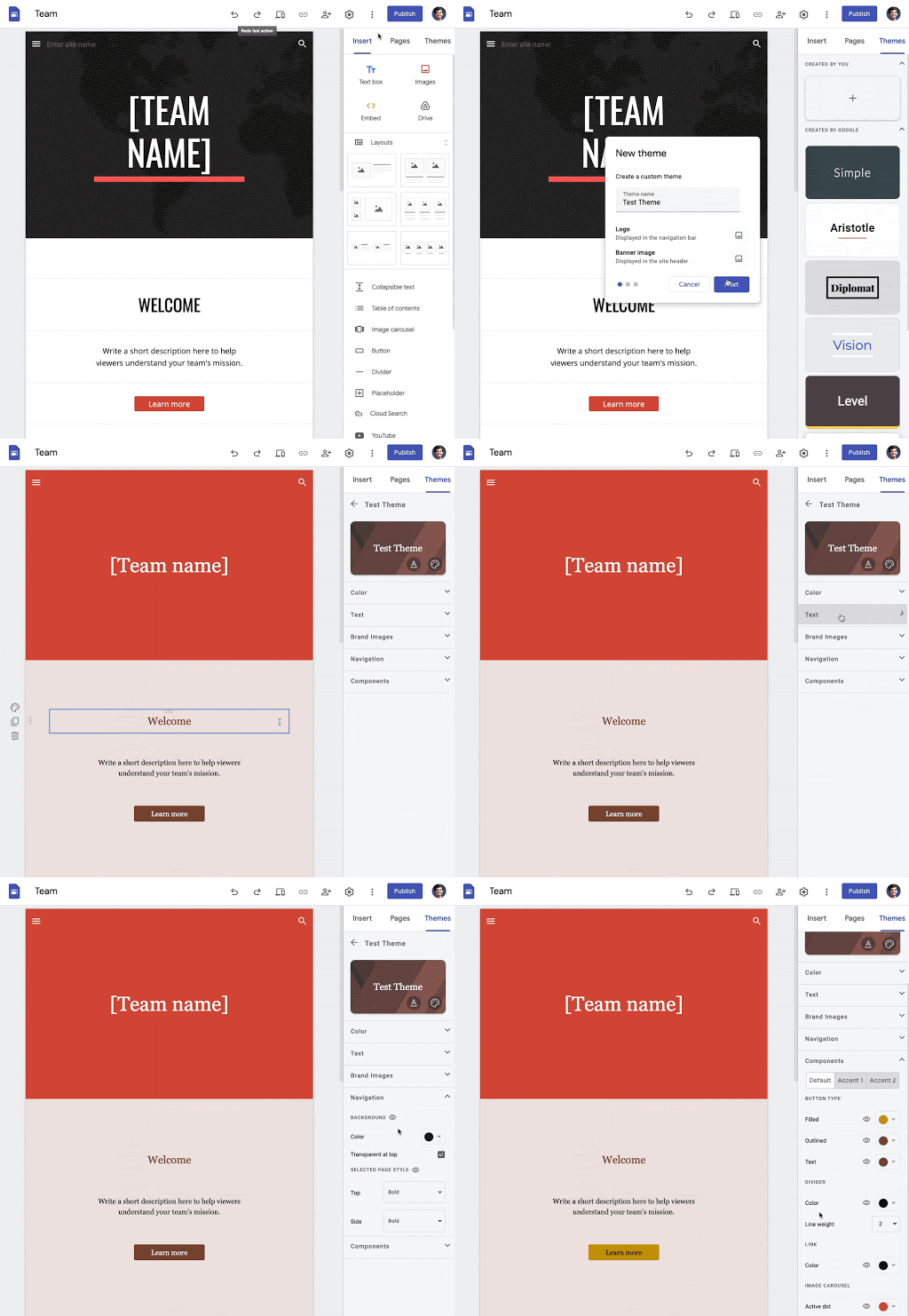
Users can now create custom themes in Google Sites to align with brand guidelines or personal style.
Google Sites has introduced the ability to create highly customized themes, giving users greater control over fonts, text styles, colors, brand images, navigation settings, and the style of components such as buttons. This allows for a more tailored look and feel compared to the six pre-created themes previously available.
Release: Both • Rapid: 2021-09-16 • Scheduled: 2021-10-06 -
2021-09-15Comms & Meetings
Google Tasks is getting a new logo to better align with other Google Workspace products.
Google is updating the Google Tasks logo to ensure visual consistency across the Google Workspace product suite. This new logo will automatically appear across the web and on mobile devices for all Google Workspace, G Suite Basic, and Business customers over the coming weeks.
Release: Both • Rapid: 2021-09-23 • Scheduled: 2021-09-23 -
2021-09-15Comms & Meetings
Admins can now control the default state for Quick access in Google Meet.
Google is adding a new Admin control to configure whether the Quick access feature is enabled or disabled by default for their domain. If the feature is set to OFF by default, meeting hosts can manually enable Quick access from inside the meeting.
Release: Both • Rapid: 2021-09-15 • Scheduled: 2021-09-15 -
2021-09-15Comms & Meetings
Admins can now control the default state for Host Management in Google Meet.
Google has introduced a new Admin setting that allows administrators to configure whether the Host Management feature is on or off by default for their domain. If the feature is set to OFF by default, meeting hosts can still manually enable Host Management from within the meeting.
Release: Both • Rapid: 2021-09-15 • Scheduled: 2021-09-15 -
2021-09-13Comms & Meetings
New iOS Data Protection setting for Google Chat restricts data sharing between Google Workspace and personal Google accounts.
Google is expanding its iOS data protection settings to include Google Chat, allowing administrators to restrict the sharing or saving of content—such as chat messages and files—between Google Workspace accounts and personal Google accounts. This measure helps minimize accidental data sharing and increases the security of corporate data on iOS devices.
Release: Both • Rapid: 2021-09-13 • Scheduled: 2021-09-13 -
2021-09-10Content & Collaboration

New viewing interface for Google Slides on iOS app.
Google is improving the mobile viewing experience for Google Slides on iOS, allowing users to scroll through a vertical stream of slides, pinch to zoom for a closer look, and easily switch between editing, presenting, or casting content.
Release: Both • Rapid: 2021-09-10 • Scheduled: 2021-09-10 -
2021-09-10Comms & Meetings
Admins can now end meetings for all participants using the security investigation tool.
Google Workspace Enterprise Plus, Education Standard, and Education Plus admins can now use the security investigation tool to end selected meetings for all users, including those in breakout rooms. This feature allows admins to end multiple meetings simultaneously, terminate old meetings being used inappropriately, or set up automated rules to end meetings based on specific user actions, such as the submission of an abuse report.
Release: Both • Rapid: 2021-09-10 • Scheduled: 2021-09-10 -
2021-09-09Other

Material You design system rolling out for Google Workspace apps on Android.
Google is introducing Material You, a new design system for Google Workspace apps on Android devices. This update brings a fresh look and feel, including updated navigation bars, improved floating action buttons, and the use of Google Sans text for better readability. On Android 12 and Pixel devices, users can personalize app colors to match their device wallpaper. The update also includes automatic adjustments for contrast, size, and line width to improve accessibility across apps including Gmail, Meet, Drive, Docs, Sheets, Slides, Calendar, and Keep.
Release: Both • Rapid: 2021-09-01 • Scheduled: 2021-09-01 -
2021-09-09Comms & Meetings

New effects settings panel in Google Meet for quick access to background blur, images, and styles.
Google Meet is introducing a new settings panel that provides quick access to visual effects, including background blur, background images, and styles. This panel is available both during active calls and in the green room self-check, allowing users to preview and apply effects before joining a meeting.
Release: Both • Rapid: 2021-09-09 • Scheduled: 2021-09-16 -
2021-09-09Comms & Meetings
We’re introducing a new settings panel in Google Meet for quick access to effects such as background blur, background images and styles during Meet calls.
This panel will also be available before joining a call in the green room self-check. In the green room, you can try out various effects to see how they work before joining a call with others.
Release: Both • Rapid: 2021-09-09 • Scheduled: 2021-09-16 -
2021-09-09Education

Classroom activity logs now exportable to BigQuery with Data Studio templates.
For Education Standard and Plus customers, admins can now export Classroom audit log data from the Admin console to BigQuery for advanced querying. To assist with data visualization, Google has provided a customizable Data Studio report template.
Release: Both • Rapid: 2021-09-09 • Scheduled: 2021-09-09


