Workspace updates from January 2022
39 Workspace updates were tracked in January 2022.
-
2022-01-25Other
Google Cloud Search customers can now use the Cloud Search Stats APIs to track billable usage.
Google Cloud Search customers can now utilize the Cloud Search Stats APIs to surface and track billable usage, including billable indexed documents, queries, and search applications. This feature allows administrators to perform more informed budget planning, cost management, and forecasting. Usage data is updated daily and can be viewed for specific date ranges or previous months.
Release: Both • Rapid: 2022-01-25 • Scheduled: 2022-01-25 -
2022-01-24Content & Collaboration
You can now use originality reports on Google Slides files, which were previously only available for Google Docs.
You can now use originality reports on Google Slides files, which were previously only available for Google Docs. Originality reports allow students and teachers to compare work against billions of web pages and books on the internet, making it easier to ensure academic integrity of the work.
Release: Both -
2022-01-24Content & Collaboration
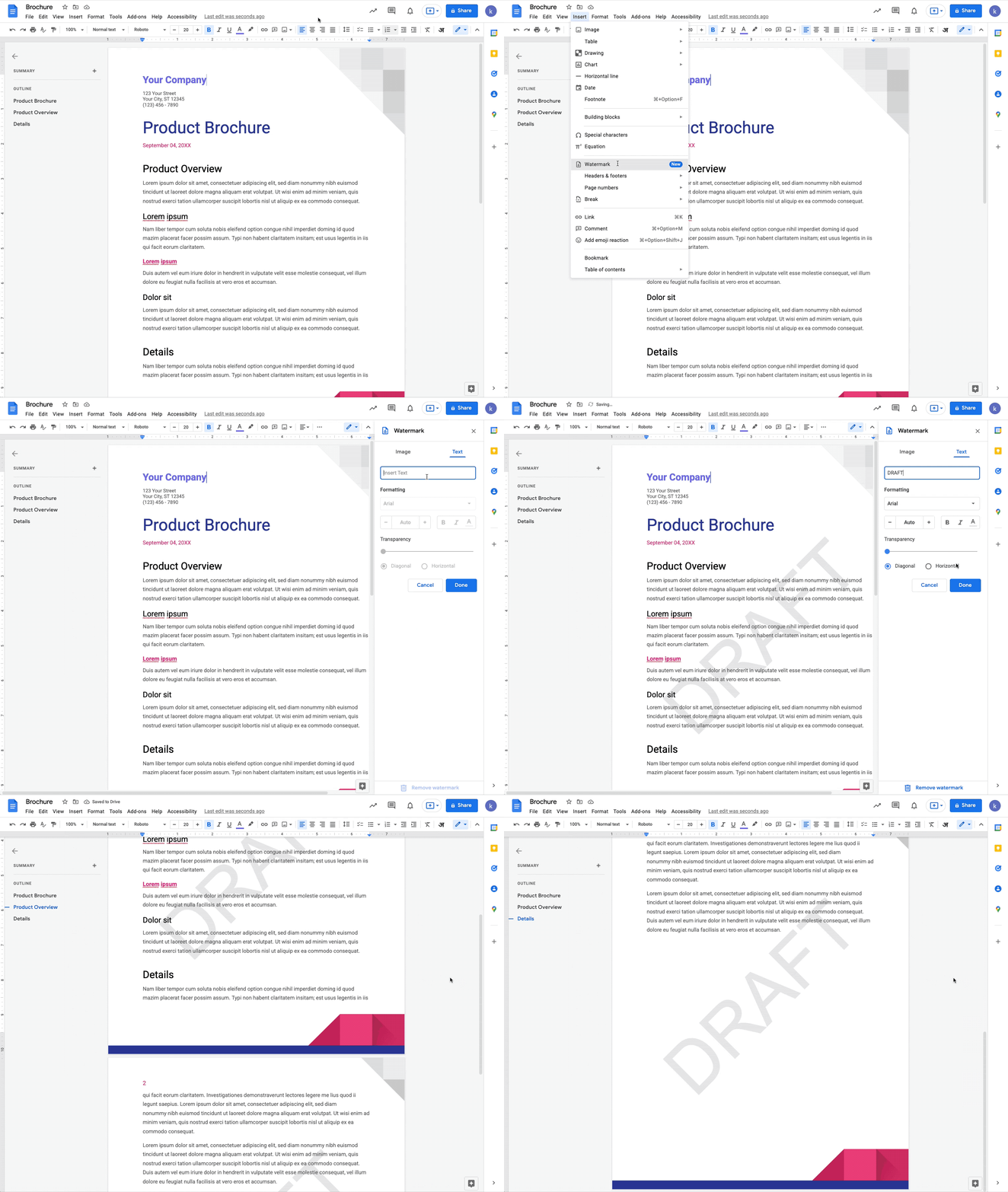
You can now add a text watermark to your documents in Google Docs.
You can now add a text watermark to your documents in Google Docs. Additionally, when working with Microsoft Word documents, text watermarks will be preserved when importing or exporting your files.
Release: Both • Rapid: 2022-01-24 • Scheduled: 2022-02-14 -
2022-01-24Content & Collaboration
Add or import text watermarks in Google Docs.
Google Docs now allows users to add text watermarks that repeat on every page, which is useful for marking documents as 'Confidential' or 'Draft'. Furthermore, text watermarks are preserved when importing or exporting Microsoft Word documents.
Release: Both • Rapid: 2022-01-24 • Scheduled: 2022-02-14 -
2022-01-24Education
Originality reports are now available for Google Slides files.
Google Classroom has expanded the originality reports feature to include Google Slides files, allowing students and teachers to compare work against billions of web pages and books to ensure academic integrity. This feature is available for all Google Workspace for Education users; however, Education Fundamentals accounts are limited to 5 reports per class, while unlimited reports are available for Teaching and Learning Upgrade or Education Plus customers.
Release: Both • Rapid: 2022-01-24 • Scheduled: 2022-01-24 -
2022-01-20Content & Collaboration

If a user opens a potentially suspicious or dangerous file in Google Drive, we will display a warning banner to help protect them and their organization from malware, phishing and ransomware.
If a user opens a potentially suspicious or dangerous file in Google Drive, we will display a warning banner to help protect them and their organization from malware, phishing and ransomware. These warnings are already available when opening Google Docs, Sheets, Slides, and Drawings.
Release: Both • Rapid: 2022-01-20 • Scheduled: 2022-01-20 -
2022-01-20Content & Collaboration
You can mark a paragraph to always begin on a new page with the new “Add page break before” option in Google Docs on mobile.
You can mark a paragraph to always begin on a new page with the new “Add page break before” option in Google Docs. This is particularly useful if you want certain paragraph styles to always create a new page such as titles, subtitles, or headings.
Release: Both • Rapid: 2022-01-20 • Scheduled: 2022-01-20 -
2022-01-20Comms & Meetings
You now can add rich formatting to Chat messages, such as bold, italics, or underlines.
You now can add rich formatting to Chat messages, such as bold, italics, or underlines. Rich text can also be accessed using standard keyboard shortcuts. Previously, Chat supported plain text or markdown characters only.
Release: Both • Rapid: 2022-01-20 • Scheduled: 2022-01-20 -
2022-01-20Content & Collaboration
Warning banners in Google Drive alert users of suspicious files
Google Drive will now display warning banners when a user opens a potentially suspicious or dangerous file to help protect users and their organizations from malware, phishing, and ransomware. This functionality complements existing warnings already present in Google Docs, Sheets, Slides, and Drawings.
Release: Both • Rapid: 2022-01-20 • Scheduled: 2022-01-20 -
2022-01-20Content & Collaboration
Add a page break before paragraphs in Google Docs on mobile.
Google Docs for Android and iOS now supports the 'Add page break before' option for paragraphs, allowing users to ensure specific styles like titles or headings always start on a new page. This update also enables Google Docs to retain this formatting when importing or exporting Microsoft Word and other third-party documents.
Release: Both • Rapid: 2022-01-20 • Scheduled: 2022-01-20 -
2022-01-20Comms & Meetings
Rich text formatting added to Google Chat messages on the web.
Google Chat on the web now supports rich text formatting, allowing users to apply bold, italics, and underlines to their messages. This can be done via a new formatting toolbar accessed by the 'A' icon in the compose bar or by using standard keyboard shortcuts.
Release: Both • Rapid: 2022-01-20 • Scheduled: 2022-01-20 -
2022-01-13Comms & Meetings
Activity notifications are being introduced for Google Meet hardware and Nest Hub Max.
Google Meet hardware and Nest Hub Max devices will now display prompts when chat messages are sent or other interactive activities are initiated in a meeting, encouraging users to utilize Companion mode to participate.
Release: Both • Rapid: 2022-02-02 • Scheduled: 2022-02-02 -
2022-01-13Comms & Meetings
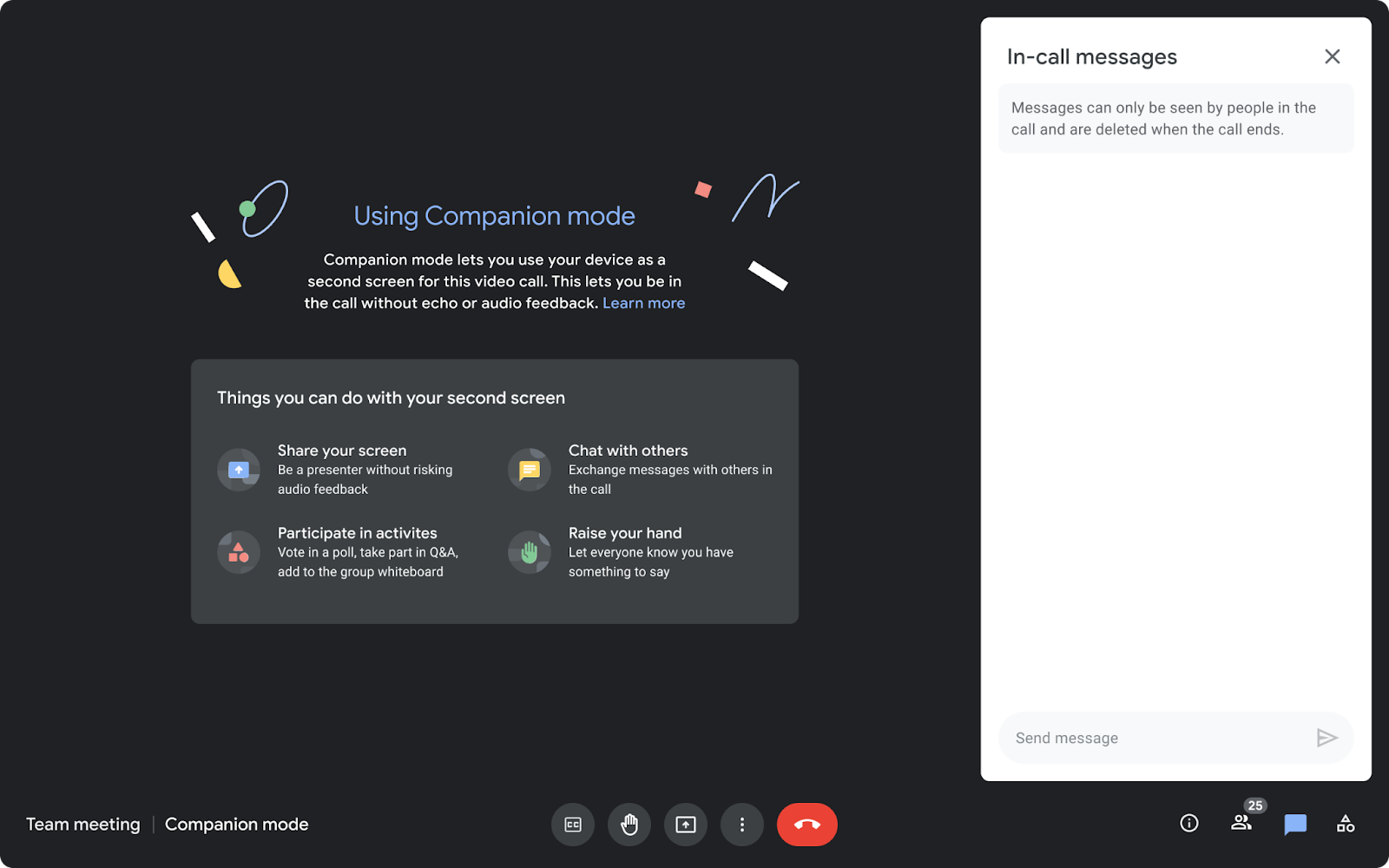
Companion mode is now available on the web for users joining meetings via Google Meet hardware or Nest Hub Max.
Companion mode allows users in hybrid meetings to connect via the web (using g.co/companion or g.co/present) while utilizing Google Meet hardware or Nest Hub Max for audio and video. This enables access to interactive features such as chat, screen sharing, hand raising, and polls without causing audio feedback, ensuring collaboration equity for all attendees regardless of their location.
Release: Both • Rapid: 2022-01-13 • Scheduled: 2022-01-27 -
2022-01-13Comms & Meetings
Beginning today, you can use Companion mode on the web when joining a meeting using Google Meet hardware or the Nest Hub Max.
Beginning today, you can use Companion mode on the web when joining a meeting using Google Meet hardware or the Nest Hub Max. Companion mode allows you to access interactive features and controls such as chat, screen sharing, hand raising, polls, host controls and more.
Release: Both • Rapid: 2022-01-13 • Scheduled: 2022-01-27 -
2022-01-12Comms & Meetings
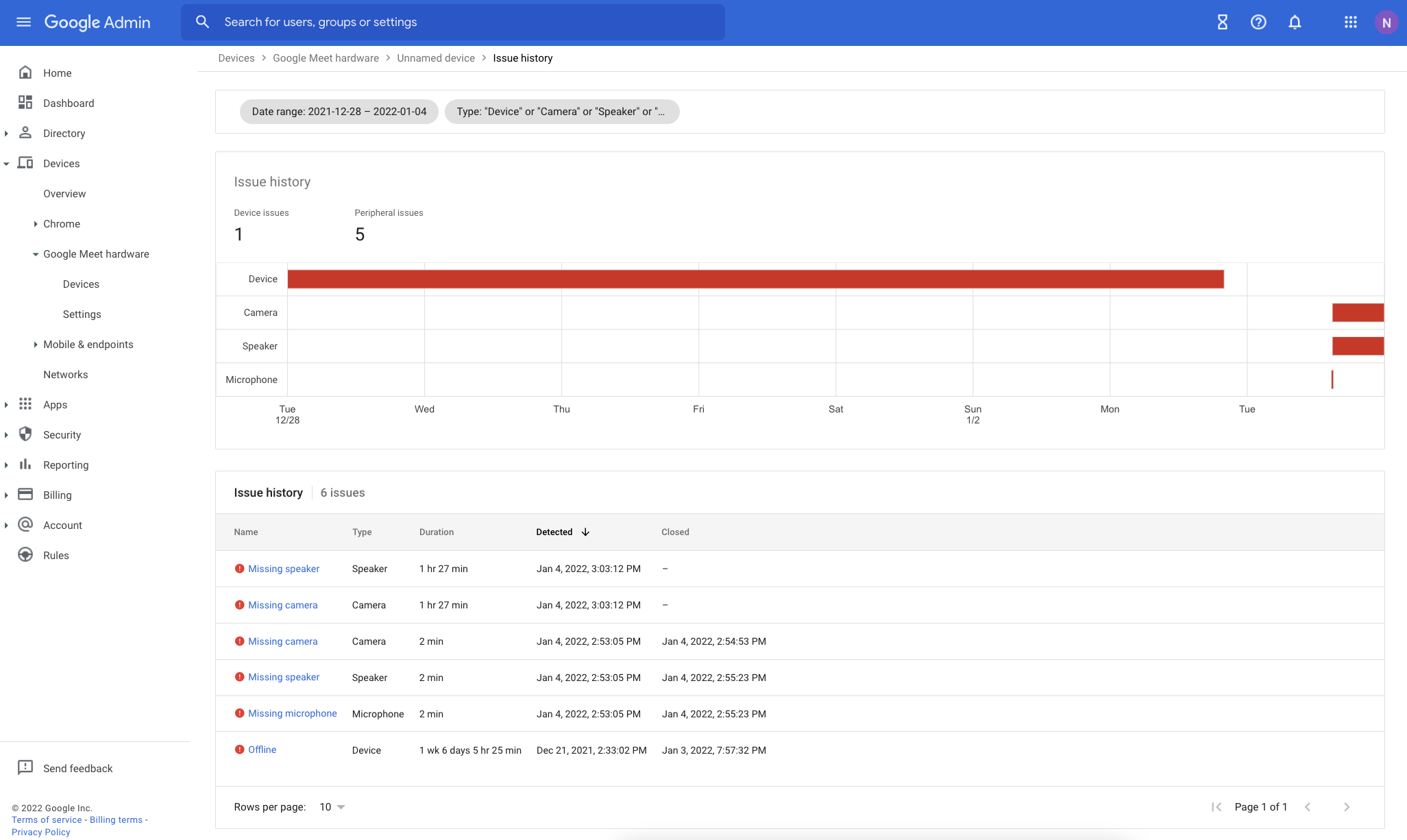
Improvements to Google Meet hardware issue troubleshooting in the Admin console.
Google has enhanced the issue detection engine for Google Meet hardware to provide more reliable alerts and reduce false signals. The Admin console now includes several new troubleshooting tools: an Issue History page for tracking device health over time, quick-filters for the device list, a detailed issue sidebar with troubleshooting recommendations, and new columns for aggregated issue counts over the last 28 days.
Release: Both • Rapid: 2022-01-12 • Scheduled: 2022-01-12