Workspace updates from July 2023
39 Workspace updates were tracked in July 2023.
-
2023-07-31Education

Users can now create a Drive item and collaborate on it with other users in the course within Canvas using Google Assignments LTI 1.3.
Today, we’re introducing a new feature exclusively for Canvas that allows users to create a Drive item and collaborate on it with other users in the course. Teachers and students can now work together on a variety of Google Drive items, including Docs, Sheets, Slides, Sites, Forms, Jamboards, and Drawing.
Release: Both -
2023-07-31Education
Google Assignments now enables collaboration on Google Drive items directly within Canvas.
Google is introducing a new feature for Google Assignments LTI 1.3 integrated with Canvas, allowing teachers and students to create and collaborate on various Google Drive items—including Docs, Sheets, Slides, Sites, Forms, Jamboards, and Drawings—with other users in the course.
Release: Both • Rapid: 2023-07-31 • Scheduled: 2023-07-31 -
2023-07-28Comms & Meetings
Include audio when sharing your screen using Google Meet on mobile
Users of Google Meet on mobile devices can now share audio in addition to their screen share, enabling the sharing of videos with sound or music during presentations. This feature is available immediately on iOS and is scheduled to roll out for Android in mid-August 2023.
Release: Both • Rapid: 2023-07-28 • Scheduled: 2023-07-28 -
2023-07-28Comms & Meetings

An optional in-line reply feature will enable members of a space to respond to or discuss an announcement in Google Chat.
While these announcement spaces aim to facilitate one-way controlled communication in Google Chat, we’re adding an optional in-line reply feature that will enable members of a space to respond to or discuss an announcement.
Release: Both • Rapid: 2023-07-28 • Scheduled: 2023-08-14 -
2023-07-28Content & Collaboration
A single Google group can be a member of 30,000 shared drives
To protect the reliability of access changes for users in Google groups, Google has introduced a limit where a single group can now be added to no more than 30,000 shared drives, replacing the previous unlimited capacity.
Release: Both • Rapid: 2023-07-28 • Scheduled: 2023-07-28 -
2023-07-28Comms & Meetings
In-line replies are now available within announcement spaces in Google Chat.
Google Chat has introduced an optional in-line reply feature for announcement spaces, allowing space managers to enable members to respond to or discuss announcements. For newly created announcement spaces, the feature is enabled by default for all members, while for existing spaces, it is enabled by default for space managers only. Space managers can toggle this setting via the space menu under permissions.
Release: Both • Rapid: 2023-07-28 • Scheduled: 2023-08-14 -
2023-07-28Admin & Security
Set Context Aware Access policies for 1P & 3P applications to access Workspace APIs
Admins can now use context-aware access to block or limit first and third party API access to Google Workspace applications. This allows for setting access levels based on a user’s identity and the context of the request, such as location, device security status, and IP address, providing an additional layer of security against data exfiltration.
Release: Both • Rapid: 2023-07-28 • Scheduled: 2023-07-28 -
2023-07-27Education

New option for teachers to disable submissions after an assignment is past the due date.
Following the recent announcement of grading periods in Google Classroom, we’re introducing another feature that enables teachers to customize grading in Classroom. The new option to disable submissions after a due date allows teachers to stop accepting submissions for an assignment past the due date.
Release: Both • Rapid: 2023-07-27 • Scheduled: 2023-07-27 -
2023-07-27Education
Teachers can now disable submissions after a due date in Google Classroom.
Google Classroom is introducing a new feature that allows teachers to stop accepting submissions for an assignment once the due date has passed. Teachers can decide whether to require a strict due date or manually disable submissions at any point, providing greater control over assignment flexibility and grading workflows.
Release: Both • Rapid: 2023-07-27 • Scheduled: 2023-07-27 -
2023-07-26Admin & Security

Google Workspace Admins can now use Directory Sync to sync users and groups from Azure Active Directory.
Google Workspace Admins can now use Directory Sync to sync users and groups from Azure Active Directory. Directory Sync is an alternative to Google Cloud Directory Sync (GCDS), which admins can use to synchronize user and group data with their Google Cloud directory without the need to manage on-prem hardware and deployments.
Release: Both • Rapid: 2023-07-26 • Scheduled: 2023-07-26 -
2023-07-26Admin & Security
Admins can now use Directory Sync to sync users and groups from Azure Active Directory, as an alternative to Google Cloud Directory Sync (GCDS).
Google Workspace Admins can now use Directory Sync to sync users and groups from Azure Active Directory. Directory Sync is an alternative to Google Cloud Directory Sync (GCDS), which admins can use to synchronize user and group data with their Google Cloud directory without the need to manage on-prem hardware and deployments. Directory Sync is available in open beta, which means no beta sign-up or registration is required. Admins can add up-to one Azure Directory connection to sync users and groups information to the Google Cloud Directory. On your Microsoft Azure Active Directory side, Global Administrator privileges are required for using this feature. You can delegate the ability to manage Active Directory with the new Directory Sync admin user role.
Release: Both • Rapid: 2023-07-26 • Scheduled: 2023-07-26 -
2023-07-26Admin & Security
Google Workspace Admins can now sync users and groups from Azure Active Directory using Directory Sync.
Google Workspace Admins can now use Directory Sync to synchronize user and group data from Azure Active Directory to the Google Cloud directory. This provides an alternative to Google Cloud Directory Sync (GCDS) by eliminating the need to manage on-premises hardware and deployments. The feature is available in open beta for all Google Workspace and Cloud Identity customers, requiring Global Administrator privileges on the Azure Active Directory side to read full user profiles and group memberships.
Release: Both • Rapid: 2023-07-26 • Scheduled: 2023-07-26 -
2023-07-24Content & Collaboration
Admins can import sensitive, encrypted files from third-party storage using Client-side encryption and the Google Drive API, launching in beta.
For select Google Workspace editions, admins can import sensitive, encrypted files from third-party storage using Client-side encryption and the Google Drive API, preserving the confidentiality of your data. Eligible admins can apply for beta access using this form.
Release: Beta -
2023-07-24Content & Collaboration
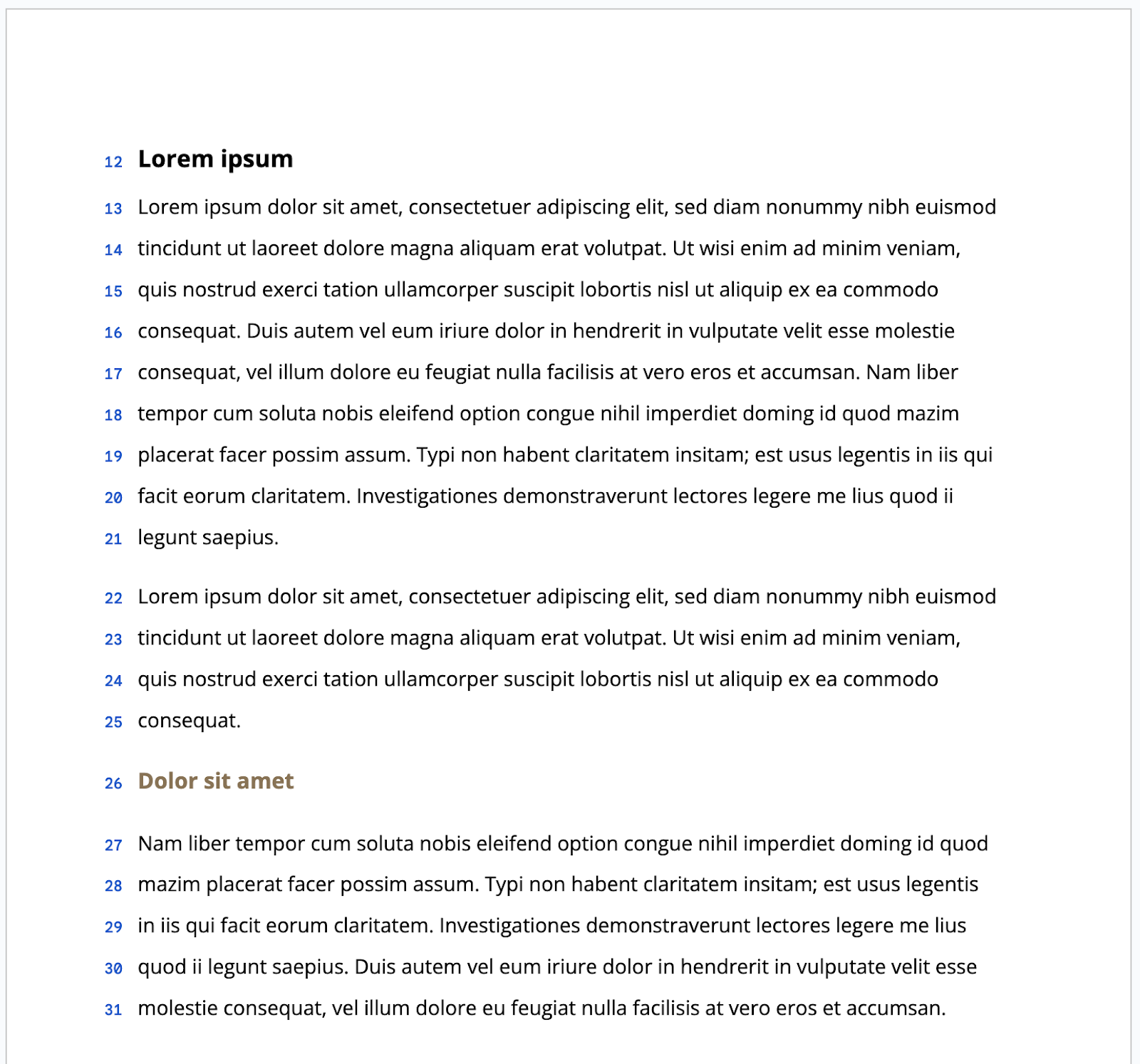
We’ve introduced the option to display line numbers within Docs that are set to paged mode.
In addition to previous updates that give you more control over formatting in Google Docs, such as viewing non-printing characters and enhancements to content organization, we’re introducing the option to display line numbers within Docs that are set to paged mode.
Release: Both • Rapid: 2023-07-24 • Scheduled: 2023-08-07 -
2023-07-24Content & Collaboration
Import sensitive external files to Google Drive with client-side encryption using the Drive API (Beta)
Google is introducing a beta feature that allows admins of eligible Google Workspace editions to import sensitive, encrypted files from third-party storage into Google Drive using Client-side encryption (CSE) and the Drive API. This functionality enables admins to bulk import files on behalf of users while maintaining strict data confidentiality and meeting data sovereignty and compliance requirements.
Release: Rapid • Rapid: 2023-07-24