Workspace updates from August 2023
79 Workspace updates were tracked in August 2023.
-
2023-08-31Content & Collaboration

View and edit client-side encrypted Excel files with Google Sheets
Google Sheets is introducing a beta feature that allows users to view and edit client-side encrypted Excel (.xlsx) files while preserving the original format and confidentiality of sensitive data. The feature supports files up to 20MB and a maximum of 5 million cells, though some advanced Microsoft Office features may be preserved but not editable within Sheets.
Release: Both • Rapid: 2023-08-31 • Scheduled: 2023-09-14 -
2023-08-31Content & Collaboration
You can now view and edit client-side encrypted Excel files with Google Sheets in beta.
Launching in beta, you can now view and edit client-side encrypted Excel files with Google Sheets. Any changes made are saved in the original Excel format. We are making it easy for you to leverage Google Workspace with the tools and formats you already use while preserving confidentiality of your sensitive data with client-side encryption.
Release: Beta • Rapid: 2023-08-31 • Scheduled: 2023-09-14 -
2023-08-30More
.png)
Introduction of an independent security verification badge for select apps in the Google Workspace Marketplace.
Google Workspace Marketplace is introducing a new independent security verification badge for select apps. This badge indicates that the app has been validated by an independent security assessor to meet the integration and security requirements outlined in Tier 3 of the Cloud Application Security Assessment, helping administrators make more informed decisions before installing or allowlisting apps for their users.
Release: Both • Rapid: 2023-08-30 • Scheduled: 2023-08-30 -
2023-08-30More
.png)
New independent security verification badge for select apps in the Google Workspace Marketplace.
Beginning today, you’ll see a new independent security verification badge for select apps in the Google Workspace Marketplace. This badge indicates that the app was validated by an independent security assessor to meet the integration and security requirements, as outlined in Tier 3 of the Cloud Application Security Assessment.
Release: Both -
2023-08-29Comms & Meetings
Translated captions now available for Google Workspace Business and Enterprise plans.
Google AI features, including translated captions, have been added directly to Google Workspace Business and Enterprise plans. Customers with Business Standard, Business Plus, Enterprise Standard, and Enterprise Plus editions can now use translated captions through their existing subscriptions.
Release: Both • Rapid: 2025-01-15 • Scheduled: 2025-01-15 -
2023-08-29Content & Collaboration

Create original AI-generated images from text in Google Slides using Duet AI.
Google Slides users with the Duet AI for Google Workspace Enterprise add-on can now generate custom visuals for their presentations. By using the 'Help me visualize' feature, users can enter a text description and optionally select a style to create unique, AI-generated images, allowing them to communicate ideas more impactfully regardless of their artistic skill.
Release: Both • Rapid: 2023-08-29 • Scheduled: 2023-08-29 -
2023-08-29Content & Collaboration

Introduce 'Help me organize' in Google Sheets powered by Duet AI to automatically generate custom templates.
Google Sheets now features 'Help me organize' via Duet AI for Google Workspace Enterprise. Users can describe a task, such as planning a company retreat or establishing onboarding plans, and Sheets will generate a tailored template—including plans, trackers, or budgets—complete with sample text and editable smart chips to help users organize data quickly.
Release: Both • Rapid: 2023-08-29 • Scheduled: 2023-08-29 -
2023-08-29Comms & Meetings
Expanded language availability for translated captions in Google Meet for Duet AI users.
Google is expanding the number of languages available for the translated captions feature for users with the Duet AI for Google Workspace Enterprise add-on. New supported languages include Chinese (Mandarin, Traditional), Hindi (India), Thai, Italian, and Russian, complementing the existing list of supported languages.
Release: Both • Rapid: 2023-08-29 • Scheduled: 2023-08-29 -
2023-08-29Other

If you’re a Google Workspace admin, you can now track the carbon footprint and gross emissions of using Google Workspace.
If you’re a Google Workspace admin, you can now track the carbon footprint and gross emissions of using Google Workspace. This means you can track the emissions impact of tools such as Google Meet, Gmail, Google Docs, and more.
Release: Both -
2023-08-29Content & Collaboration
You can now generate compelling visuals for presentations through the power of Duet AI for Google Workspace.
In addition to the recently introduced feature that helps users create with pre-designed branded templates in Google Slides, we’re giving you the ability to generate compelling visuals for presentations through the power of Duet AI for Google Workspace. By simply typing a few words in Help me visualize, you can easily create original images for your presentations.
Release: Both -
2023-08-29Content & Collaboration
Through Duet AI for Google Workspace, you can now use Google Sheets to quickly get started organizing your data in a straightforward, highly-visual manner.
Through Duet AI for Google Workspace, you can now use Google Sheets to quickly get started organizing your data in a straightforward, highly-visual manner. By simply describing what you want to accomplish using Help me organize, Sheets will generate a plan, tracker, budget, schedule, and more in the form of a template with sample text and smart chips that are easily editable.
Release: Both -
2023-08-29Comms & Meetings
Introducing studio look in Google Meet, powered by Duet AI. Studio look enhances the quality of your portrait by reducing noise and increasing sharpness.
Google Meet already offers a variety of tools to help you appear your best during meetings, including automatic framing and lighting adjustments. Today, we’re taking these enhancements a step further by introducing studio look in Google Meet, powered by Duet AI. Studio look enhances the quality of your portrait by reducing noise and increasing sharpness, bringing you into focus more clearly.
Release: Both -
2023-08-29Comms & Meetings

You can now use the power of Duet AI to generate completely unique and bespoke meeting backgrounds.
There are a variety of ways to change your background in Google Meet today, including immersive backgrounds, seasonal backgrounds, and more. Beginning today, you can now use the power of Duet AI to generate completely unique and bespoke meeting backgrounds.
Release: Both -
2023-08-29Comms & Meetings
Expanding the number of languages available for the translated captions feature.
As part of the Duet AI for Workspace Enterprise add-on, we’re expanding the number of languages available for the translated captions feature. If you have Duet AI for Google Workspace, you can now translate English and non-English speech to and from the following languages: Chinese (Mandarin, Traditional) Hindi (India) Thai Italian Russian
Release: Both -
2023-08-29Content & Collaboration
.png)
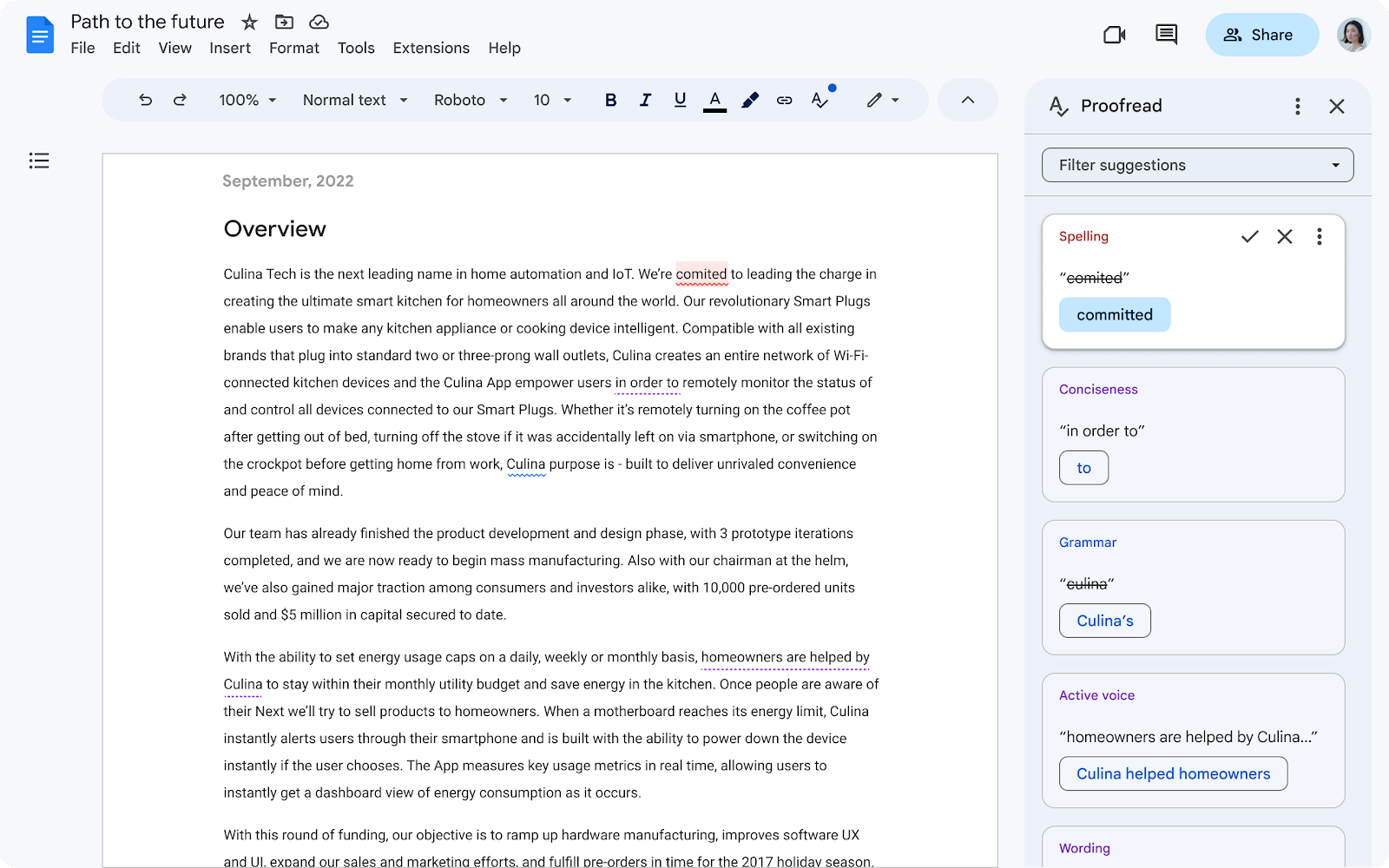
Proofread, next generation of writing suggestions, powered by AI will provide a list of suggestions you can review and accept.
Google Docs offers several existing capabilities to help you write faster and with more confidence, such as grammar suggestions, smart compose, and smart reply. Today, we’re introducing the next generation of writing suggestions, powered by AI: Proofread.
Release: Both • Rapid: 2023-08-29