Workspace updates from August 2023
79 Workspace updates were tracked in August 2023.
-
2023-08-24Education
Google Workspace for Education Admins must review and confirm access settings for third-party configured apps by Oct 23, 2023.
Through the app access control settings, we’re making it easier for Google Workspace for Education admins to control how third-party apps access their organizations' Google data when users sign-in using their Google Workspace for Education accounts.
Release: Both -
2023-08-24Comms & Meetings
You can join a client-side encrypted meeting directly from the Google Meet and Calendar apps.
Beginning today, you can join a client-side encrypted meeting directly from the Google Meet and Calendar apps. Client-side encryption gives users direct control of their encryption keys and the identity service that authenticates those keys. Further, client-side encryption ensures that Google cannot access audio and video content under any circumstances.
Release: Both • Rapid: 2023-08-24 • Scheduled: 2023-08-24 -
2023-08-24Content & Collaboration
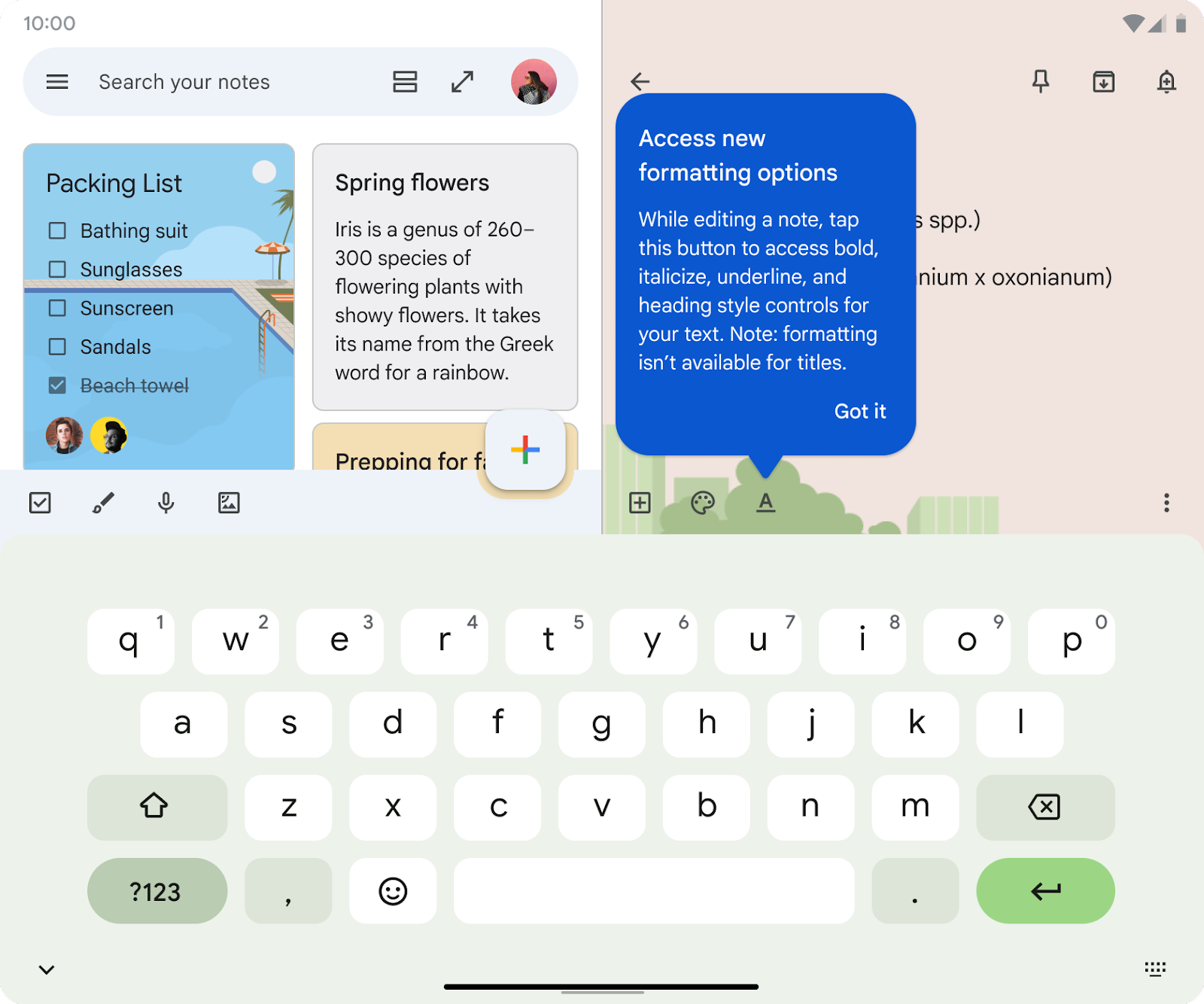
Adding rich text formatting options to new notes on Keep.
Building upon our recent updates to Google Keep on Android devices, such as multi-instance support and the single note widget, we’re adding rich text formatting options to new notes on Keep. This highly requested feature enables you to customize and add emphasis to your text through bolding, underlining, italicizing, and heading styles.
Release: Both • Rapid: 2023-08-24 -
2023-08-24Content & Collaboration
Adding rich text formatting options to new notes on Keep for Android.
Adding rich text formatting options to new notes on Keep. This enables you to customize and add emphasis to your text through bolding, underlining, italicizing, and heading styles. You will be able to access rich text formatting in existing Keep notes on Android devices in the coming weeks.
Release: Both • Rapid: 2023-08-24 • Scheduled: 2023-08-24 -
2023-08-24Comms & Meetings

Adding a new Workday app for Google Chat that allows you to perform quick actions in Workday.
We’re adding a new Workday app for Google Chat that allows you to perform quick actions in Workday, such as requesting time off, filing expense reports and looking up colleague's information, all without leaving Google Chat.
Release: Both -
2023-08-24Comms & Meetings
Microsoft Outlook user who organize meetings are now listed amongst the other meeting attendees in Calendar as the meeting organizer.
Previously, if a Microsoft Outlook user invited a Google Calendar user to a meeting event, the Outlook user’s display name would not appear at all in the list of meeting attendees on Google Calendar. Starting today, we’re updating this experience so that the Outlook user who organized the meeting is listed amongst the other meeting attendees in Calendar as the meeting organizer.
Release: Both • Rapid: 2023-08-24 • Scheduled: 2023-08-24 -
2023-08-24Comms & Meetings
Microsoft Outlook user who organized the meeting is listed amongst the other meeting attendees in Google Calendar as the meeting organizer.
We’re updating this experience so that the Outlook user who organized the meeting is listed amongst the other meeting attendees in Calendar as the meeting organizer.
Release: GA • Rapid: 2023-08-24 • Scheduled: 2023-08-24 -
2023-08-24Education
Enhanced third-party app access controls for users designated as under 18 in Google Workspace for Education.
Google Workspace for Education admins now have enhanced controls to manage how third-party apps access organizational data for users designated as under 18. Users under 18 are required to request access to apps that are not already configured as trusted, limited, or blocked, although admins can allow users to skip this request for apps that only require basic profile information. Admins can now configure these settings by organizational units and must review and confirm existing third-party app settings by October 23, 2023, to ensure uninterrupted access for users under 18.
Release: Both • Rapid: 2023-08-24 • Scheduled: 2023-08-24 -
2023-08-24Comms & Meetings
Introducing the Workday app for Google Chat.
Google has introduced a new Workday app for Google Chat that allows users to perform quick actions within Workday—such as requesting time off, filing expense reports, and looking up colleague information—directly from the Google Chat interface.
Release: Both • Rapid: 2023-08-24 • Scheduled: 2023-08-24 -
2023-08-24Comms & Meetings
Microsoft Outlook users will now be displayed as organizers in Google Calendar meeting attendee lists.
Google Calendar is updating the experience for meetings organized by Microsoft Outlook users. Previously, the Outlook organizer's display name would not appear in the attendee list; now, the Outlook user who organized the meeting will be listed among other attendees as the meeting organizer.
Release: Both • Rapid: 2023-08-24 • Scheduled: 2023-08-24 -
2023-08-23Comms & Meetings

Co-presenters can now view speaker notes when co-presenting Google Slides in Google Meet.
Google Meet now allows co-presenters to view speaker notes while co-presenting a Google Slides presentation. This enables both primary and co-presenters to access the same notes, reducing context switching between Meet and Slides and allowing for more confident delivery. To utilize this feature, co-presenters must have edit access to the Slides presentation.
Release: Both • Rapid: 2023-08-23 • Scheduled: 2023-09-05 -
2023-08-23Comms & Meetings
.png)
Stronger protections for sensitive actions in Gmail, including filters, forwarding, and IMAP access.
Google is extending security safeguards to sensitive actions within Gmail. Specifically, when users create or edit filters, add new forwarding addresses, or enable IMAP access, Google will evaluate the session for risk. If a session is deemed risky, the user will be challenged with a 'Verify it's you' prompt requiring a second trusted factor, such as a 2-step verification code. If verification fails or is not completed, a 'Critical security alert' notification is sent to trusted devices.
Release: Both • Rapid: 2023-08-23 • Scheduled: 2023-09-06 -
2023-08-23Comms & Meetings

Google Chat spaces now support message view counts.
Google Chat is introducing view counts for messages in spaces, allowing members to see how many people have viewed a specific message. Users can access this information by hovering over a message, selecting the three-dot menu, and clicking 'See message views'. This feature applies to messages sent on or after August 1, 2023, though it is not available for in-line replies.
Release: Both • Rapid: 2023-08-23 • Scheduled: 2023-08-23 -
2023-08-23More
.png)
New interface for developers to view previously deployed script versions and compare versions to the current script version.
Project history, a new interface for developers to view previously deployed script versions and compare versions to the current script version. Developers can use project history to view the code of previously deployed script versions.
Release: Both • Rapid: 2023-08-23 • Scheduled: 2023-08-23 -
2023-08-18Content & Collaboration

Introduction of 'Type @ to insert' prompt for smart canvas in Google Sheets.
When opening a new spreadsheet or tab in Google Sheets, users will now see a 'Type @ to insert' prompt to help them discover and start using the smart canvas features available in Sheets.
Release: Both