Admin console updates from January 2020
8 updates to Admin console were tracked in January 2020.
-
2020-01-16Admin & Security
Manage Windows 10 devices through the G Suite Admin console
Enabling enhanced desktop security for Windows with a new beta. This will allow you to manage and secure Windows 10 devices through the Admin console, just as you do for Android, iOS, Chrome, and Jamboard devices today. It will also enable SSO so users can more easily access G Suite and other SSO-enabled applications on Windows 10 devices.
Release: Beta -
2020-01-16Admin & Security

Manage and secure Windows 10 devices through the G Suite Admin console via a new beta.
Google is launching a beta that enables G Suite admins to manage and secure Windows 10 devices directly from the Admin console, similar to Android, iOS, and Chrome devices. This update introduces Single Sign-On (SSO) for easier access to G Suite and other enabled applications, enhanced security features like anti-phishing and suspicious login detection, and the ability to push cloud-based configuration updates (such as BitLocker and Windows Update) or remotely wipe devices to ensure compliance and data security.
Release: Rapid • Rapid: 2020-01-16 -
2020-01-15Admin & Security

Enable SAML apps for specific groups of users.
Administrators can now enable SAML applications for specific groups of users within their organization, providing more flexibility than the previous method of enabling them only by organizational unit (OU). This allows apps to be turned on or off for specific sets of users without altering the organizational structure.
Release: Both • Rapid: 2020-01-15 • Scheduled: 2020-01-15 -
2020-01-13Admin & Security
Password recovery for super admins and a new interface for security settings
Making it easier for super admins to recover their own passwords, as well as updating the look of some basic security settings in the Admin console.
Release: Both • Rapid: 2020-01-13 • Scheduled: 2020-01-13 -
2020-01-13Admin & Security
Security settings in the Admin console are migrating to a streamlined, card-based interface.
Google is gradually migrating security settings within the Admin console to a more streamlined, card-based interface. These visual updates are intended to improve the user experience and generally will not impact the actual configuration of settings or existing workflows.
Release: Both • Rapid: 2020-01-13 • Scheduled: 2020-01-13 -
2020-01-13Admin & Security
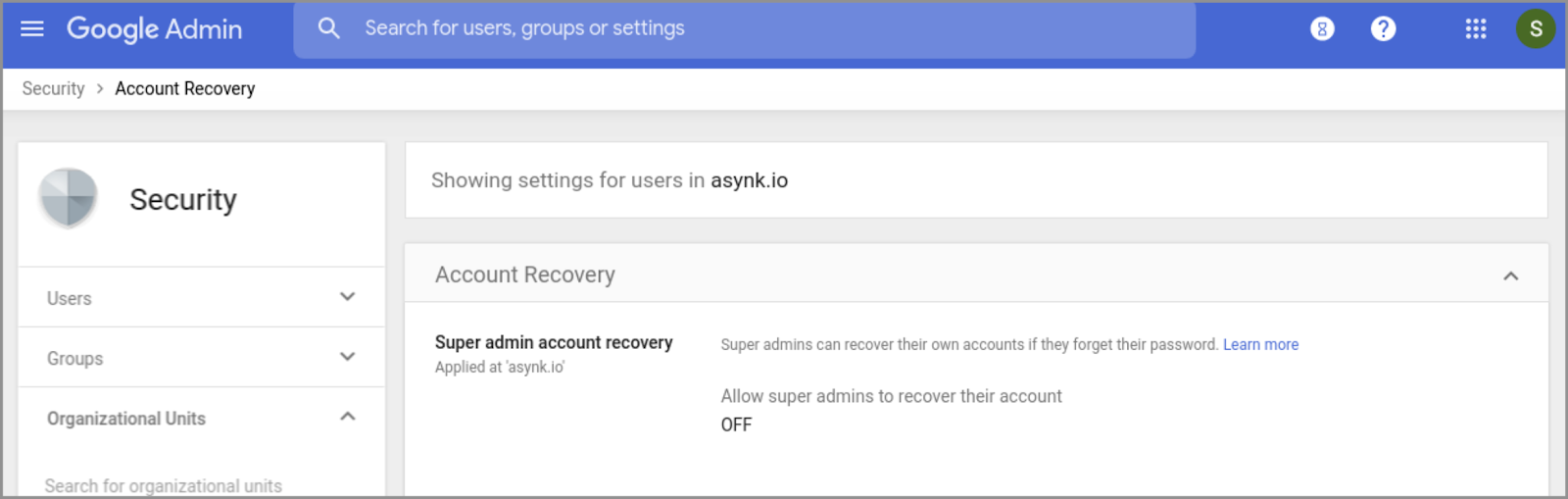
Super admins can now recover their own passwords using the 'Forgot password?' link.
Google is introducing a 'Super admin account recovery' setting in the Admin console. When enabled, super admins who have added recovery options to their accounts can recover their own passwords via the 'Forgot password?' link on the sign-in page, removing the need to contact another super admin or Google Support.
Release: Both • Rapid: 2020-01-13 • Scheduled: 2020-01-13 -
2020-01-02Admin & Security
Support ticket numbers in Access Transparency audit logs
G Suite admins can now see support ticket numbers associated with requests directly within the Access Transparency audit log report, allowing for easier tracking of Google staff actions related to customer data.
Release: Both • Rapid: 2020-01-02 • Scheduled: 2020-01-02 -
2020-01-02Admin & Security

Email alerts for Access Transparency logs
G Suite admins can now create automated email alerts to be notified when specific criteria related to Access Transparency logs are met, such as using the 'Event Name = Access' filter, providing better visibility into actions taken by Google staff.
Release: Both • Rapid: 2020-01-02 • Scheduled: 2020-01-02