-
2019-10-15Content & Collaboration

Directly click on chart elements to move and delete them in Google Sheets
Google Sheets has introduced new features allowing users to easily customize charts by clicking directly on data labels, chart titles, or legends to drag and reposition them, or delete them using the delete or backspace keys. Additionally, the update includes keyboard navigation support (using Tab, Enter, Escape, and Arrow keys) and screen reader verbalization for chart elements to improve accessibility.
Release: Both • Rapid: 2019-10-15 • Scheduled: 2019-10-28 -
2019-10-14Content & Collaboration
Customize text size and position for captions in Google Slides
Users can now personalize the text size and position of captions while presenting in Google Slides. This allows presenters to make captions easier to read for audience members in large rooms or reduce the text size to maximize the number of words visible on the screen at once.
Release: Both • Rapid: 2019-10-14 • Scheduled: 2019-11-04 -
2019-10-09Content & Collaboration

Goal Seek add-on now available for Google Sheets
The Goal Seek add-on for Google Sheets is now available for download and installation from the G Suite Marketplace. This tool allows users to calculate the required value of a cell to achieve a desired value in another cell, which is particularly useful for conducting break-even analysis or sensitivity calculations.
Release: Both • Rapid: 2019-10-01 • Scheduled: 2019-10-01 -
2019-10-09More
Admins can now view Cloud Search usage information via charts in the Admin console and using the Stats API.
Previously, admins only had limited visibility into the usage of Cloud Search within their domains. Now, they have greater insight into things like how often applications are being used and whether all the content they need indexed is accessible.
Release: GA • Rapid: 2019-10-09 • Scheduled: 2019-10-09 -
2019-10-07Content & Collaboration
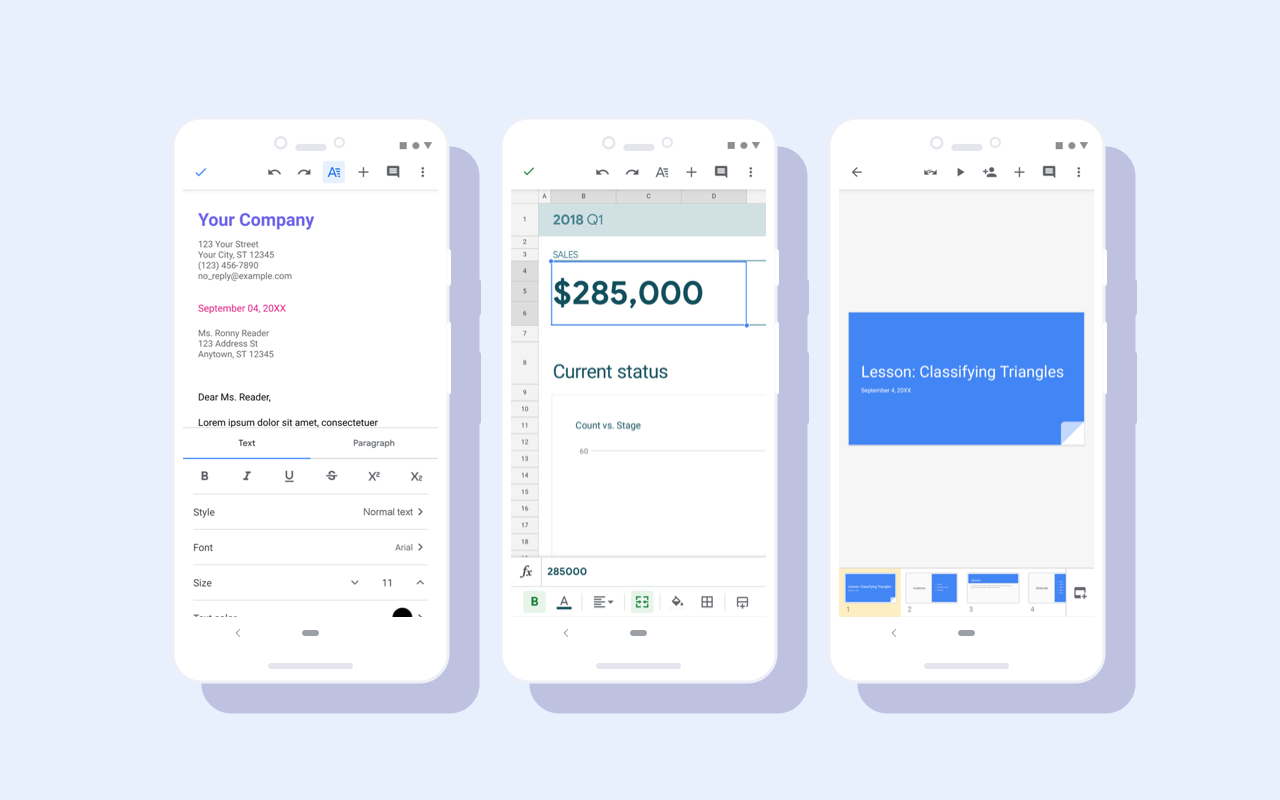
Material redesign for Google Docs, Sheets, and Slides Android apps
Google Docs, Sheets, and Slides Android apps have received a visual update as part of a Material redesign. While functionality remains the same, users will see visual improvements including a restyled document list, highly-legible typefaces, consistent controls, and updated iconography to bring consistency and ease-of-use to G Suite apps.
Release: Both • Rapid: 2019-10-07 • Scheduled: 2019-10-07 -
2019-10-03Other
Google Device Policy app ending support for iOS 9.0
The Google Device Policy app will no longer support mobile devices running iOS version 9.0 or lower after the end of 2019. Users with advanced mobile device management (MDM) enabled must upgrade to iOS version 10.0 or higher to access new MDM features or to download the Device Policy app for the first time. Support will be officially removed in the first release of the app in 2020.
Release: Scheduled -
2019-10-01Comms & Meetings

Dark theme is now available for Google Voice on Android.
Google Voice now supports Dark theme on Android devices to improve the viewing experience in low-light conditions and preserve battery life. The app can automatically respect the Android system's dark theme settings or be manually enabled through the app's display options.
Release: Both • Rapid: 2019-10-01 • Scheduled: 2019-10-01 -
2019-09-27Comms & Meetings
Google Voice auto attendants now support voicemail setup.
Admins can now configure voicemail for Google Voice auto attendants in three different ways: sending incoming calls directly to voicemail, routing calls to voicemail when a caller presses a specific key, or sending calls to voicemail during non-business hours. Additionally, admins can record a custom message to play for callers before they are sent to voicemail.
Release: Both • Rapid: 2019-09-27 • Scheduled: 2019-09-27 -
2019-09-26Comms & Meetings
Google Voice admins can now batch import desk phone information using Google Sheets.
Google Voice admins can now batch import desk phone information using Google Sheets, making it faster to add multiple desk phones at once. Previously, admins could only add a single desk phone at a time.
Release: Both • Rapid: 2019-09-26 • Scheduled: 2019-09-26 -
2019-09-24Comms & Meetings

Updated layout and navigation for Hangouts Chat mobile apps on Android and iOS.
Google has updated the Hangouts Chat mobile apps for Android and iOS to improve organization. The previous single list of People, Rooms, and Bots has been replaced by two distinct tabs: 'People' (which now includes bots) and 'Rooms'. Additionally, the top filter has been removed to simplify navigation, with users encouraged to use the search icon or the '+' button to start conversations.
Release: Both • Rapid: 2019-09-24 • Scheduled: 2019-09-24 -
2019-09-23Education
Transformation reports are now available for G Suite for Education and G Suite Enterprise for Education Super Admins in the US, Canada, and Mexico.
Google for Education transformation reports are now generally available for Super Admins of G Suite for Education and G Suite Enterprise for Education in K-12 districts and schools across the US, Canada, and Mexico. Admins can log in to generate a Fall 2019 report by completing a survey and gathering stakeholder feedback between September 23 and October 9, with the final custom report available for download on October 14.
Release: Both • Rapid: 2019-09-23 • Scheduled: 2019-09-23 -
2019-09-20Other
Updated 'What’s new in G Suite?' Help Center article with filterable and searchable lists.
Google has updated the 'What’s new in G Suite?' Help Center article to include a comprehensive list of launches from the past six months. Users can now filter these updates by product or search by keyword to easily find and learn about specific recent launches.
Release: Both -
2019-09-19Content & Collaboration
Retirement of the Sheets v3 API
Google is retiring the Sheets v3 API and requiring users to migrate their apps to the Sheets v4 API to ensure continued functionality. After several extensions, the final turndown date for all components of the v3 API is August 2, 2021.
Release: Scheduled -
2019-09-19Comms & Meetings

Search, view and add bots directly within Hangouts Chat
Google is making it easier to find bots within Hangouts Chat by introducing a catalog. When users select 'Find a Bot', they can now discover bots, view more information about them, and choose to either message the bot or add it to a room, depending on the bot's capabilities.
Release: Both • Rapid: 2019-09-19 • Scheduled: 2019-09-19 -
2019-09-18Other

Custom line spacing less than one is now available in Google Docs and Google Slides.
Google Docs and Google Slides now allow users to set custom line spacing to be less than one. This provides more detailed control over font appearance, helping users meet strict brand guidelines and create visually polished documentation. Additionally, this update improves the preservation of formatting when importing and exporting files in legacy formats.
Release: Both • Rapid: 2019-09-18 • Scheduled: 2019-10-07