-
2021-09-27Comms & Meetings
Live translated captions in Google Meet available in beta
Live translated captions help video call participants communicate better by translating a spoken language to captions in another language. Live translated captions will initially be available in beta and will support English meetings translated to Spanish, French, Portuguese and German.
Release: Both • Rapid: 2021-09-27 • Scheduled: 2021-09-27 -
2021-09-27Content & Collaboration
Comment size increasing in Google Docs
Increased the comment width to a maximum of 50 characters, a +43% increase in width. Comment width will intelligently scale based on your browser window to maximize the use of available screen space.
Release: Both • Rapid: 2021-09-27 • Scheduled: 2021-09-27 -
2021-09-27Content & Collaboration
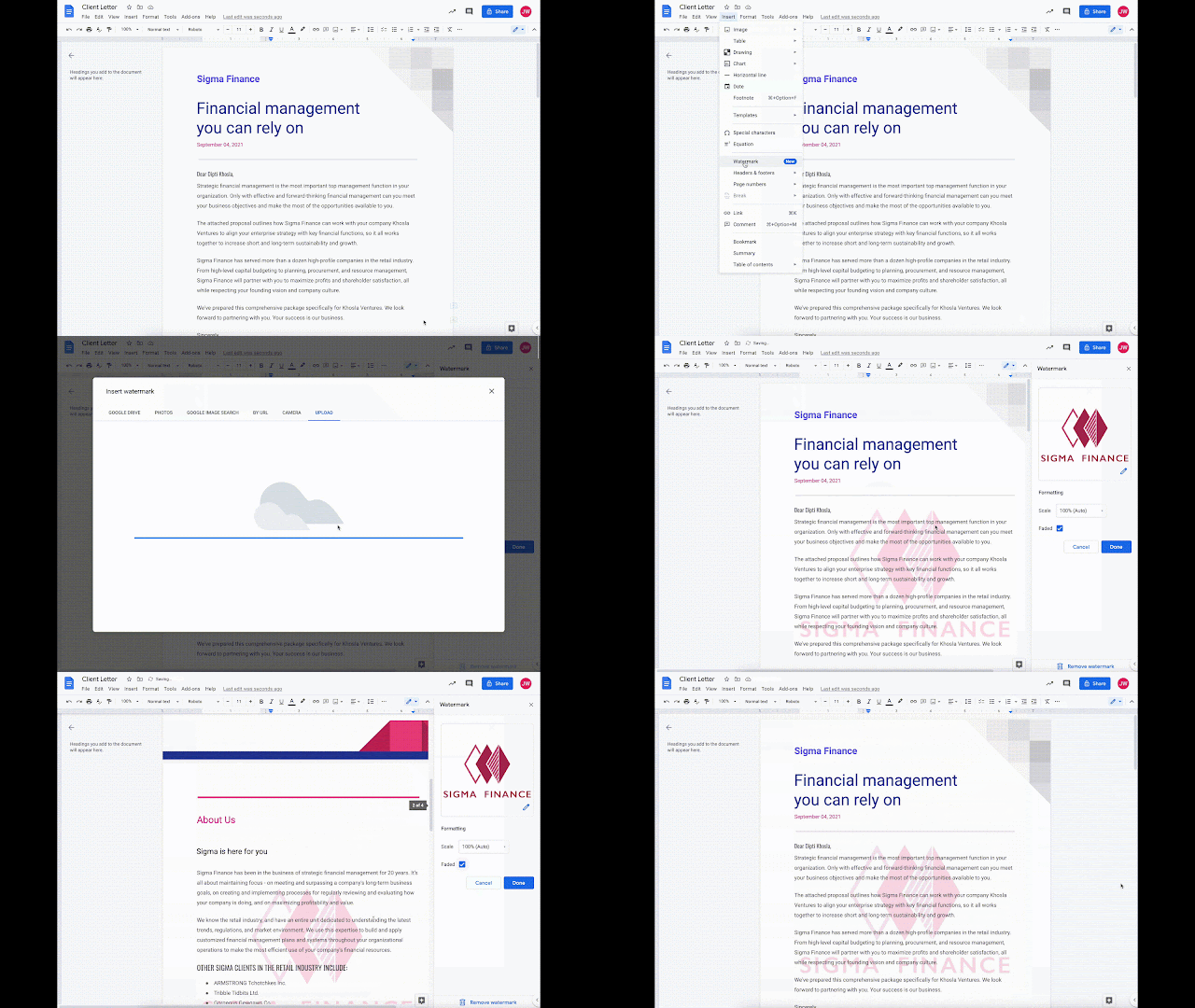
Add image watermarks directly into Google Docs.
Google Docs now allows users to insert image watermarks that repeat behind the text on every page of a document, which is ideal for company logos and branding. These watermarks are also preserved when importing or exporting documents from Microsoft Word.
Release: Both • Rapid: 2021-09-27 • Scheduled: 2021-10-11 -
2021-09-22Comms & Meetings
Ability to mute all Google Meet participants at once is rolling out to mobile platforms.
Meeting hosts and co-hosts can now mute all participants at once in Google Meet on mobile platforms to prevent or stop disruptions. This feature is rolling out on iOS immediately, with Android availability expected later in 2021. While hosts can mute everyone, they cannot unmute them; participants must unmute themselves. Note that users joining via Pexip devices will not be muted.
Release: Both • Rapid: 2021-09-22 • Scheduled: 2021-09-22 -
2021-09-22Comms & Meetings
Easily create group chats with meeting participants directly from Google Calendar events.
Google is adding a Chat icon next to the guest list within Google Calendar events on both web and mobile. This allows users to quickly create a group chat containing all internal organization participants of a meeting, making it simpler to communicate before, during, or after the event without relying solely on email.
Release: Both • Rapid: 2021-09-20 • Scheduled: 2021-10-04 -
2021-09-21Comms & Meetings

New detailed metrics over time added to the Meet Quality Tool for admins.
Google has introduced detailed metrics over time for endpoints within the Meet Quality Tool to help admins perform more advanced troubleshooting. Admins can now view charts for average CPU usage, connection delay, microphone audio level, received audio level, and both sent and received video packet loss. For meetings currently in progress, these metrics can be refreshed to provide near-real-time values.
Release: Both • Rapid: 2021-09-21 • Scheduled: 2021-09-21 -
2021-09-20Comms & Meetings

Google Meet on the web now automatically enhances brightness for underexposed users.
Google Meet on the web now automatically detects when a user appears underexposed, such as when there is too much light behind them, and enhances the brightness to improve their visibility.
Release: Both • Rapid: 2021-09-20 • Scheduled: 2021-10-04 -
2021-09-20Comms & Meetings

Upgrade to the newest version of the Google Chat Progressive Web Application (PWA).
Google is requiring users of the Google Chat Progressive Web Application (PWA) to upgrade to the latest version to ensure continued functionality. Users on older versions will see an in-app banner instructing them to uninstall the old version and visit chat.google.com to install the new one. Starting September 27, 2021, older versions of the Chat PWA will no longer be accessible, and users will be directed to the upgrade screen.
Release: Both • Rapid: 2021-09-20 • Scheduled: 2021-09-20 -
2021-09-17Content & Collaboration
Google Drive user blocks will no longer apply to users in trusted domains.
Google is updating the user blocking feature in Google Drive so that blocks can no longer be applied to users within trusted domains. Any existing blocks for users in trusted domains will no longer be enforced within Google Drive, although they will continue to be enforced in other Google apps and services.
Release: Both • Rapid: 2021-09-17 • Scheduled: 2021-09-17 -
2021-09-16Content & Collaboration
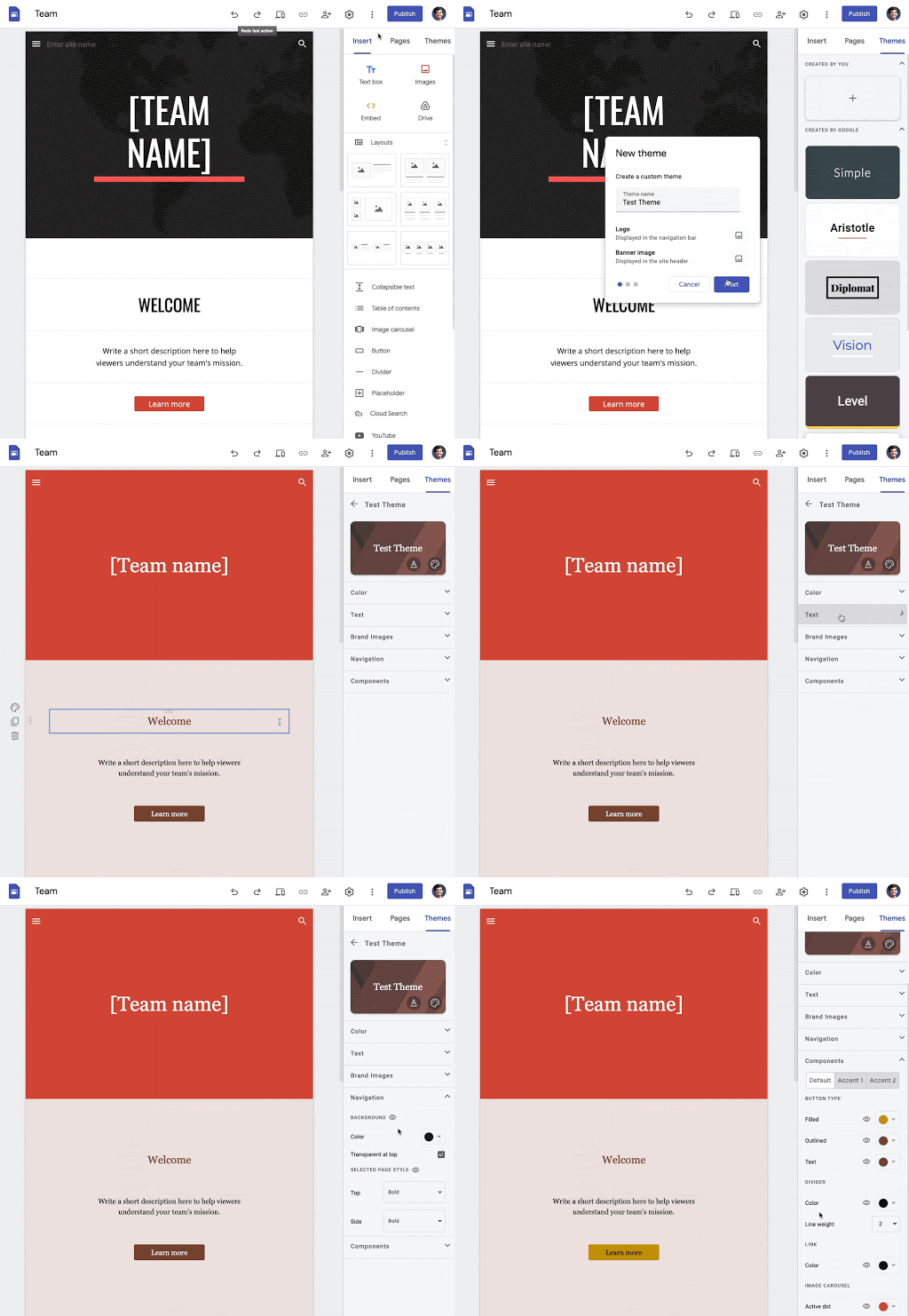
Users can now create custom themes in Google Sites to align with brand guidelines or personal style.
Google Sites has introduced the ability to create highly customized themes, giving users greater control over fonts, text styles, colors, brand images, navigation settings, and the style of components such as buttons. This allows for a more tailored look and feel compared to the six pre-created themes previously available.
Release: Both • Rapid: 2021-09-16 • Scheduled: 2021-10-06 -
2021-09-15Comms & Meetings
Google Tasks is getting a new logo to better align with other Google Workspace products.
Google is updating the Google Tasks logo to ensure visual consistency across the Google Workspace product suite. This new logo will automatically appear across the web and on mobile devices for all Google Workspace, G Suite Basic, and Business customers over the coming weeks.
Release: Both • Rapid: 2021-09-23 • Scheduled: 2021-09-23 -
2021-09-15Comms & Meetings
Admins can now control the default state for Quick access in Google Meet.
Google is adding a new Admin control to configure whether the Quick access feature is enabled or disabled by default for their domain. If the feature is set to OFF by default, meeting hosts can manually enable Quick access from inside the meeting.
Release: Both • Rapid: 2021-09-15 • Scheduled: 2021-09-15 -
2021-09-15Comms & Meetings
Admins can now control the default state for Host Management in Google Meet.
Google has introduced a new Admin setting that allows administrators to configure whether the Host Management feature is on or off by default for their domain. If the feature is set to OFF by default, meeting hosts can still manually enable Host Management from within the meeting.
Release: Both • Rapid: 2021-09-15 • Scheduled: 2021-09-15 -
2021-09-13Comms & Meetings
New iOS Data Protection setting for Google Chat restricts data sharing between Google Workspace and personal Google accounts.
Google is expanding its iOS data protection settings to include Google Chat, allowing administrators to restrict the sharing or saving of content—such as chat messages and files—between Google Workspace accounts and personal Google accounts. This measure helps minimize accidental data sharing and increases the security of corporate data on iOS devices.
Release: Both • Rapid: 2021-09-13 • Scheduled: 2021-09-13 -
2021-09-10Content & Collaboration

New viewing interface for Google Slides on iOS app.
Google is improving the mobile viewing experience for Google Slides on iOS, allowing users to scroll through a vertical stream of slides, pinch to zoom for a closer look, and easily switch between editing, presenting, or casting content.
Release: Both • Rapid: 2021-09-10 • Scheduled: 2021-09-10


