All Google Chat updates
204 updates to Google Chat tracked so far.
-
2023-05-30Comms & Meetings

Admins can now delete individual spaces and remove individual members from a space within the space management tool.
To further enhance the tool’s functionality, we’re giving admins the ability to: Delete individual spaces and Remove individual members from a space
Release: Both • Rapid: 2023-05-30 • Scheduled: 2023-05-30 -
2023-05-30Comms & Meetings
Expanded actions in the Admin console space management tool for Google Chat.
Google has enhanced the space management tool in the Admin console, providing administrators with the ability to delete individual spaces and remove individual members from a space within Google Chat.
Release: Both • Rapid: 2023-05-30 • Scheduled: 2023-05-30 -
2023-05-25Comms & Meetings
.png)
For select Google Workspace customers, admins can enable content reporting for their Google Chat users.
For select Google Workspace customers, admins can enable content reporting for their Google Chat users. Once a user has flagged a message, admins can find more information about the incident in the Security Investigation Tool and decide whether further action is needed. This feature is available for Google Chat on the web and mobile devices.
Release: Both • Rapid: 2023-05-25 • Scheduled: 2023-05-25 -
2023-05-25Comms & Meetings
Admins can now enable content reporting for Google Chat users to flag inappropriate messages.
Google Workspace admins for Enterprise Plus, Education Standard, and Education Plus can now enable content reporting for Google Chat users across 1:1 messages, group messages, and spaces. Once a user flags a message for categories such as harassment or sensitive information, admins can use the Security Investigation Tool to review the incident, view chat transcripts, and decide on further actions or the creation of data protection rules.
Release: Both • Rapid: 2023-05-25 • Scheduled: 2023-05-25 -
2023-05-19Comms & Meetings

AppSheet-powered no-code apps in Google Chat
Google Workspace customers with an AppSheet plan can now create Google Chat apps without writing code, enabling the development of custom integrations and workflows within the Chat environment.
Release: Both • Rapid: 2023-05-19 -
2023-05-19Comms & Meetings
Revamped web onboarding experience for Google Chat
Google Chat is updating its web onboarding for new users accessing the service via Gmail or chat.google.com, offering streamlined options to start direct messages, join spaces, or explore Chat apps.
Release: Both • Rapid: 2023-05-19 • Scheduled: 2023-06-05 -
2023-05-16Comms & Meetings

Quick reactions in Google Chat display frequently used emojis upon hovering or long-pressing a message.
Google Chat is introducing quick reactions, which display a user's most frequently used emojis when hovering over a message on the web or long-pressing on Android. This update streamlines the process of reacting to messages while maintaining access to the full emoji picker, threaded replies, and quoting options.
Release: Both • Rapid: 2023-05-16 • Scheduled: 2023-05-30 -
2023-01-13Comms & Meetings
Find apps and app commands in Chat with a new Integration Menu
Making it easier to discover and use Chat apps with a new Integration Menu. Simply click the (+) button next to the compose bar in a Chat message to see installed apps. You can also browse the slash commands that the apps support and execute them. On the web, the Integration Menu includes a search functionality that allows you to browse new apps.
Release: Both • Rapid: 2023-01-13 • Scheduled: 2023-01-13 -
2022-01-26Comms & Meetings
Now when a user deletes a message in an unthreaded Google Chat Space, a message and timestamp will be added to the conversation indicating the deletion.
Now when a user deletes a message in an unthreaded Google Chat Space, a message and timestamp will be added to the conversation indicating the deletion. When a message has been deleted, both the content will be replaced with a placeholder
Release: Both • Rapid: 2022-01-26 • Scheduled: 2022-01-26 -
2022-01-26Comms & Meetings
Google Chat now displays a notification and timestamp when a message is deleted in an unthreaded space.
When a user deletes a message in an unthreaded Google Chat Space, the content is replaced with a placeholder and a notification including a timestamp is added to the conversation. This update is designed to help users keep track of deletions, improving the readability and flow of conversations by providing additional context.
Release: Both • Rapid: 2022-01-26 • Scheduled: 2022-01-26 -
2022-01-20Comms & Meetings
You now can add rich formatting to Chat messages, such as bold, italics, or underlines.
You now can add rich formatting to Chat messages, such as bold, italics, or underlines. Rich text can also be accessed using standard keyboard shortcuts. Previously, Chat supported plain text or markdown characters only.
Release: Both • Rapid: 2022-01-20 • Scheduled: 2022-01-20 -
2022-01-20Comms & Meetings
Rich text formatting added to Google Chat messages on the web.
Google Chat on the web now supports rich text formatting, allowing users to apply bold, italics, and underlines to their messages. This can be done via a new formatting toolbar accessed by the 'A' icon in the compose bar or by using standard keyboard shortcuts.
Release: Both • Rapid: 2022-01-20 • Scheduled: 2022-01-20 -
2021-12-10Comms & Meetings
Quicker access to Google Workspace integrations in Google Chat via the + icon.
Users in Google Chat can now more easily access other Google Workspace products such as Drive, Docs, Sheets, Slides, Photos, and Calendar by hovering over the + icon at the start of the text box. This feature is initially available on the Web and Android, with iOS support expected in early 2022.
Release: Both • Rapid: 2021-12-09 • Scheduled: 2021-12-09 -
2021-12-06Comms & Meetings
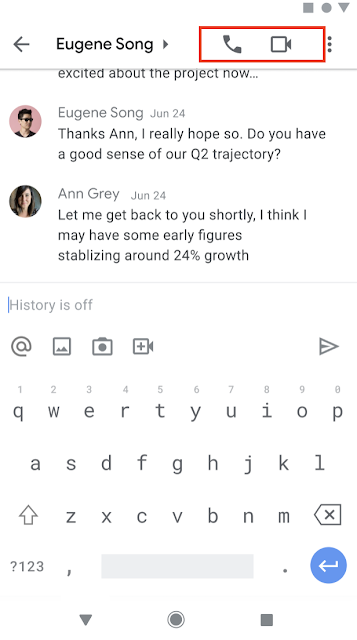
Start and join meetings and audio calls from 1:1 chats using Google Chat in Gmail on mobile.
Users can now start or join meetings and audio calls directly from 1:1 chats in Google Chat within the Gmail app on Android and iOS. To initiate a call, users can select the phone or video icon in the top right corner of a 1:1 chat, or select the phone/video chip to join an existing call. Missed calls are indicated by red phone or video icons within the conversation and chat roster.
Release: Both • Rapid: 2021-12-06 • Scheduled: 2021-12-06 -
2021-11-16Comms & Meetings

Google Chat now allows creators to delete named spaces in specific Google Workspace editions.
Creators of named spaces in Google Workspace Business Standard and Business Starter editions can now fully delete spaces, which removes all owned content, room tasks, and files not saved elsewhere. Once deleted, members lose access to the space, its files, and the member list. This feature is currently unavailable for editions that include Google Vault.
Release: Both • Rapid: 2021-11-16 • Scheduled: 2021-11-16