All Google Contacts updates
39 updates to Google Contacts tracked so far.
-
2020-12-09More
Shared external contacts limit increased from 50,000 to 200,000 contacts.
Shared external contacts are users outside of your domain who you add to your company directory. Previously, there was a limit of 50,000 external contacts. Now that limit is 200,000. Additionally, the total storage limit has been increased from 20MB to 40MB.
Release: Both • Rapid: 2020-12-09 • Scheduled: 2020-12-09 -
2020-11-23More

You can now find additional information about people within your organization, your Contacts, and people who email you in the Gmail side panel.
You can now find additional information about people within your organization, your Contacts, and people who email you in the Gmail side panel. This includes Contact information, such as phone number and email address, Team and manager, Office and desk location, Whether you’ve received email from them before, and more.
Release: Both • Rapid: 2020-11-23 • Scheduled: 2020-11-23 -
2020-07-16More

Adding Trash to Google Contacts. Now, when you delete a contact, it will go into Trash, where it will stay for 30 days before being permanently deleted.
Adding Trash to Google Contacts. Now, when you delete a contact, it will go into Trash, where it will stay for 30 days before being permanently deleted. In that time, you can view, restore, or permanently delete the contact.
Release: Both • Rapid: 2020-07-16 • Scheduled: 2020-07-16 -
2019-12-16More
Turning off less secure app access to G Suite accounts - Impact to Contacts
Limiting the ability for less secure apps (LSAs) to access G Suite account data. If your G Suite account is syncing contacts to iOS or MacOS via CardDAV and uses only a password to login, you’ll need to remove your account. When you add it back, select “sign in with Google” to automatically use OAuth. If your G Suite account is syncing contacts to any other platform or app via CardDAV and uses only a password to login, switch to a method that supports OAuth.
Release: Both • Rapid: 2020-06-15 • Scheduled: 2020-06-15 -
2018-11-27More
Adding more information to Contacts hovercards when the contact itself is a group.
When you mouse over the name of a group in Gmail, you’ll now be able to see essential information, like group members, as well as take some actions, such as: Schedule an event with the group, Email the group, See more members.
Release: Both -
2018-11-01More
Timeline to move users to new Google Contacts and shut down old Contacts
Over the next few months, we’ll completely replace old Google Contacts with new Google Contacts (also known as Contacts preview). As a result, new Contacts will replace the older version, and it will be the only Google Contacts version after February 12, 2019.
Release: Both -
2018-10-31More
Adding the ability to delegate contact management to someone else in new Google Contacts.
Adding the ability to delegate contact management to someone else in new Google Contacts. When you delegate contact management, you give someone else the ability to edit or delete information in your personal contacts folder on your behalf.
Release: Both -
2018-04-10More

G Suite admins can now create multiple directories with custom visibility rules for different organizational units.
G Suite admins can now cluster users into separate directories with custom visibility rules for each organizational unit (OU). Previously, only one directory per domain was allowed, meaning visibility was all-or-nothing for the entire domain. This update allows for more granular control, such as allowing full-time employees to see a global directory while restricting temporary staff to a limited custom directory.
Release: Both • Rapid: 2018-04-10 • Scheduled: 2018-04-10 -
2015-06-25More
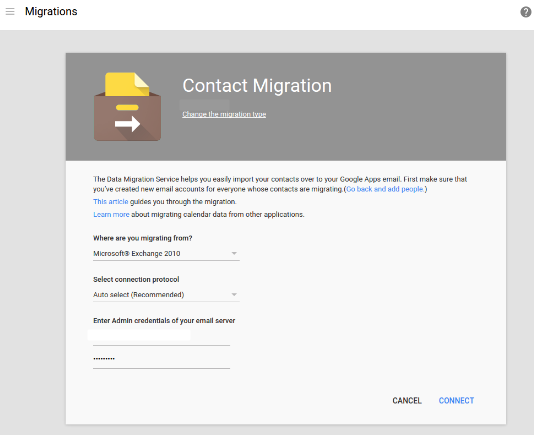
Admins can now migrate employee contacts from Microsoft Exchange and Office 365 to Google Apps via the Admin console.
Google Apps for Work administrators can now migrate employee contacts from Microsoft Exchange (2007 and above) and Microsoft Office 365 to Google Apps directly from the Admin console. This cloud-based data migration service simplifies the process by removing the need to install or configure client tools, utilizing straightforward set-up flows and auto-discovery of mail server connections.
Release: Both • Rapid: 2015-06-25 • Scheduled: 2015-06-25 -
2012-05-30More
Contacts delegation for 'My Contacts' group
Google Contacts now allows users to delegate full access to the contacts in their 'My Contacts' group without granting access to their email or other account data.
Release: Scheduled • Scheduled: 2012-05-30 -
2012-05-23More
Introduction of Contacts delegation.
A new Contacts delegation feature allows users to grant full access to their 'My Contacts' group to other users without granting access to their email or other account data.
Release: Scheduled • Scheduled: 2012-05-29 -
2012-04-26More
New Contacts delegation feature allows users to share their "My Contacts" group with others in their domain.
Google has introduced Contacts delegation, enabling users to grant full access to their "My Contacts" group to up to 25 other users within the same domain. This delegation is limited to the entire "My Contacts" list and does not grant access to the user's email or other account data.
Release: Rapid • Rapid: 2012-04-26 -
2012-03-07More
Google Contacts integration with profiles and Google+ circles
Google Contacts now integrates with user profiles and Google+ circles for domains following the Scheduled Release track.
Release: Scheduled • Scheduled: 2012-03-07 -
2012-02-29More
Google Contacts integration with profiles and Google+ circles
Google Contacts is now integrated with profiles and Google+ circles for domains following the Scheduled Release track.
Release: Scheduled • Scheduled: 2012-03-06 -
2012-02-28More
Google+ circles are now integrated into the Google Contacts list.
For Google+ users, their circles will now appear within the Google Contacts list, making it easier to view the contact information for all members of a specific circle in one place.
Release: Rapid • Rapid: 2012-02-28