All Google Docs and Google Slides updates
3 updates to Google Docs and Google Slides tracked so far. Most recent: 2019-09-18 — Custom line spacing less than one is now available in Google Docs and Google Slides.
-
2019-09-18Other

Custom line spacing less than one is now available in Google Docs and Google Slides.
Google Docs and Google Slides now allow users to set custom line spacing to be less than one. This provides more detailed control over font appearance, helping users meet strict brand guidelines and create visually polished documentation. Additionally, this update improves the preservation of formatting when importing and exporting files in legacy formats.
Release: Both • Rapid: 2019-09-18 • Scheduled: 2019-10-07 -
2017-12-13Other

Improvements to menus and toolbars in Google Docs and Slides for better consistency and discoverability.
Google is updating the menus and toolbars in Google Docs and Slides on the web to make items easier to find and increase consistency. Key changes include renaming 'Lists' to 'Bullets and numbering', moving and renaming 'Show spelling suggestions' to 'Spelling' in the Tools menu, moving 'Document outline' to the View menu in Docs, and removing 'Import slides' from the Insert menu in Slides.
Release: Both • Rapid: 2017-12-13 • Scheduled: 2018-01-04 -
2015-08-04Other
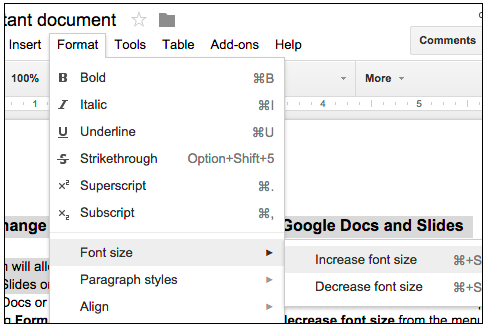
Easily change the relative font size of text in Google Docs and Slides.
Users can now increase or decrease the relative font size of selected text or textboxes in Google Docs and Slides in 1-pt increments by navigating to Format > Font size. If the selected text contains multiple font sizes, each will be increased or decreased accordingly.
Release: Both • Rapid: 2015-08-04 • Scheduled: 2015-08-04