All Google Keep updates
20 updates to Google Keep tracked so far. Most recent: 2025-10-14 — Google Keep reminders now saved to Google Tasks
-
2025-10-14Content & Collaboration

Google Keep reminders now saved to Google Tasks
Reminders created in Google Keep will now be automatically saved to Google Tasks, allowing users to view and manage them across Calendar, the Tasks app, and even via the Gemini app with the Tasks extension. This change unifies the to-do management experience across various Workspace products, making Google Tasks the central solution for all reminders and tasks.
Release: Both • Rapid: 2025-10-13 • Scheduled: 2025-10-13 -
2025-05-13Content & Collaboration
Gemini can now create, find, and reference notes and lists in Google Keep.
Gemini can now interact with Google Keep to create notes and lists, add items to an existing list, find content from your notes and lists, and reference your notes and lists in conversion with Gemini. This is part of the broader Google Workspace apps integration with Gemini.
Release: Both • Rapid: 2025-05-13 • Scheduled: 2025-05-13 -
2025-05-09Content & Collaboration

Enhance Google Keep notes on web with rich text formatting.
Users can customize and add emphasis to their text through bolding, underlining, italicizing, and heading styles on web.
Release: Both -
2024-06-28Content & Collaboration

Multi-account support now available for Google Keep on large screen Android devices.
Allowing multiple accounts to be used at the same time on the same device in Keep. Having two windows open side-by-side enables better insight into your notes and gives you more ways to work with, display, and organize your content across multiple accounts.
Release: Both -
2023-08-24Content & Collaboration
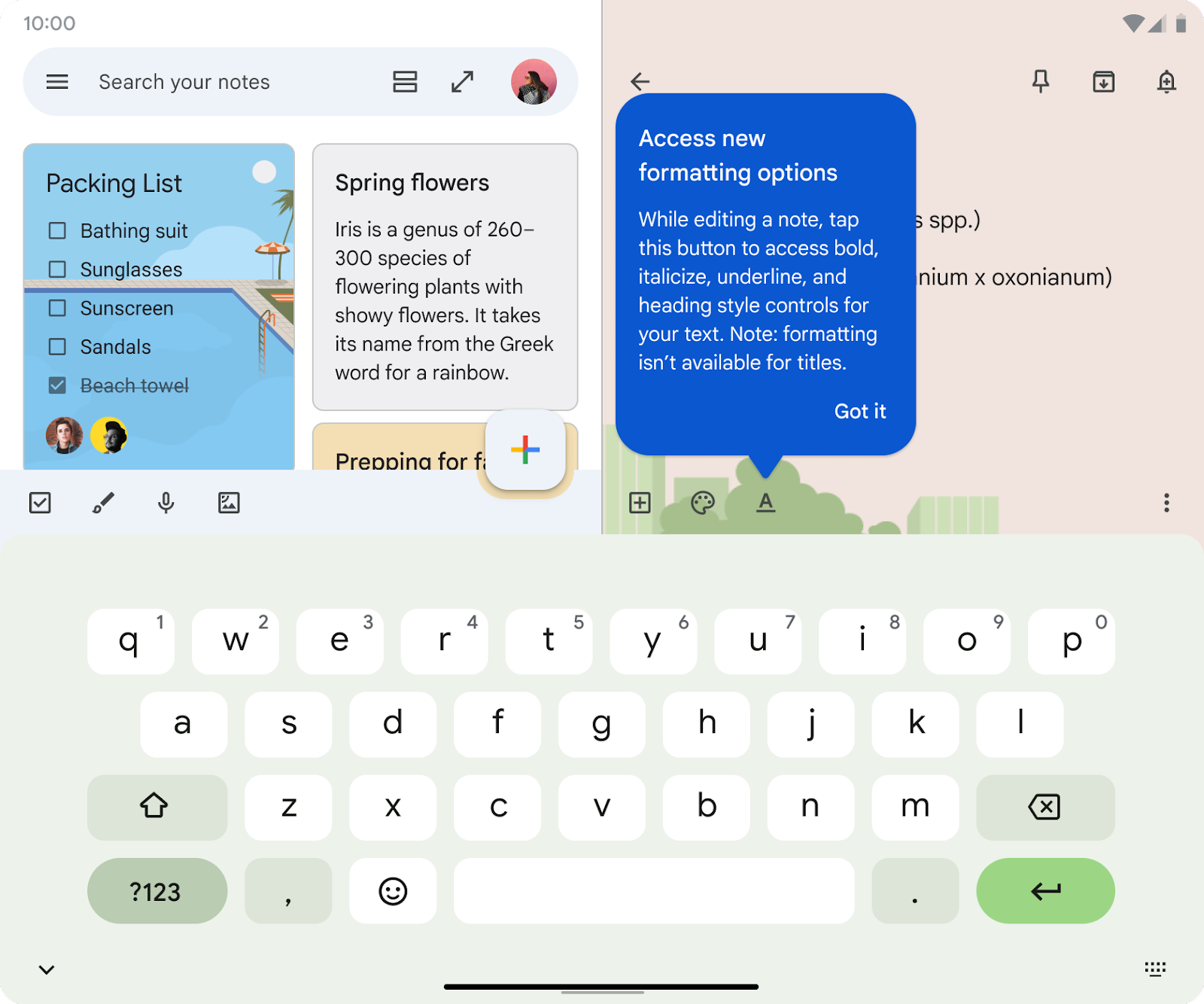
Rich text formatting coming to existing notes in Google Keep on Android.
Rich text formatting options will be extended to existing notes in Google Keep on Android devices, enabling users to apply styles to previously created content.
Release: Both • Rapid: 2023-10-01 • Scheduled: 2023-10-01 -
2023-08-24Content & Collaboration
Rich text formatting added to new notes in Google Keep on Android.
Google Keep on Android now supports rich text formatting for new notes, allowing users to customize and add emphasis to their text using bolding, underlining, italicizing, and heading styles.
Release: Both • Rapid: 2023-08-24 • Scheduled: 2023-08-24 -
2023-08-24Content & Collaboration
Adding rich text formatting options to new notes on Keep.
Building upon our recent updates to Google Keep on Android devices, such as multi-instance support and the single note widget, we’re adding rich text formatting options to new notes on Keep. This highly requested feature enables you to customize and add emphasis to your text through bolding, underlining, italicizing, and heading styles.
Release: Both • Rapid: 2023-08-24 -
2023-08-24Content & Collaboration
Adding rich text formatting options to new notes on Keep for Android.
Adding rich text formatting options to new notes on Keep. This enables you to customize and add emphasis to your text through bolding, underlining, italicizing, and heading styles. You will be able to access rich text formatting in existing Keep notes on Android devices in the coming weeks.
Release: Both • Rapid: 2023-08-24 • Scheduled: 2023-08-24 -
2023-08-09Content & Collaboration

Google Keep integration with Google Assistant is now available for all Google Workspace users.
Google Workspace users can now set Google Keep as the default provider for their notes and lists within Google Assistant. This integration allows users to use voice commands to create new lists, add or delete items from existing lists, and have Assistant read list items back to them.
Release: Both • Rapid: 2023-08-09 • Scheduled: 2023-08-09 -
2023-08-09Content & Collaboration
You can set Google Keep as the default provider for notes and lists when using Google Assistant with your Google Workspace device.
You can set Google Keep as the default provider for your notes and lists if you’re using the Google Assistant with your Google Workspace device. You can ask Assistant to create a new list, add or delete items for an existing list, or read back all the list items to you.
Release: Both • Rapid: 2023-08-09 • Scheduled: 2023-08-09 -
2023-03-31Content & Collaboration

Introducing the ability to open a second instance of the Keep app on the same device for large screen Android.
Introducing the ability to open a second instance of the Keep app on the same device. Having two windows open side-by-side enables better insight into your notes and gives you more ways to work with, display, and organize your content across Google Workspace.
Release: Both -
2023-03-02Content & Collaboration

Keep single note widget enables pinning a note or list to your home screen and edit them in the Keep app with a single tap.
With this new feature, you can “pin” a note or list to your home screen and edit them in the Keep app with a single tap. Lists enable you to toggle checkboxes directly on the note without having to open the Keep app. Also, your notes and lists will reflect any background colors and reminders present within the Keep app.
Release: Both • Rapid: 2023-03-02 • Scheduled: 2023-03-02 -
2022-10-28Content & Collaboration

Releasing updated keyboard shortcuts for Keep on Android that better align with the web experience.
Releasing updated keyboard shortcuts for Keep on Android that better align with the web experience.
Release: Both -
2022-09-09Content & Collaboration

Introducing Dual pane view on Keep. This allows you to browse Keep notes on the left side of your screen, while editing content on the right side of your screen.
Introducing Dual pane view on Keep. This allows you to browse Keep notes on the left side of your screen, while editing content on the right side of your screen.
Release: Both • Rapid: 2022-09-08 • Scheduled: 2022-09-08 -
2021-05-27Content & Collaboration
Workspace admins can monitor and analyze their organizations’ Keep activity with audit logs and a new API for Keep.
Workspace admins can monitor and analyze their organizations’ Keep activity, starting today, admins will see audit logs for user activity in Google Keep in the Admin console. The API will allow admins and admin-enabled apps to manage Keep access controls for an organization, enabling support for cases such as enterprise data protection.
Release: Both • Rapid: 2021-05-27 • Scheduled: 2021-05-27