Google Meet updates from February 2025
17 updates to Google Meet were tracked in February 2025.
-
2025-02-21Comms & Meetings

“Take notes for me” in Google Meet now captures citations to transcripts
Your meeting notes document will now include citations, or timestamps, which correlate to the exact point in the meeting transcript that references the summarized notes.
Release: Both -
2025-02-21Comms & Meetings
Updated design for Google Meet meeting controls on Android and iOS
We are updating the location of some Google Meet meeting controls on Android and iOS devices, which are intended to organize features in a more intuitive way.
Release: Both -
2025-02-21Comms & Meetings
Scroll through live captions and translated captions in Google Meet
We’re improving the live captions and translated captions experience in Google Meet by including the ability to scroll through the text.
Release: Both -
2025-02-21Comms & Meetings
“Take notes for me” in Google Meet now captures “next steps”
“Take notes for me” will capture next steps discussed during the meeting in a new “suggested next steps” section
Release: Both -
2025-02-20Comms & Meetings

Updated design for Google Meet meeting controls on Android and iOS
We are updating the location of some Google Meet meeting controls on Android and iOS devices, which are intended to organize features in a more intuitive way. This will help you to navigate the Meet layout faster and more intuitively.
Release: Both • Rapid: 2025-02-20 • Scheduled: 2025-02-20 -
2025-02-20Comms & Meetings
The option to report a problem is now in one location, in the Settings menu in Google Meet on Android and iOS.
Google Meet is updating the location of some meeting controls on Android and iOS devices to organize features in a more intuitive way. The option to report a problem is now in one location, in the Settings menu.
Release: Both • Rapid: 2025-02-20 • Scheduled: 2025-02-20 -
2025-02-20Comms & Meetings
Host management controls will move from the overflow menu to the settings menu, under the “General” section in Google Meet on Android and iOS.
Google Meet is updating the location of some meeting controls on Android and iOS devices to organize features in a more intuitive way. Host management controls will move from the overflow menu to the settings menu, under the “General” section.
Release: Both • Rapid: 2025-02-20 • Scheduled: 2025-02-20 -
2025-02-20Comms & Meetings
Updated design for Google Meet meeting controls on iOS devices.
Updates to the location of Google Meet meeting controls on iOS devices, intended to organize features in a more intuitive way. Emoji reactions are moving to the bottom bar, hand raise feature to the overflow menu, host management controls to the settings menu, and the report a problem option is now in the Settings menu. For iOS, the end call button is moving to the right side.
Release: Both • Rapid: 2025-02-24 • Scheduled: 2025-02-24 -
2025-02-20Comms & Meetings
.gif)
your meeting notes document will now include citations, or timestamps, which correlate to the exact point in the meeting transcript that references the summarized notes.
For example, you’ll see something like: “Sophie discussed the updated marketing plan (00:08:32)”.
Release: Both • Rapid: 2025-02-20 • Scheduled: 2025-02-20 -
2025-02-18Comms & Meetings
.gif)
Google Meet now allows users to scroll through the last 30 minutes of live and translated captions.
Google Meet is improving the live and translated captions experience by enabling users to scroll back and review the last 30 minutes of captions. Previously, captions disappeared in real-time; this update allows users to review missed portions of the conversation or specific details mentioned earlier at their own pace.
Release: Both • Rapid: 2025-02-18 • Scheduled: 2025-03-06 -
2025-02-18Comms & Meetings
.png)
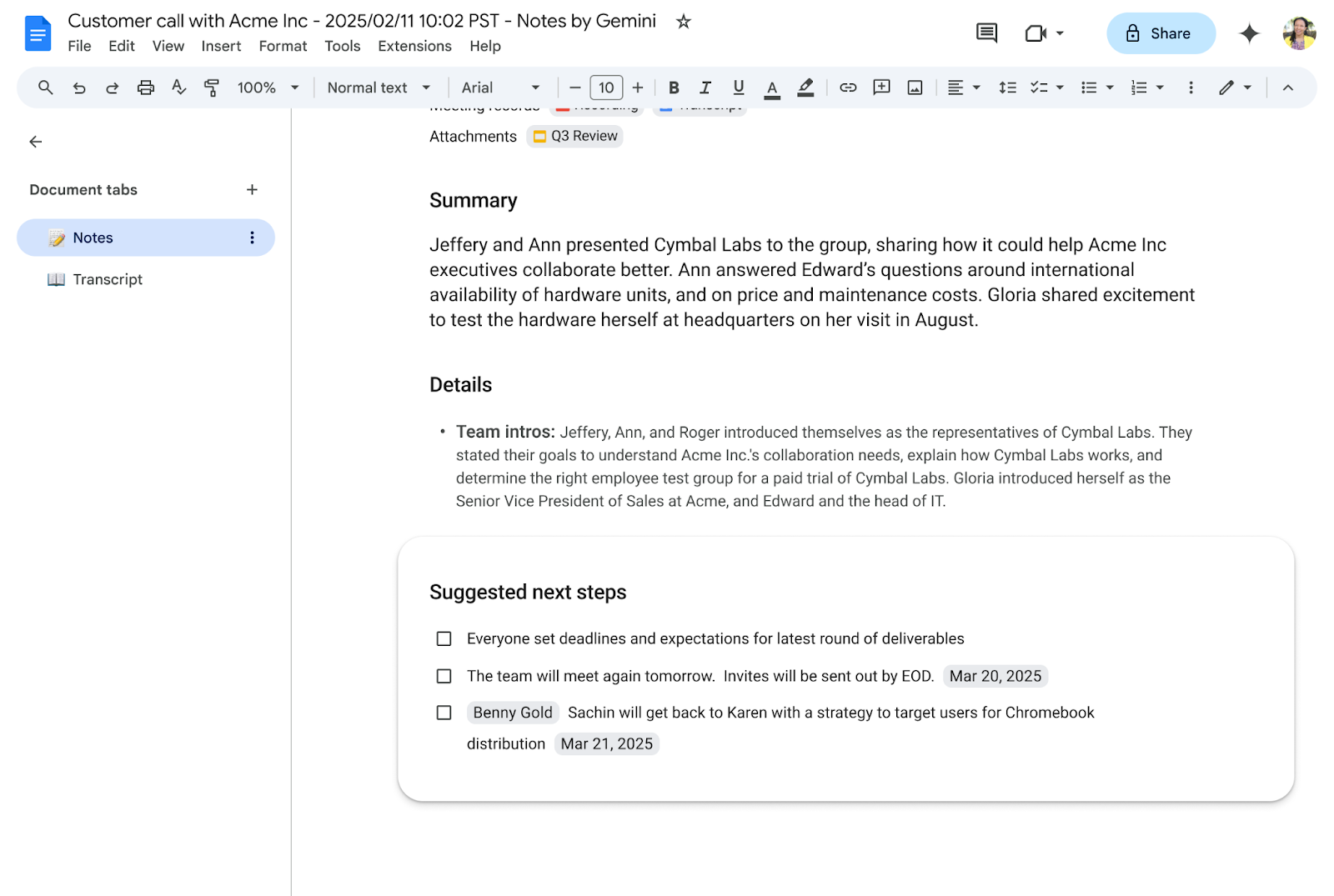
“take notes for me” will capture next steps discussed during the meeting in a new “suggested next steps” section.
Powered by AI, these next steps and follow-ups will automatically be identified and organized within the meeting notes document.
Release: Both • Rapid: 2025-02-18 • Scheduled: 2025-02-18 -
2025-02-18Comms & Meetings
improving the live captions and translated captions experience in Google Meet by including the ability to scroll through the text.
This update makes it possible to scroll back and review the last 30 minutes of captions at your own pace.
Release: Both • Rapid: 2025-02-18 • Scheduled: 2025-02-18 -
2025-02-10Comms & Meetings

Instructors using Meet LTI can now control when meeting recordings are shared with students.
Instructors using Google Meet Learning Tools Interoperability (LTI) to create and host meetings can now control how meeting recordings are shared. Previously, all meeting participants had access to the recording automatically; now, instructors can use a toggle within the 'Meet artifacts' tab to manage when recordings are shared with students.
Release: Both • Rapid: 2025-02-10 • Scheduled: 2025-02-10 -
2025-02-10Comms & Meetings
Instructors can control how meeting recordings are shared through Meet LTI.
Instructors using Meet LTI™ to create and host meetings can control how meeting recordings are shared. Previously, everyone in the meeting could access the recording after the meeting. Now, instructors can control when recordings are shared with students.
Release: GA • Rapid: 2025-02-10 • Scheduled: 2025-02-10 -
2025-02-10Comms & Meetings
Instructors using Meet LTI™ to create and host meetings can control how meeting recordings are shared
Now, instructors can control when recordings are shared with students.
Release: Both • Rapid: 2025-02-10 • Scheduled: 2025-02-10