All Google Sites updates
91 updates to Google Sites tracked so far.
-
2022-11-04Content & Collaboration
Reminder to migrate your classic Google Sites before January 30, 2023
We’re extending the previously announced timeline to give Google Workspace customers more time to migrate from classic Google Sites to new Google Sites
Release: Both -
2022-11-04Content & Collaboration
Reminder to migrate your classic Google Sites before January 30, 2023
We’re extending the previously announced timeline to give Google Workspace customers more time to migrate from classic Google Sites to new Google Sites
Release: Both -
2021-11-16Content & Collaboration
Bulk conversion tool in Classic Sites Manager is temporarily unavailable.
The bulk conversion tool within the Classic Sites Manager is temporarily unavailable as Google implements improvements to conversion fidelity for site settings. Admins and end-users can still convert individual classic Sites to new Google Sites in the meantime.
Release: Scheduled -
2021-11-16Content & Collaboration
Google is extending the transition timeline for Classic Google Sites.
Google has extended the timeline for migrating from classic Google Sites to new Google Sites to make the process easier for customers. Starting June 1, 2022, users will no longer be able to edit classic Sites, and starting July 1, 2022, classic Sites will no longer be viewable unless they have been converted to the new Google Sites format.
Release: Scheduled • Scheduled: 2022-06-01 -
2021-11-10Content & Collaboration
Editors can now copy a single page or a subset of pages into a new Google Site.
Google Sites is adding the ability for editors to copy a single page or a specific subset of pages into a new site. Previously, users could only copy an entire site. This update allows for better content reuse and the ability to easily break large sites into smaller, more manageable ones.
Release: Both • Rapid: 2021-11-10 • Scheduled: 2021-11-10 -
2021-10-29Content & Collaboration
New navigation menus in Google Sites
Site editors can now organize page and external links under new navigation menus by selecting 'New Menu', providing greater flexibility in structuring the navigation within their sites.
Release: Both • Rapid: 2021-10-29 • Scheduled: 2021-10-29 -
2021-10-19Content & Collaboration
Classic Google Sites editing and viewing will be disabled starting December 1, 2021, and January 1, 2022, respectively.
Google is replacing classic Google Sites with new Google Sites. Starting December 1, 2021, users will no longer be able to edit classic Google Sites. Beginning January 1, 2022, classic Sites will no longer be viewable unless they are converted to new Google Sites; any remaining classic Sites will be automatically archived to the owner's Google Drive or replaced with a draft in new Google Sites. Users are encouraged to migrate their sites by December 31, 2021.
Release: Both • Rapid: 2021-12-01 • Scheduled: 2021-12-01 -
2021-09-16Content & Collaboration
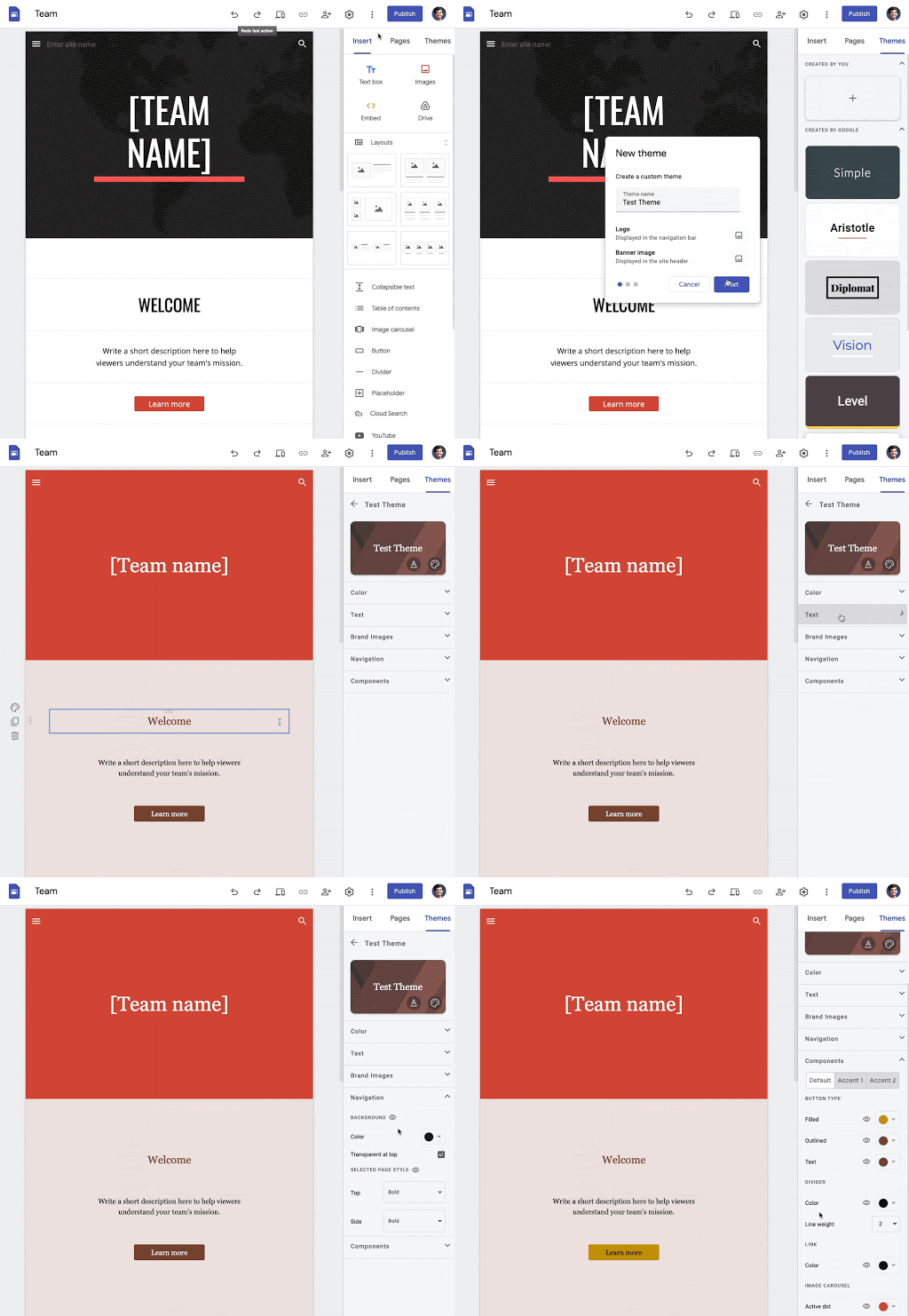
Users can now create custom themes in Google Sites to align with brand guidelines or personal style.
Google Sites has introduced the ability to create highly customized themes, giving users greater control over fonts, text styles, colors, brand images, navigation settings, and the style of components such as buttons. This allows for a more tailored look and feel compared to the six pre-created themes previously available.
Release: Both • Rapid: 2021-09-16 • Scheduled: 2021-10-06 -
2021-09-08Content & Collaboration

Restore specific pages via version history in new Google Sites.
In new Google Sites, users can now restore a specific page from the version history. Previously, restoration was only possible for the entire site. This update simplifies the process of recovering, editing, and re-publishing individual pages that may have been accidentally deleted or modified.
Release: Both • Rapid: 2021-09-08 • Scheduled: 2021-09-21 -
2021-04-27Content & Collaboration
Google Vault now supports Google Sites
You can use Google Vault to set retention policies for Google Sites, perform searches of Google Sites data, and export Google Sites content.
Release: Both • Rapid: 2021-04-27 • Scheduled: 2021-04-27 -
2020-04-23Content & Collaboration

Google Sites now supports access for accounts managed by Family Link.
Users with personal Google Accounts managed by Family Link can now view public sites and view or edit sites that are shared with them, specifically for sites created with the new Google Sites.
Release: Both -
2020-04-23Content & Collaboration
Google Sites adds announcement banners for time-sensitive updates.
Site owners can now create announcement banners that appear at the top of the site to highlight important, time-sensitive information for visitors, such as updated business hours or new assignment notifications.
Release: Both • Rapid: 2020-04-22 • Scheduled: 2020-04-22 -
2020-04-23Content & Collaboration
Google Sites introduces new site templates for common use cases.
Google Sites has added 10 professional templates available in 16 languages to help users quickly create high-quality sites for help centers, project collaboration, class or team resources, club activities, and small businesses without requiring design or coding skills.
Release: Both • Rapid: 2020-04-14 • Scheduled: 2020-04-28 -
2020-02-11Content & Collaboration

Google Sites revamped its Settings menu and added an option to hide anchor links.
Google Sites has updated its Settings menu to consolidate various configuration options, such as favicons and Google Analytics tracking, into a single location for easier access. Additionally, site editors now have the ability to hide anchor links from viewers on published sites through the Viewer tools setting, providing more control over the site's appearance.
Release: Both • Rapid: 2020-02-11 • Scheduled: 2020-02-11 -
2020-02-11Content & Collaboration
Edit your new Google Sites faster with a revamped Settings menu
Making improvements to the “Settings” menu in new Google Sites. Specifically, consolidating the location of several settings into one place, making it easier for site editors to access and configure different options for their sites.
Release: Both • Rapid: 2020-02-11 • Scheduled: 2020-02-11

