All Google Slides updates
84 updates to Google Slides tracked so far.
-
2018-04-18Content & Collaboration
New guides and rulers for precision design in Google Slides
Google Slides has introduced guide lines for consistent placement and alignment across all slides, with objects snapping to these guides. Additionally, a new visual ruler provides fine-grained control over the alignment of text, lists, objects, and guides, including indentation markers for bullets and text.
Release: Both • Rapid: 2018-04-18 • Scheduled: 2018-05-02 -
2018-04-18Content & Collaboration

Insert and link Google Slides into Google Docs
Users can now insert a slide from a Google Slides presentation directly into Google Docs. These slides can be linked to the source presentation, allowing users to sync any changes with a single click, ensuring document content remains up to date.
Release: Both • Rapid: 2018-04-18 • Scheduled: 2018-05-02 -
2018-01-18Content & Collaboration
HTML view removed from the menu in Google Slides.
The HTML view option has been removed from the View menu in Google Slides. Users can still access this view using the keyboard shortcut Ctrl+Alt+Shift+P.
Release: Both • Rapid: 2018-01-18 • Scheduled: 2018-02-01 -
2018-01-18Content & Collaboration
Change shape option moved to right-click menu in Google Slides.
In Google Slides, the 'Change shape' option has been removed from the Format menu and is now available via the right-click context menu on a selected shape.
Release: Both • Rapid: 2018-01-18 • Scheduled: 2018-02-01 -
2018-01-09Other
Screen magnifier support added to Google Slides and Drawings
Screen magnifier support has been extended to Google Slides and Google Drawings for users on Mac and Chrome OS devices, improving accessibility across the Google Docs editors suite.
Release: Both • Rapid: 2018-01-09 • Scheduled: 2018-01-09 -
2017-12-13Other

Improvements to menus and toolbars in Google Docs and Slides for better consistency and discoverability.
Google is updating the menus and toolbars in Google Docs and Slides on the web to make items easier to find and increase consistency. Key changes include renaming 'Lists' to 'Bullets and numbering', moving and renaming 'Show spelling suggestions' to 'Spelling' in the Tools menu, moving 'Document outline' to the View menu in Docs, and removing 'Import slides' from the Insert menu in Slides.
Release: Both • Rapid: 2017-12-13 • Scheduled: 2018-01-04 -
2015-10-28Content & Collaboration
Hyperlink text and shapes in Slides Android app
Users can now insert new links and edit existing links for both text and shapes directly within the Google Slides Android app using the toolbar and context menu.
Release: Both • Rapid: 2015-10-28 • Scheduled: 2015-10-28 -
2015-09-16Content & Collaboration
Enhanced presentation controls and video toggling in the Google Slides Android app.
The Google Slides Android app now allows presenters to change and preview slides directly from their phone's lock screen via a notification, eliminating the need to unlock the device to advance slides. Additionally, users can now toggle between their presentation and video when presenting to Google Hangouts by tapping the video camera icon.
Release: Both • Rapid: 2015-09-16 • Scheduled: 2015-09-16 -
2015-09-02Content & Collaboration
New Themes in Google Slides
Google Slides has introduced 22 new themes, accessible via a new Themes side panel, allowing users to quickly change the visual style of their presentations.
Release: Both • Rapid: 2015-09-02 • Scheduled: 2015-09-21 -
2015-08-06Content & Collaboration
Present Google Slides presentations to Google Hangouts using the Android app.
The latest version of the Google Slides app for Android now allows users to present their work directly to Google Hangouts. Users can join scheduled calendar meetings or initiate new video calls, with the ability to see participants, advance slides, view speaker notes, and use a built-in timer, all from their mobile device.
Release: Both • Rapid: 2015-08-06 • Scheduled: 2015-08-06 -
2015-08-04Other
Easily change the relative font size of text in Google Docs and Slides.
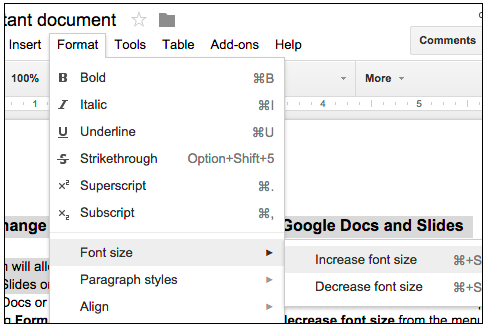
Users can now increase or decrease the relative font size of selected text or textboxes in Google Docs and Slides in 1-pt increments by navigating to Format > Font size. If the selected text contains multiple font sizes, each will be increased or decreased accordingly.
Release: Both • Rapid: 2015-08-04 • Scheduled: 2015-08-04 -
2015-07-09Content & Collaboration
Change slide layouts in Google Slides for Android
Within the Google Slides app for Android, users can now change the layout of an existing slide to one of several predefined layouts, allowing them to update presentations on mobile more effectively.
Release: Both • Rapid: 2015-07-09 • Scheduled: 2015-07-09 -
2015-06-11Content & Collaboration
Google Slides app now supports Chromecast and AirPlay.
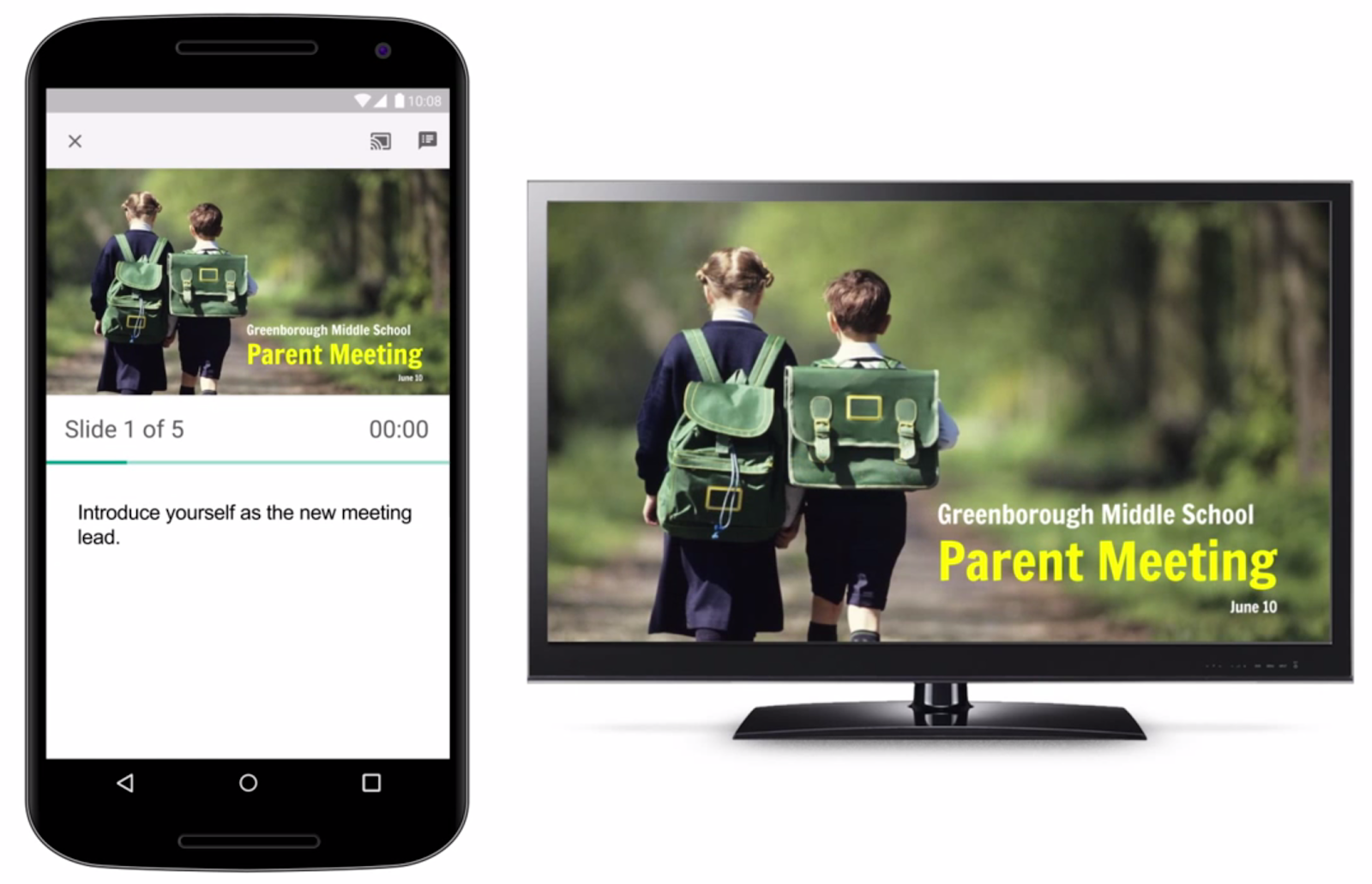
The Google Slides app has been updated to enable users to present their presentations on big screens using Chromecast or AirPlay from a phone or tablet. While presenting, the mobile device can be used as a remote to advance slides, view speaker notes, and monitor a timer.
Release: Both • Rapid: 2015-06-11 • Scheduled: 2015-06-11 -
2015-05-13Content & Collaboration
Mobile image and table insertion and manipulation now available in Google Slides apps for Android and iOS.
New versions of the Google Slides app for Android and iOS now support inserting, cropping, and masking images, as well as inserting and manipulating tables. These improvements are available for both online and offline use.
Release: Both • Rapid: 2015-05-13 • Scheduled: 2015-05-13 -
2015-04-28Content & Collaboration
New animations and direction settings for existing animations in Google Slides.
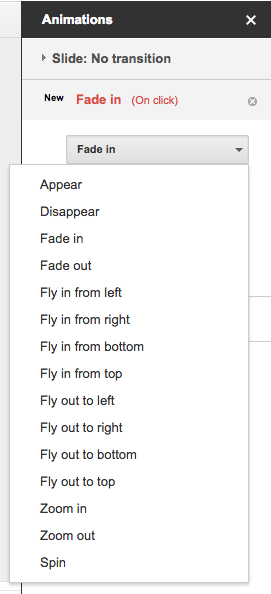
Google Slides has introduced two new animations, 'Appear' and 'Disappear', to make presentations more dynamic. Additionally, users can now set the direction (to and from left, right, top, and bottom) for the existing 'Fly in' and 'Fly out' animations.
Release: Both • Rapid: 2015-04-28 • Scheduled: 2015-04-28