Workspace updates from June 2023
59 Workspace updates were tracked in June 2023.
-
2023-06-16Education

Rich text formatting added to class and private comments in Google Classroom.
Rich text formatting is now available for class and private comments in Google Classroom, allowing teachers and students to emphasize content using bolding, underlining, italicizing, and bulleted lists.
Release: Both • Rapid: 2023-06-16 • Scheduled: 2023-06-16 -
2023-06-16Education
Originality reports in Google Classroom now support Microsoft Word files.
Educators can now run originality reports on Microsoft Word (.docx) files in Google Classroom to check for authenticity. The tool identifies uncited content and plagiarism by comparing the file against books and webpages on the internet.
Release: Both • Rapid: 2023-06-16 • Scheduled: 2023-06-16 -
2023-06-16Google Chrome

We’ve added a card for Chrome Browser Cloud Management to the Admin console landing page.
Here you can see quick stats, such as the number of enrolled browsers, and directly perform actions such as enrolling new browsers or managing Chrome extensions.
Release: GA • Rapid: 2023-06-16 • Scheduled: 2023-06-16 -
2023-06-16Admin & Security
Added a Chrome Browser Cloud Management card to the Admin console home page.
Google has introduced a new Chrome Browser Cloud Management card on the Admin console landing page. This card allows administrators to view quick statistics, such as the number of enrolled browsers, and perform direct actions like enrolling new browsers or managing Chrome extensions without having to navigate through the full menu system.
Release: Both • Rapid: 2023-06-16 • Scheduled: 2023-06-16 -
2023-06-14Content & Collaboration
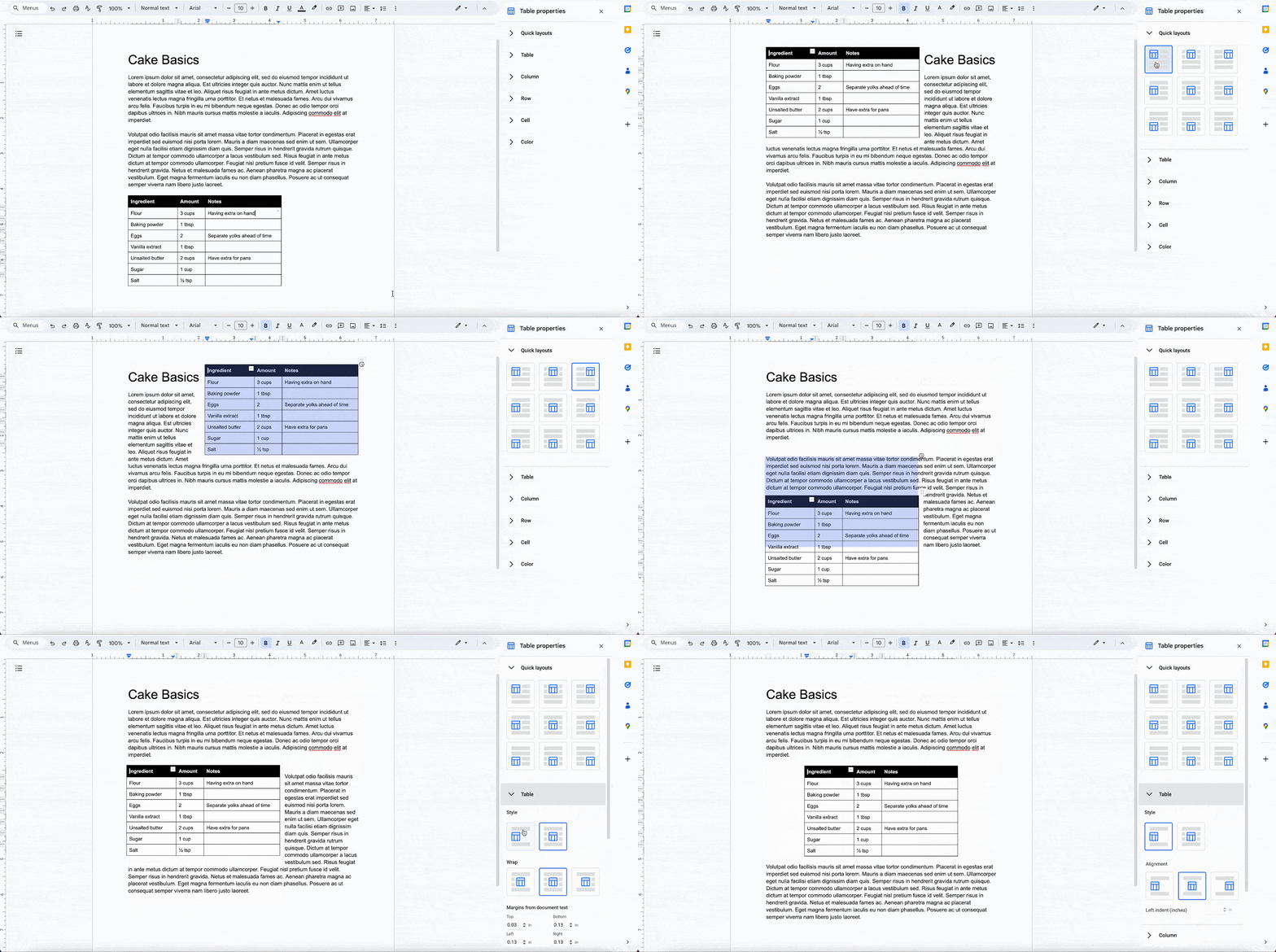
Improved table positioning and layout options in Google Docs pages format.
Google Docs is introducing enhanced table positioning options for documents set in pages format, enabling users to drag tables to specific locations, wrap text around tables (with adjustable directions and margins), set fixed positions, and utilize quick layouts for preset positioning. Additionally, the import and export functionality for Microsoft Word documents with tables has been improved to ensure better consistency.
Release: Both • Rapid: 2023-06-14 • Scheduled: 2023-07-31 -
2023-06-13Other
.png)
Add or remove client-side encryption from existing Google Sheets and Google Slides files.
Users can now add or remove client-side encryption for existing spreadsheets in Google Sheets and presentations in Google Slides by navigating to File > Make a copy > Add/Remove additional encryption. This update provides greater flexibility in controlling encryption as documents and projects evolve, bringing this capability to Sheets and Slides after it was previously introduced for Google Docs.
Release: Both • Rapid: 2023-06-13 • Scheduled: 2023-07-05 -
2023-06-13Comms & Meetings
Several closed caption languages in Google Meet have moved out of beta.
Google Meet has removed the beta tag from closed captioning for Dutch, Italian, Japanese, Korean, Portuguese, and Russian, as these languages have been validated.
Release: Both • Rapid: 2023-06-13 • Scheduled: 2023-06-13 -
2023-06-13Comms & Meetings
Google Meet adds new target languages for translated captions from English.
Google Meet now supports translating meetings spoken in English into Dutch, Indonesian, Turkish, and Vietnamese. These newly supported languages are currently denoted with a beta tag.
Release: Both • Rapid: 2023-06-13 • Scheduled: 2023-06-13 -
2023-06-13Comms & Meetings
Google Meet expands closed captioning support to include seven new languages.
To improve inclusivity, Google Meet has expanded its closed captioning support to include French Canadian (web only), Indonesian, Polish, Romanian, Thai, Turkish, and Vietnamese.
Release: Both • Rapid: 2023-06-13 • Scheduled: 2023-06-13 -
2023-06-12Comms & Meetings
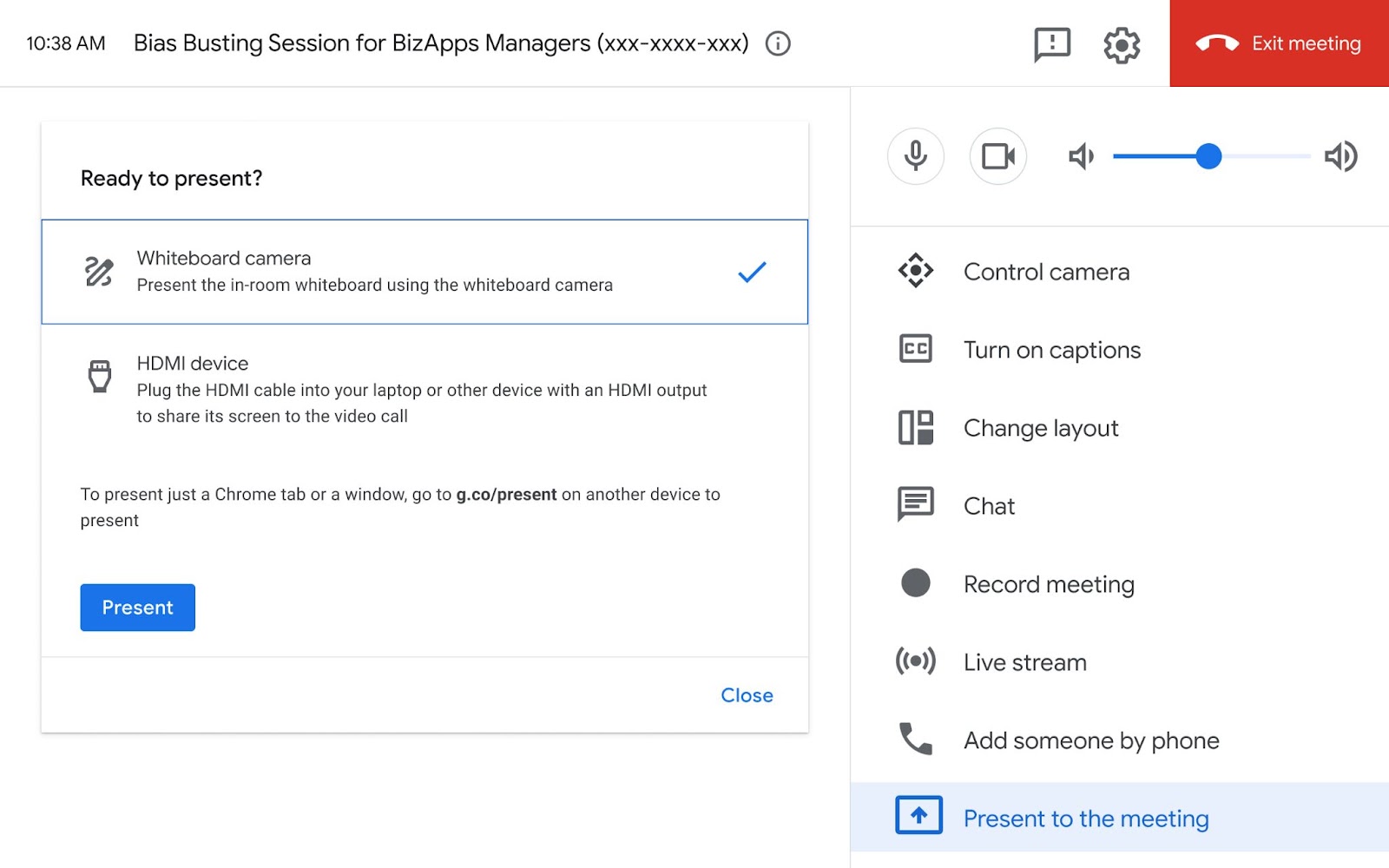
Google Meet Hardware now supports whiteboard cameras, starting with the Logitech Scribe.
Google Meet Hardware has introduced support for whiteboard cameras, with the Logitech Scribe being the first certified device. This update allows in-person meeting participants to share content written on a physical whiteboard as a presentation, ensuring remote colleagues can see the brainstorming process in real-time. Users can access this feature through an updated touch controller UI by selecting 'Present to the meeting' and then choosing the 'Whiteboard camera' option.
Release: Both • Rapid: 2023-06-19 • Scheduled: 2023-06-19 -
2023-06-12Admin & Security

Directory Sync now allows admins to replace the domain name for synced users and groups.
Google Workspace admins can now use Directory Sync to automatically replace the domain name for synced users and groups in their Google cloud directory. This enables synced users and groups to have a different domain name than the one used in the external directory. Admins can specify if the domain change should apply only to newly synced users and groups or to both new and previously synced entities.
Release: Both • Rapid: 2023-06-12 • Scheduled: 2023-06-12 -
2023-06-09Content & Collaboration

Optimizing the Google Drive Android app for foldable devices
The Google Drive Android app now features controls within the item preview viewer that intelligently respond and adjust based on the position of a foldable device, whether it is opened, closed, or partially opened.
Release: Both • Rapid: 2023-06-09 • Scheduled: 2023-06-09 -
2023-06-09Content & Collaboration
View documents in paginated mode on Android devices
Google Docs on tablets and foldable devices will now open in paginated mode by default, unless the document is specifically set to pageless. This ensures a more cohesive visual design and consistent page breaks between the web, tablet, and foldable versions of the app.
Release: Both • Rapid: 2023-06-09 • Scheduled: 2023-06-09 -
2023-06-08Comms & Meetings
Assistant and Calendar reminders are automatically migrating to Google Tasks.
Google is migrating Reminders from Google Calendar and Google Assistant to Google Tasks to create a unified experience for managing to-dos. For Google Workspace users, this automatic migration begins on June 8, 2023. Admins must ensure the Tasks service is enabled for their organization to prevent data loss, as reminders data deletion will be initiated after June 22, 2023, for those with the service turned off.
Release: Both • Rapid: 2023-06-08 • Scheduled: 2023-06-08 -
2023-06-08Comms & Meetings
Assistant and Calendar reminders are automatically migrating to Tasks.
Google Workspace users who have not already migrated their Reminders to Tasks, they will be migrated starting today. Admins should verify that the Tasks service is ON for your organization. If the Tasks service is OFF, any Reminders data will not be migrated to Tasks, and Reminders data deletion will be initiated after June 22, 2023.
Release: Both • Rapid: 2023-06-08 • Scheduled: 2023-06-08