All Admin console updates
158 updates to Admin console tracked so far.
-
2018-04-26Admin & Security

Display your organization’s brand logo in the Google bar
Google is updating the Google bar to feature organization branding. Admins can now add their organization's logo in the Admin console under Company profile > Personalization, which will then be displayed next to the user's profile picture or avatar across various G Suite services, such as Calendar and Drive. If no logo is provided, the G Suite logo will be shown by default.
Release: Both • Rapid: 2018-04-26 • Scheduled: 2018-04-26 -
2018-04-20Admin & Security

Session length controls are now available for domains using SAML federation.
Google is extending session length controls for Google services to domains that federate to another Identity Provider (IdP) using SAML. This allows G Suite Business, Enterprise, and Education admins to specify the duration of web sessions (e.g., four hours, seven days, or infinite) regardless of the browser used. Additionally, session-based cookies for SAML-federated customers will be removed on May 7th, 2018, to ensure consistent behavior across different browsers.
Release: Both • Rapid: 2018-04-20 • Scheduled: 2018-04-20 -
2018-04-10Admin & Security

Improved user management interface in the Admin console.
Google is updating the Admin console interface for managing organization users to make it easier to find and control user information. The update introduces a new quick actions panel for basic user details and category cards that provide summarized views and quick editing for security, groups, admin roles, apps, managed devices, licenses, and Team Drives. Additionally, license management is improved with better visibility of license states, separate view and edit modes, and enhanced error messaging.
Release: Both • Rapid: 2018-04-10 • Scheduled: 2018-04-10 -
2018-03-27Admin & Security
Admins can now manage the frequency of 2-step verification (2SV) challenges.
Admins across all G Suite editions can now control whether users are allowed to trust their devices during 2-step verification. Admins can choose to display the 'Remember this computer' checkbox, allowing users to skip the second factor on trusted devices, or disable it to force a 2SV challenge every time a user signs in.
Release: Both • Rapid: 2018-03-27 • Scheduled: 2018-03-27 -
2018-03-27Admin & Security

Admins can now control the session length for Google services on the web.
G Suite Business, Enterprise, and Education admins now have the ability to specify the duration of web sessions for Google services (e.g., four hours, seven days, or infinite). Users will be automatically signed out at the end of the specified duration and prompted to re-enter their login credentials, unless they log out manually beforehand. This applies to desktop web sessions and some mobile browser sessions, but not native mobile apps or domains using SAML federation.
Release: Both • Rapid: 2018-03-27 • Scheduled: 2018-03-27 -
2018-03-23Admin & Security

All G Suite editions can now manage security keys for two-step verification.
Google has expanded security key management capabilities to all G Suite editions. Admins can now restrict users' two-step verification methods to security keys only, add or revoke security keys for users, and view reports on security key usage within the Admin console to enhance organizational security against phishing attacks.
Release: Both • Rapid: 2018-03-23 • Scheduled: 2018-03-23 -
2018-03-21Admin & Security

Basic mobile management will be enabled by default for G Suite domains by the end of 2018.
Google is automatically enabling basic mobile management for G Suite domains that have not previously enabled it by the end of 2018. This change requires users on Android and iOS devices to set up a passcode or screen lock before accessing G Suite apps. Admins can control the timing of this rollout by manually enabling basic mobile management (with or without passcode enforcement) or by enabling and then disabling it to prevent the automatic activation.
Release: Both -
2018-02-27Admin & Security
Twelve third-party applications added to the G Suite pre-integrated SAML apps catalog
Google has added SAML integration for 12 additional third-party applications—15Five, 4Me, Clarizen, Deskpro, Heroku, Hightail, moxtra, ScreenSteps, Targetprocess, Tinfoil, UserEcho, and xMatters—to the G Suite pre-integrated apps catalog. This update simplifies the process for admins to set up Single-Sign-On (SSO) for these specific enterprise cloud applications.
Release: Both • Rapid: 2018-02-27 • Scheduled: 2018-02-27 -
2018-01-31Admin & Security

Basic Mobile Management is now available for Android devices.
G Suite admins can now mandate basic security measures on Android devices, such as enforcing screen locks, wiping corporate accounts, and managing device inventory, without requiring employees to install the Google Apps Device Policy app. This allows users to access corporate accounts without risking the deletion of personal data.
Release: Both • Rapid: 2018-01-31 • Scheduled: 2018-01-31 -
2018-01-17Admin & Security

Introducing the security center for G Suite, providing security analytics and best practice recommendations.
Google is introducing the security center for G Suite, a tool for G Suite Enterprise customers that centralizes security analytics, actionable insights, and best practice recommendations. It allows admins to monitor security metrics via a unified dashboard, identify potential threats like phishing and DLP violations, and receive customized security health recommendations to improve their organization's security posture.
Release: Both • Rapid: 2018-01-17 • Scheduled: 2018-01-17 -
2018-01-16Admin & Security

New side navigation menu for the Admin console.
Google is introducing a new side navigation menu for the Admin console designed to improve the discoverability and accessibility of settings. The update features a logical multi-layered menu for easier scanning, a drill-down capability via hover and click, and a streamlined interface for delegated admins that only displays menu items relevant to their specific administrative privileges.
Release: Both • Rapid: 2018-01-16 • Scheduled: 2018-01-16 -
2017-12-18Admin & Security

Easily turn G Suite apps on or off for domains and organizational units in the Admin console.
Google is updating the apps settings list page in the Admin console to provide a cleaner look and feel. Admins can now use a new left-hand panel to toggle between domain and organizational unit (OU) level management. For OUs, admins can choose to either override the parent setting to turn an app off or inherit the setting from the parent organization. Additionally, a new page layout has been introduced for managing apps that are 'On for some organizations'.
Release: Both • Rapid: 2017-12-18 • Scheduled: 2017-12-18 -
2017-12-04Admin & Security

Navigation updates to reports in the Admin console.
Google is improving the visibility of reports in the Admin console by renaming 'Aggregate reports' to 'Apps' and moving app-specific reports to the left-side navigation. These reports are now categorized into 'Apps', 'Devices', and 'Users' subsections, allowing admins to access them more directly from the main reports page.
Release: Both • Rapid: 2017-12-04 • Scheduled: 2017-12-04 -
2016-01-11Admin & Security
Hijacked account, password leak, and suspended for spamming alerts removed from Admin console notification inbox
To reduce the volume of notifications and improve overall impact, Google is removing hijacked account, password leak, and suspended for spamming alerts from the Admin console notification inbox. These specific alerts will continue to be delivered to administrators via email.
Release: Both • Rapid: 2016-01-14 • Scheduled: 2016-01-14 -
2016-01-07Admin & Security
Redesigned device management settings in the Admin console for easier navigation.
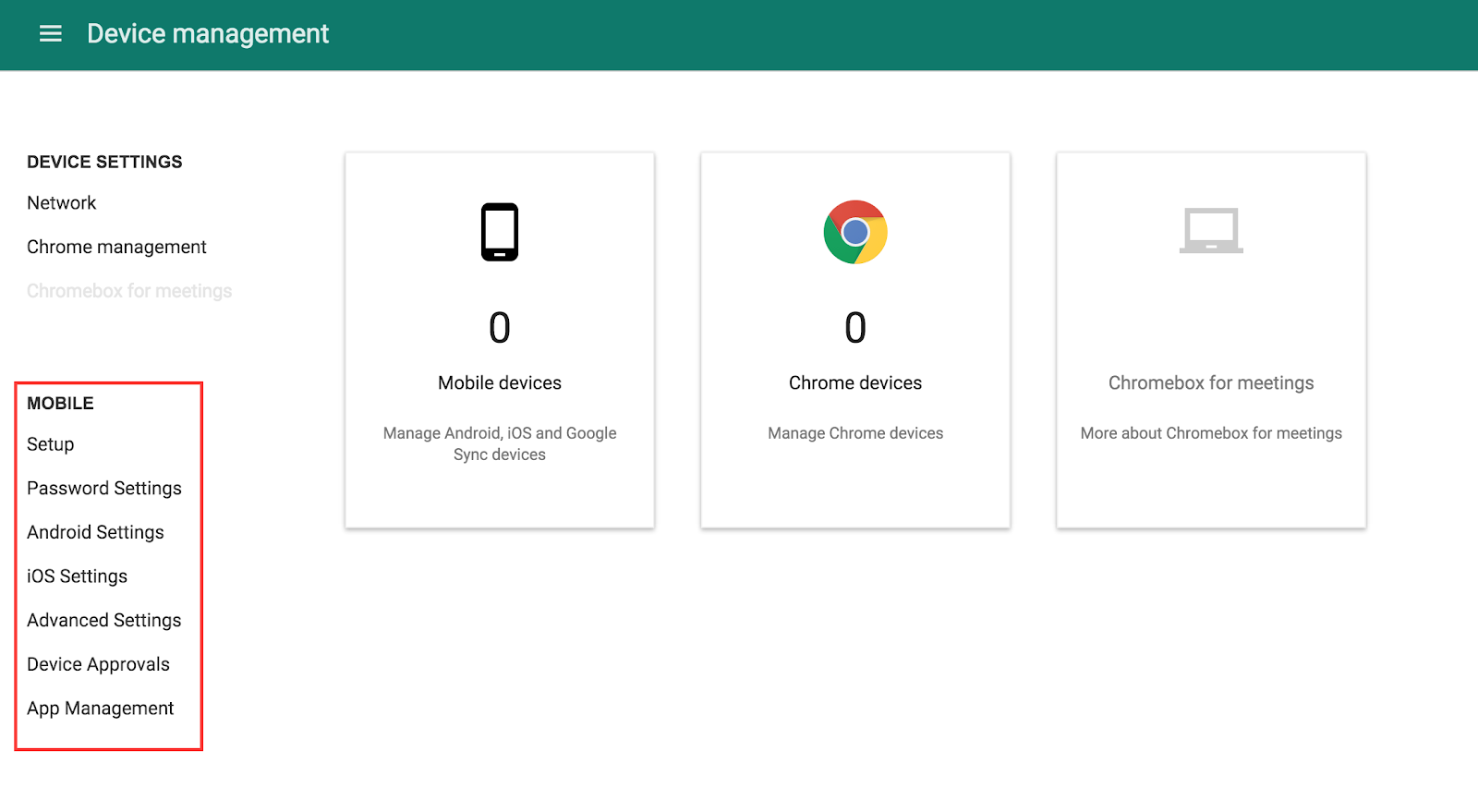
Google has redesigned the device management experience in the Admin console by logically categorizing settings into groups such as Android Settings, Setup, Password Settings, iOS Settings, Advanced Settings, Device Approvals, and App Management. This update makes the growing list of policy settings easier for admins to find and use, while the individual settings themselves remain unchanged.
Release: Both • Rapid: 2016-01-07 • Scheduled: 2016-01-07