-
2015-09-02Content & Collaboration
Revamped Google Forms interface and functionality
Google Forms has been updated with a mobile-friendly interface, new themes, color palettes, custom photo/logo options, and the ability to insert images, GIFs, and videos. Responses are now viewable in the same window as the editor.
Release: Both • Rapid: 2015-09-02 • Scheduled: 2015-09-21 -
2015-09-02Content & Collaboration
Templates for Docs, Sheets, and Slides
A wide variety of pre-designed templates for newsletters, invoices, pitch decks, and more are now available on the home screens of Google Docs, Sheets, and Slides on the web.
Release: Both • Rapid: 2015-09-02 • Scheduled: 2015-09-21 -
2015-09-02Content & Collaboration
Google Fonts preservation in Microsoft Word and PowerPoint
Google Fonts are now preserved when downloading Google Docs and Slides files as Microsoft Word or PowerPoint files on PCs, ensuring consistent formatting when sharing with external partners.
Release: Both • Rapid: 2015-09-02 • Scheduled: 2015-09-02 -
2015-09-02Content & Collaboration
See new changes in Google Docs
Users can now easily identify changes made to a document since they last viewed it by clicking 'See new changes' from the File menu or the top of the document on the web.
Release: Both • Rapid: 2015-09-02 • Scheduled: 2015-09-21 -
2015-09-02Content & Collaboration
Voice typing in Google Docs
Voice typing allows users to dictate ideas directly into Google Docs across Chrome on the web, Android, and iOS mobile apps, supporting more than 40 languages.
Release: Both • Rapid: 2015-09-02 • Scheduled: 2015-09-21 -
2015-09-02Content & Collaboration
Research in Google Docs for Android
The Docs Android app now includes a Research feature that allows users to search Google without leaving the app and directly add facts, images, and quotes to their documents.
Release: Both • Rapid: 2015-09-02 • Scheduled: 2015-09-02 -
2015-09-02Education
Launch of the Share to Classroom Chrome extension for pushing websites to students.
Google has launched the Share to Classroom Chrome extension, enabling teachers to instantly 'push' a website to all their students' devices during class. The extension also allows students to push websites to their teachers and is available to Google Apps for Education and Google Apps for Nonprofits customers using Google Classroom across Chromebooks, Macs, and PCs.
Release: Both • Rapid: 2015-09-02 • Scheduled: 2015-09-02 -
2015-09-02Other

New features and a redesigned look for the Google Admin mobile app on Android and iOS.
The Google Admin mobile app has been updated with a new Material Design look and feel to align with the desktop Admin console. New functionality includes richer user profiles with group support and new attributes, the ability to perform bulk actions on users and groups, and the option to send text messages (such as SMS or WhatsApp) to users when adding them or resetting their passwords.
Release: Both • Rapid: 2015-09-02 • Scheduled: 2015-09-02 -
2015-08-31Content & Collaboration
Deprecation of web hosting support in Google Drive
Beginning August 31, 2015, web hosting in Google Drive for users and developers is deprecated. Google Apps customers can continue to use this feature until August 31, 2016, after which serving content via googledrive.com/host/ will be discontinued. Users are encouraged to migrate to alternatives like Google Domains or Google Cloud Platform.
Release: Scheduled • Scheduled: 2015-08-31 -
2015-08-25Comms & Meetings
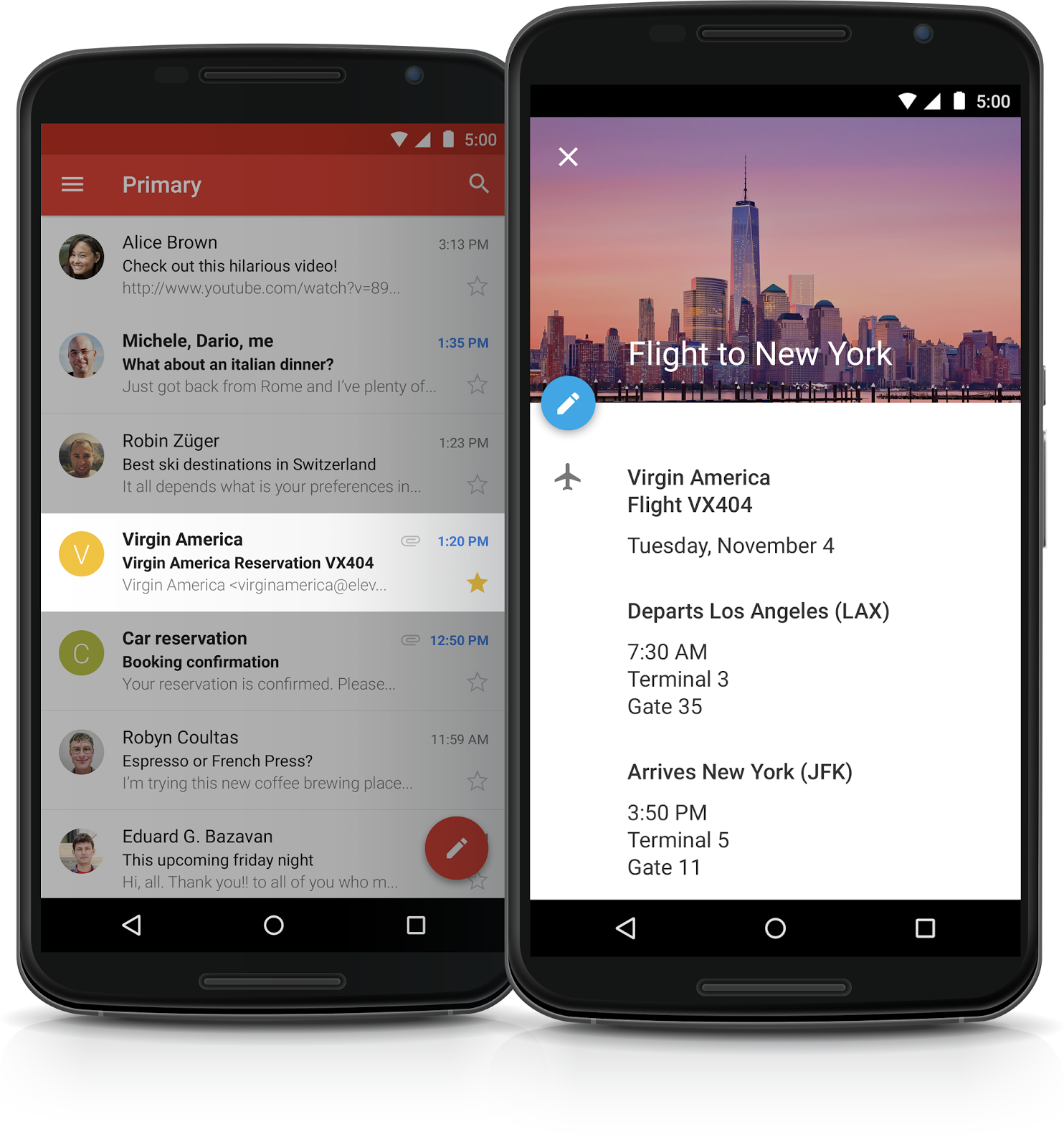
Events from Gmail are automatically added to Google Calendar for Google Apps customers.
Gmail and Google Calendar will now work together to automatically add flight, hotel, restaurant, and ticketed event information from confirmation emails directly into the user's Google Calendar. This feature includes automatic updates for changes, such as flight delays or reservation shifts, and is enabled by default for all Google Apps customers except those in Government domains. Users can manage visibility or disable the feature entirely within their Calendar settings.
Release: Both -
2015-08-24Content & Collaboration
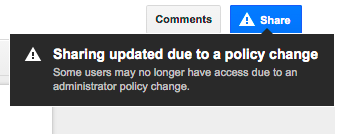
Hover over the Share button in Google Docs, Sheets, and Slides to see warnings if sharing settings are invalid.
Starting August 24, 2015, users with permission to edit a file's sharing settings in Google Docs, Sheets, or Slides will see a warning when hovering over the Share button if sharing settings are invalid. This warning appears if sharing outside the employee's domain is disabled, if sharing into the recipient's domain is disabled, or if 'anyone' sharing options are restricted, providing increased visibility into file sharing restrictions.
Release: Both • Rapid: 2015-08-24 • Scheduled: 2015-08-24 -
2015-08-24Education
Ability to attach Google Forms to posts and assignments.
Teachers and students will soon be able to attach Google Forms from Google Drive directly to posts and assignments, providing a streamlined way to distribute tests, quizzes, or surveys and view answers.
Release: Both -
2015-08-24Education
Optional due dates for assignments.
Teachers now have the option to create assignments without due dates, which is useful for long-term projects or student-driven assignments.
Release: Both • Rapid: 2015-08-24 • Scheduled: 2015-08-24 -
2015-08-24Education
Option to bump posts to the top of the stream.
Teachers can now move any older post to the top of the class stream to ensure that important items are easily visible to students.
Release: Both • Rapid: 2015-08-24 • Scheduled: 2015-08-24 -
2015-08-24Education
Automatic Google Calendar integration for classes.
Google Classroom will automatically create a calendar for each class. All assignments with due dates will be automatically added and updated on these calendars, which can be viewed within Classroom or via Google Calendar.
Release: Both