-
2015-06-29Content & Collaboration
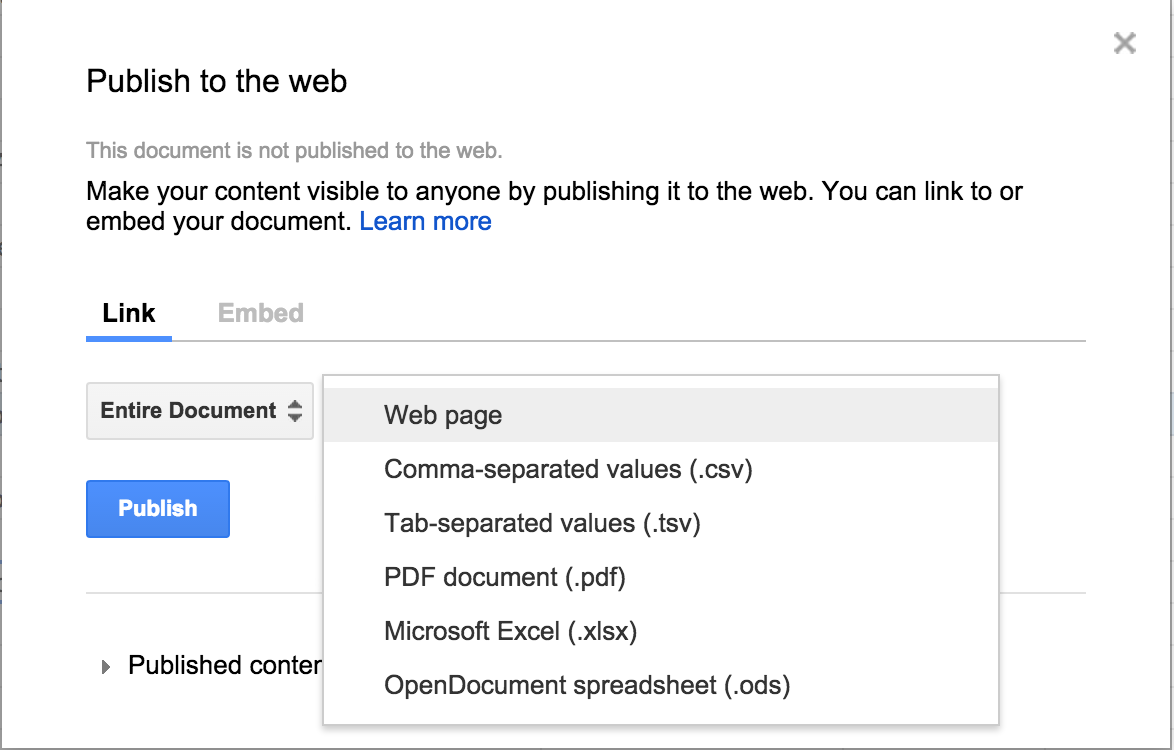
Google Sheets now supports publishing spreadsheets in five additional formats: .csv, .tsv, .pdf, .xlsx, and .ods.
Users of Google Sheets on the web can now publish their spreadsheets in five additional formats beyond the standard web page: comma-separated values (.csv), tab-separated values (.tsv), PDF documents (.pdf), Microsoft Excel spreadsheets (.xlsx), and OpenDocument spreadsheets (.ods). When the generated URL is opened in a browser, the spreadsheet will automatically download in the chosen format.
Release: Both • Rapid: 2015-06-29 • Scheduled: 2015-06-29 -
2015-06-26Content & Collaboration
Google Drive audit logs now include support for download events.
Admins for Drive for Work and Google Apps for Education can now track download events for both Google and non-Google file formats within the Drive audit logs. These logs are accessible via the Admin console Reports area and the Reports API, enabling admins to filter by document name, user name, and timestamp, and to set download alerts for specific files based on filenames or owners.
Release: Both • Rapid: 2015-06-26 • Scheduled: 2015-06-26 -
2015-06-25Content & Collaboration
New features and UI improvements for the Google Drive app for Android.
A new version of the Google Drive app for Android introduces several enhancements, including the ability to download multiple files in the background, use the 'Send File' feature on multiple files simultaneously, an improved sharing UI for adding people and reviewing access, file thumbnails in the folder details pane, and the ability to report abuse cases within Settings.
Release: Both • Rapid: 2015-06-25 • Scheduled: 2015-06-25 -
2015-06-25More
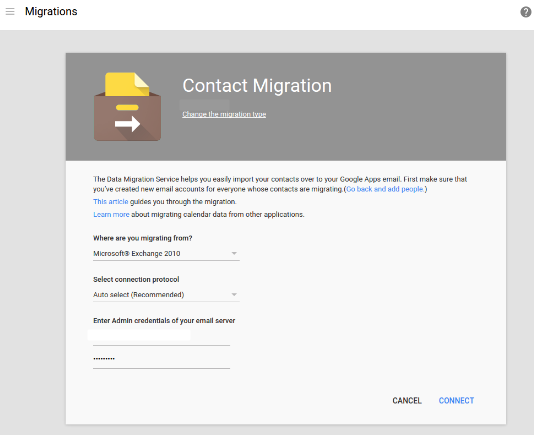
Admins can now migrate employee contacts from Microsoft Exchange and Office 365 to Google Apps via the Admin console.
Google Apps for Work administrators can now migrate employee contacts from Microsoft Exchange (2007 and above) and Microsoft Office 365 to Google Apps directly from the Admin console. This cloud-based data migration service simplifies the process by removing the need to install or configure client tools, utilizing straightforward set-up flows and auto-discovery of mail server connections.
Release: Both • Rapid: 2015-06-25 • Scheduled: 2015-06-25 -
2015-06-23Comms & Meetings
Calendar view selection moved to navigation drawer in iPhone app
Access to all available views (Schedule, Day, 3 Day, Week) in the Google Calendar app for iPhone has been moved from the overflow menu into the navigation drawer for easier access.
Release: Both • Rapid: 2015-06-23 • Scheduled: 2015-06-23 -
2015-06-23Comms & Meetings
Option to show week numbers in Google Calendar app for iPhone
A new option has been added to the Settings of the Google Calendar app for iPhone that allows users to display week numbers.
Release: Both • Rapid: 2015-06-23 • Scheduled: 2015-06-23 -
2015-06-23Comms & Meetings
Direct actions added to event notifications in Google Calendar app for iPhone
The Google Calendar app for iPhone now allows users to directly email guests or open a map from an event notification.
Release: Both • Rapid: 2015-06-23 • Scheduled: 2015-06-23 -
2015-06-23Comms & Meetings
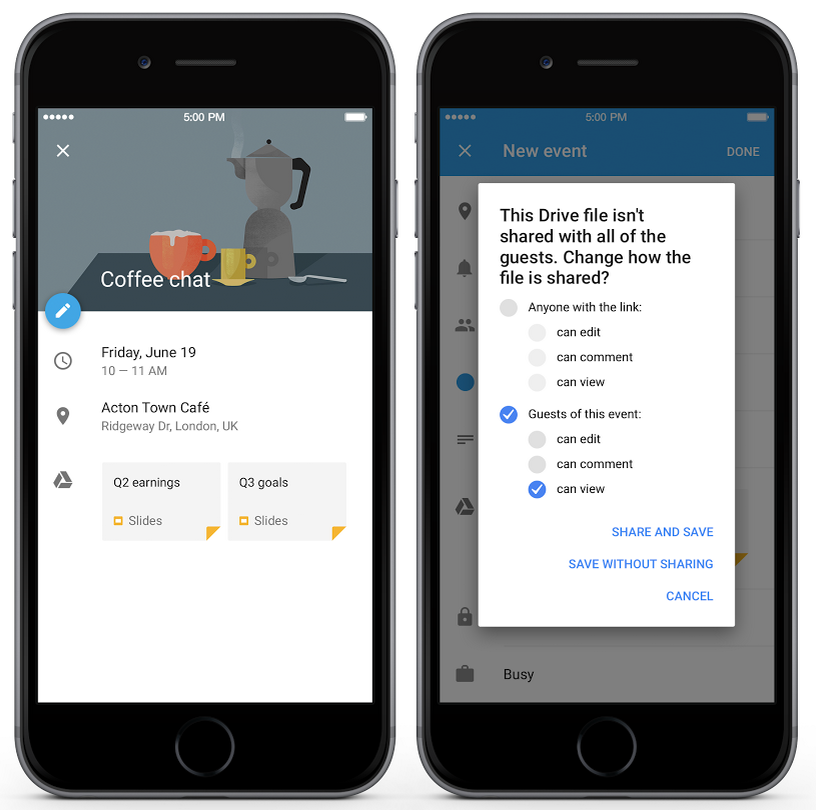
Google Drive file attachments now supported in Google Calendar app for iPhone
Users can now add Google Drive files to events within the Google Calendar app for iPhone. For domains with Drive enabled, the app will automatically check if all event invitees have access to the files and prompt the user to add access if they do not.
Release: Both • Rapid: 2015-06-23 • Scheduled: 2015-06-23 -
2015-06-23Comms & Meetings
Event attachment improvements for Google Calendar web and API
Google Calendar web now supports event attachments by default, allowing users to attach Google Drive files to events. Drive will also automatically check if event invitees have access to attached files and prompt the user to grant access if necessary. Additionally, developers can now add Drive files to Google Calendar events via the Calendar API.
Release: Both • Rapid: 2015-06-23 • Scheduled: 2015-07-07 -
2015-06-22Content & Collaboration
Expanded image type support for file conversion in Google Docs, Sheets, and Slides.
Google has expanded the image types supported during the conversion of Microsoft Office files to Google Docs, Sheets, and Slides. In addition to JPEG, PNG, EMF, and WMF, users can now successfully import and export larger images, less common formats like TIFF, and images with non-RGB color profiles such as CMYK.
Release: Both • Rapid: 2015-06-22 • Scheduled: 2015-06-22 -
2015-06-19Content & Collaboration
Full launch of the new Google Drive UI
The new Google Drive user interface is being fully launched to Google Apps customers, and the option to revert to the old UI will be removed. The rollout begins for Rapid release customers on June 23, 2015, followed by Scheduled release customers on July 7, 2015. Users are advised to upgrade to supported browsers as older versions (Chrome 23, Firefox 23, IE9, and Safari 6) are not compatible.
Release: Both • Rapid: 2015-06-23 • Scheduled: 2015-07-07 -
2015-06-17Other
Google Apps Password Sync 1.4 is now available.
Google Apps Password Sync (GAPS) version 1.4 has been released to fix an issue where the application would silently crash after failing to retrieve the email address attribute for an account from Active Directory. While this issue was primarily observed on Windows Server 2003, the update is recommended for all Windows Server versions.
Release: Both • Rapid: 2015-06-17 • Scheduled: 2015-06-17 -
2015-06-16Content & Collaboration
Insert images into Google Sheets while offline
Users can now insert images into Google Sheets when working offline in the Chrome browser, provided that offline access has been enabled. Any images inserted while offline will be synced once the user regains internet connectivity.
Release: Both • Rapid: 2015-06-16 • Scheduled: 2015-06-16 -
2015-06-15Content & Collaboration
Introduction of protected cell warnings to prevent accidental edits.
To facilitate safer collaboration, Google Sheets now allows owners to set warnings for individuals who attempt to edit certain cells, reducing unintended changes like typos without requiring complex permission settings.
Release: Both • Rapid: 2015-06-15 • Scheduled: 2015-06-15 -
2015-06-15Content & Collaboration
Pivot table enhancements with calculated fields and GETPIVOTDATA function.
Google Sheets has introduced calculated fields to pivot tables, allowing users to apply formulas to pivot table data, and the GETPIVOTDATA function to retrieve specific data from a pivot table.
Release: Both • Rapid: 2015-06-15 • Scheduled: 2015-06-15