-
2023-08-11Content & Collaboration

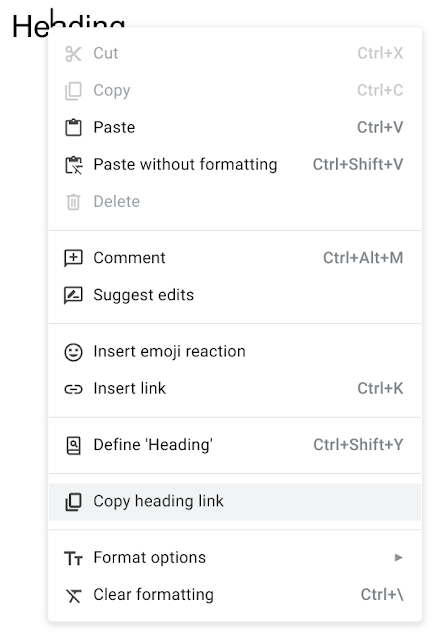
Reorganized file and folder menu in Google Drive
Google Drive has updated the right-click menu for files and folders. While the core functionality remains the same, the menu items have been reordered and renamed, and new sub-menus have been added to improve the user interface.
Release: Both • Rapid: 2023-08-11 • Scheduled: 2023-08-11 -
2023-08-11Comms & Meetings
Updated timeline for in-line threaded experience in Google Chat
Google has updated the timeline for upgrading existing spaces organized by conversation topic to the new in-line threaded experience. The upgrade is now expected to begin in September 2023 and be completed by the end of Q1 2024.
Release: Both • Rapid: 2023-09-01 • Scheduled: 2023-09-01 -
2023-08-10Content & Collaboration

Google Slides introduces a pen tool for adding annotations during presentations.
Google Slides is introducing a new pen tool that allows presenters to highlight, circle, underline, draw connections, or make quick notes directly on their presentation while in slideshow mode. This feature is designed to make presentations more engaging and interactive. Users can activate the pen tool via the three-dot menu in the bottom-left of the viewer and use the accompanying eraser tool to remove annotations.
Release: Both • Rapid: 2023-08-10 • Scheduled: 2023-08-31 -
2023-08-09Comms & Meetings
Gallery view is now supported for Zoom interoperability on Google Meet hardware.
Google Meet hardware devices now support Zoom's Gallery view for interoperability calls, replacing the previous Speaker view as the default layout. This update allows more participants to be seen on screen simultaneously, making better use of the available screen real estate.
Release: Both • Rapid: 2023-08-16 • Scheduled: 2023-08-16 -
2023-08-09Content & Collaboration

Google Keep integration with Google Assistant is now available for all Google Workspace users.
Google Workspace users can now set Google Keep as the default provider for their notes and lists within Google Assistant. This integration allows users to use voice commands to create new lists, add or delete items from existing lists, and have Assistant read list items back to them.
Release: Both • Rapid: 2023-08-09 • Scheduled: 2023-08-09 -
2023-08-09Content & Collaboration
You can set Google Keep as the default provider for notes and lists when using Google Assistant with your Google Workspace device.
You can set Google Keep as the default provider for your notes and lists if you’re using the Google Assistant with your Google Workspace device. You can ask Assistant to create a new list, add or delete items for an existing list, or read back all the list items to you.
Release: Both • Rapid: 2023-08-09 • Scheduled: 2023-08-09 -
2023-08-09Content & Collaboration

Introducing eSignature for Google Docs and Google Drive
Google is launching eSignature in open beta for Workspace Individual subscribers and in beta for select Google Workspace customers. This native integration allows users to request and capture signatures on official contracts directly within Google Docs and sign documents from Google Drive without switching apps, streamlining the workflow for solopreneurs and small businesses.
Release: Rapid • Rapid: 2023-08-08 -
2023-08-08Content & Collaboration

Admins can now distribute branded domain templates in Google Slides.
Google Slides now allows admins to assign domain templates to all users or specific workgroups. These templates include branded slides, layouts, images, colors, and fonts that appear automatically when creating a new presentation, ensuring brand consistency across the organization.
Release: Both • Rapid: 2023-08-07 • Scheduled: 2023-08-07 -
2023-08-08Content & Collaboration
Admins can now distribute branded domain themes in Google Forms.
Google Forms now enables admins to provide a domain theme that includes branded fonts, colors, and header images. Users can apply these themes when creating new forms or editing existing ones to maintain organizational brand consistency.
Release: Both • Rapid: 2023-08-07 • Scheduled: 2023-08-07 -
2023-08-07Education
Teachers now have more control over student resources in Google Classroom practice sets.
Google Classroom is updating practice sets to give teachers greater control over the resources provided to students. Teachers can now review suggested resources, add their own text-based hints or YouTube videos, remove unwanted resources, and customize the order in which these resources appear to students to better tailor the support their students receive.
Release: Both • Rapid: 2023-08-07 • Scheduled: 2023-08-07 -
2023-08-04Content & Collaboration
Insert emojis into Google Sites
Google Sites now allows users to insert emojis directly into text boxes and headings via a new emoji button located in the toolbar, making it easier to create engaging content.
Release: Both -
2023-08-04Content & Collaboration
People chips in Google Sheets now available on mobile devices
People chips, which allow users to quickly view contact information, job titles, and locations of colleagues or contacts, are now available for Google Sheets on both iOS and Android devices.
Release: Both -
2023-08-04Content & Collaboration
Create more engaging content on Google Sites with the new option to insert emojis directly into text boxes and headings.
Create more engaging content on Google Sites with the new option to insert emojis directly into text boxes and headings.
Release: Both • Rapid: 2023-08-04 -
2023-08-04Content & Collaboration
Adding drag & drop to Google Drive multi-instance support on large screen Android devices
Users on large screen Android devices can now drag and drop files and folders between two side-by-side instances of the Google Drive app, enabling faster sharing of content between two different Google Accounts.
Release: Both -
2023-08-04Content & Collaboration
Empty the entire trash folder of shared drives in Google Drive
Google Drive has added the ability to empty the entire trash folder of a shared drive, eliminating the manual effort of removing items individually. As a reminder, files and folders in Trash are automatically deleted forever after 30 days.
Release: Both