-
2023-07-14Comms & Meetings
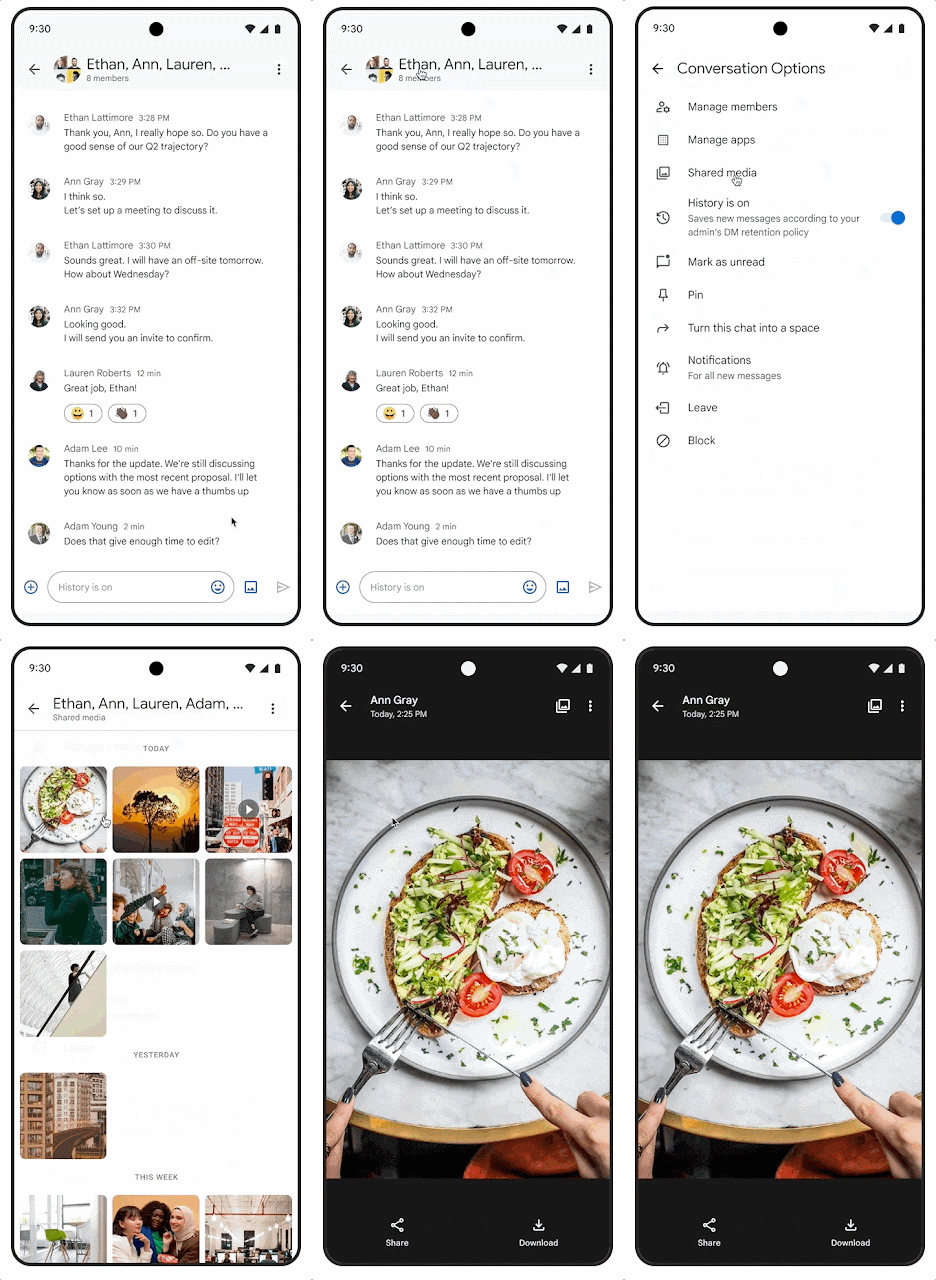
Improved media viewing on Android devices in Google Chat
Google Chat on Android devices now features a new media viewer that improves the browsing experience. Media thumbnails open faster in full screen, repeat playback is quicker, and users can swipe between media in a conversation. Additionally, a shared media option allows users to quickly browse all media shared within a Chat conversation.
Release: Both -
2023-07-13Comms & Meetings
.gif)
Add hyperlinks to text in Google Chat
Users can now hyperlink text on web and Android when composing or editing messages in Google Chat. This update also includes the ability to copy over hyperlinks from other Google Workspace applications such as Gmail, Docs, Sheets, and Slides to make messages cleaner and more compact.
Release: Both • Rapid: 2023-07-13 • Scheduled: 2023-08-01 -
2023-07-10Comms & Meetings

Paid appointment bookings are now available in Google Calendar via Stripe integration.
Google Calendar is integrating paid appointment bookings, allowing appointment providers to connect their Stripe accounts to set a price for their booking pages. Bookers can select their preferred time and enter credit card information to pay upfront. Google does not process or store payment information, and all cancellations and refunds are managed through the Stripe dashboard.
Release: Both • Rapid: 2023-07-27 • Scheduled: 2023-08-07 -
2023-07-07Content & Collaboration

Convert email addresses and links into smart chips using the tab key in Google Sheets.
Google Sheets now allows users to quickly convert pasted email addresses or links to Google Drive files, Google Maps places, or YouTube videos into smart chips by simply pressing the tab key.
Release: Both • Rapid: 2023-07-07 • Scheduled: 2023-07-07 -
2023-07-07Content & Collaboration
Revamped first open experience for Google Docs on Android foldable and tablet devices.
The Google Docs app for Android foldable and tablet devices now opens directly in edit mode. This update includes a more visible formatting toolbar, an I-beam cursor, and automatic on-screen keyboard exposure when tapping, unless a physical keyboard is connected.
Release: Both • Rapid: 2023-07-07 • Scheduled: 2023-07-07 -
2023-07-07Comms & Meetings
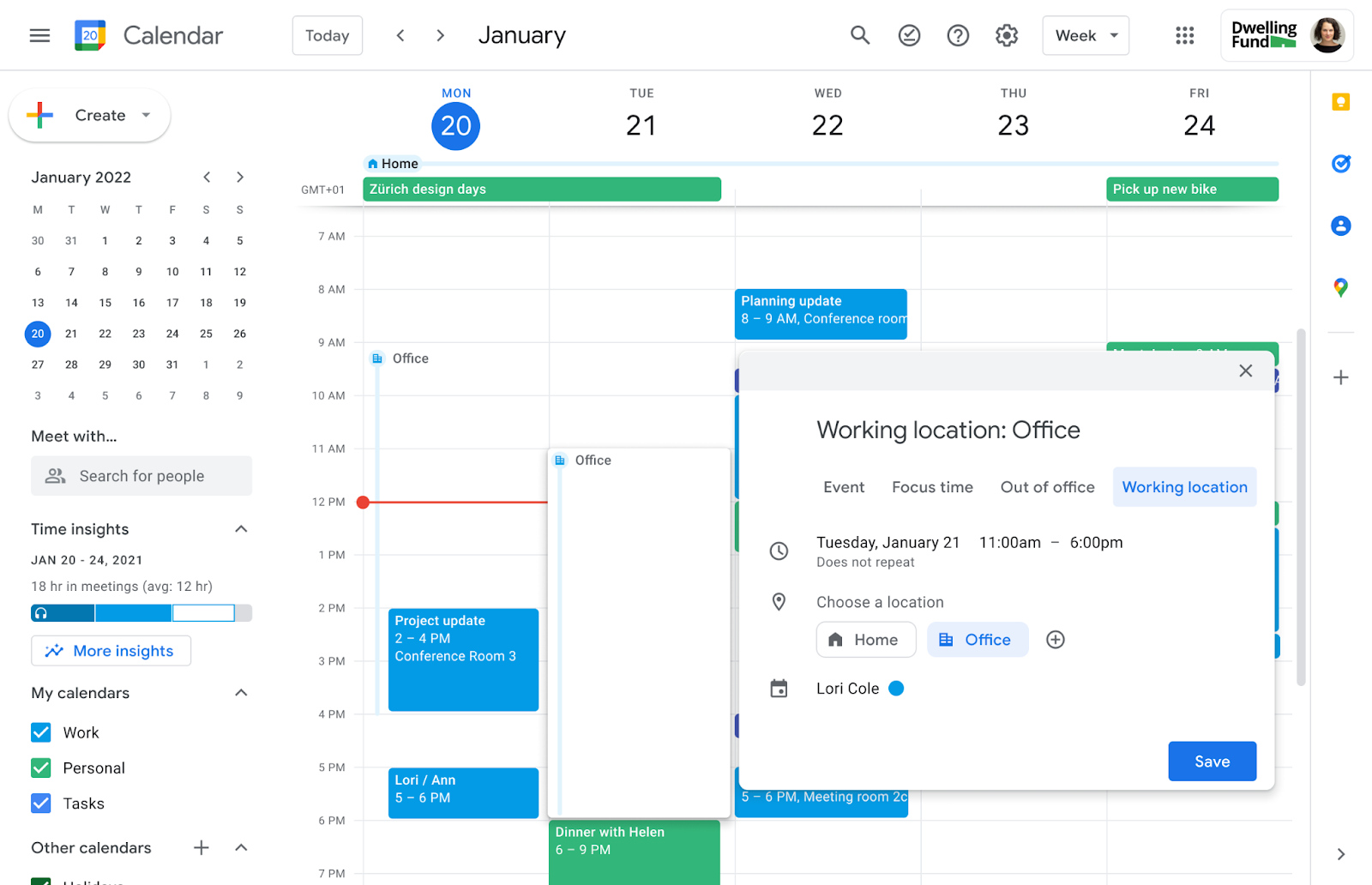
Delegates can now edit working locations for the calendars they manage.
Users with delegate access to another person's Google Calendar can now fully edit working locations for the entire day or for specific portions of the day. This update is designed to assist those who manage calendars for others, such as executive assistants.
Release: Both • Rapid: 2023-07-07 • Scheduled: 2023-07-14 -
2023-07-07Comms & Meetings
Google Calendar now allows users to set working locations for specific portions of the day.
Google Calendar is introducing the ability to set working locations for specific portions of the day rather than just the full day. This allows users in hybrid work environments to more accurately reflect their physical availability as it changes throughout the day.
Release: Both • Rapid: 2023-07-07 • Scheduled: 2023-07-14 -
2023-07-06Comms & Meetings

Customizable error messages for Google Chat data loss prevention (DLP) rules are now in open beta.
Admins can now customize the messages displayed to users when a Google Chat message is blocked or intercepted by data loss prevention (DLP) rules. Instead of a standard warning, admins can provide specific context, instructions on how to unblock the message, or links to additional safety resources. This feature is available in open beta for web users across various Google Workspace Enterprise, Education, and Frontline editions.
Release: Both • Rapid: 2023-07-06 • Scheduled: 2023-07-06 -
2023-06-30Content & Collaboration
Easily duplicate groups and objects in Google Sites.
Google Sites editors can now duplicate individual objects—such as images, buttons, and text boxes—as well as groups when editing a site, extending the existing functionality that allowed only the duplication of entire sections.
Release: Both • Rapid: 2023-06-30 • Scheduled: 2023-06-30 -
2023-06-30Content & Collaboration
Revamped First Open Experience for Sheets and Slides on Android tablets and foldables.
Google is introducing a more creation-focused experience when first opening the Sheets and Slides apps on Android foldable and tablet devices. In Sheets, users will see larger tap targets and easier access to the formula bar, tab bar, and contextual formatting toolbar. In Slides, a filmstrip will now appear on the left-hand side, and selecting an object will expose the contextual toolbar and an on-screen keyboard.
Release: Both • Rapid: 2023-06-30 • Scheduled: 2023-06-30 -
2023-06-30Content & Collaboration
Easily duplicate objects (images, buttons, text boxes) and groups when editing a Site.
Extending the duplicate feature by enabling you to easily duplicate objects (images, buttons, text boxes) and groups when editing a Site.
Release: Both • Rapid: 2023-06-30 -
2023-06-30Content & Collaboration
Ability to paste HTML elements into Google Docs on Android.
To improve the user experience on large screen devices, Google is introducing the ability for users to copy HTML elements to the clipboard and paste them into a Google Doc on Android while maintaining the original formatting elements.
Release: Both • Rapid: 2023-06-30 • Scheduled: 2023-06-30 -
2023-06-29Comms & Meetings
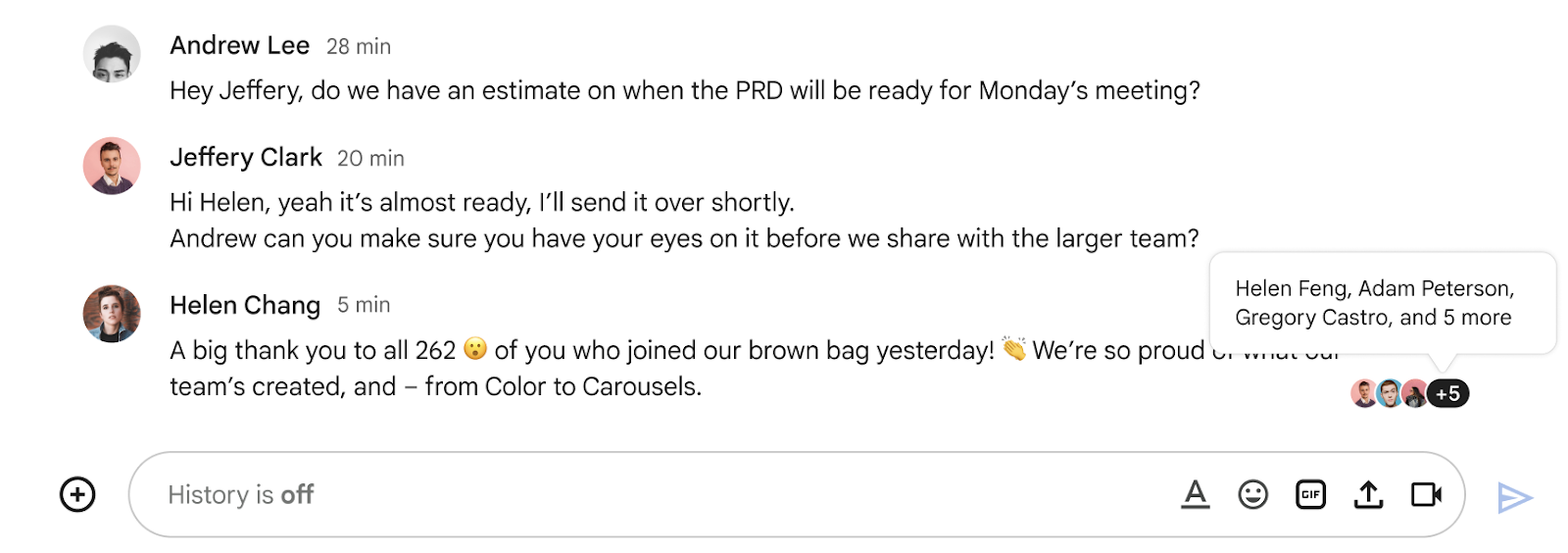
Introducing read receipts in Google Chat group direct messages.
Following the recent updates in Google Chat that add context without breaking the flow of conversations and enable you to declutter your chat conversations, we’re introducing read receipts in group direct messages. With this feature, you can now quickly identify if other members of a group have read your latest message within a Chat stream.
Release: Both • Rapid: 2023-06-29 • Scheduled: 2023-06-29 -
2023-06-29Comms & Meetings
Read receipts are now available for group direct messages in Google Chat.
Google Chat has introduced read receipts for group direct messages, enabling users to identify which members of a group have read their latest message. This feature is available for group chats of 20 people or fewer and is designed to help users manage communication expectations and ensure visibility of topics. It is available to all Google Workspace customers and users with personal Google Accounts.
Release: Both • Rapid: 2023-06-29 • Scheduled: 2023-06-29 -
2023-06-28Comms & Meetings
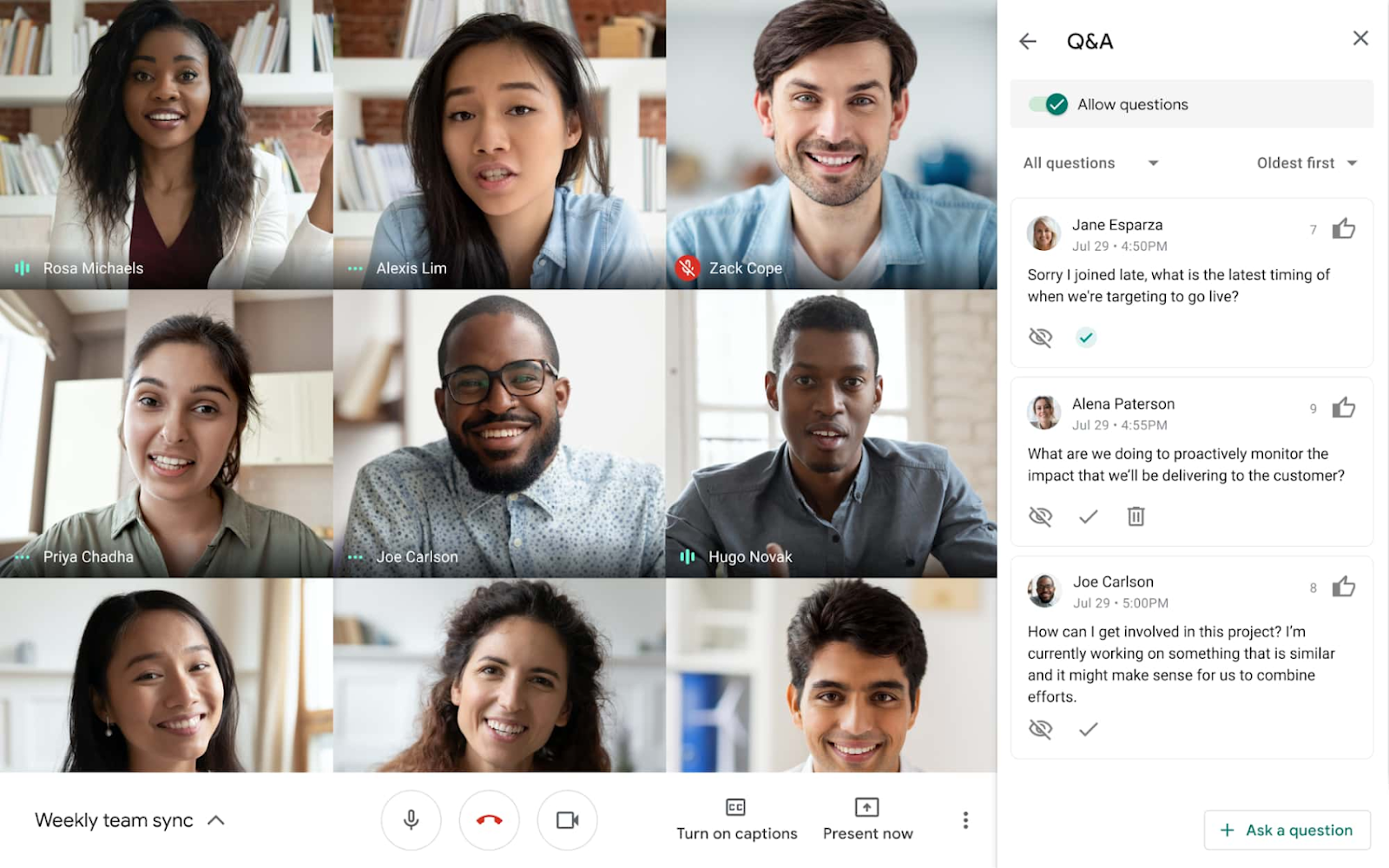
Polls and Q&A features are now available for Google Meet live streams.
Meeting hosts can now enable Q&A and poll features during live-streamed Google Meet meetings, expanding capabilities that were previously only available in traditional Meet meetings. These tools allow hosts to better engage audiences, gather real-time feedback, and provide a structured way for participants to ask and upvote questions without disrupting the flow of the presentation.
Release: Both • Rapid: 2023-06-28 • Scheduled: 2023-06-28