-
2023-06-28Comms & Meetings
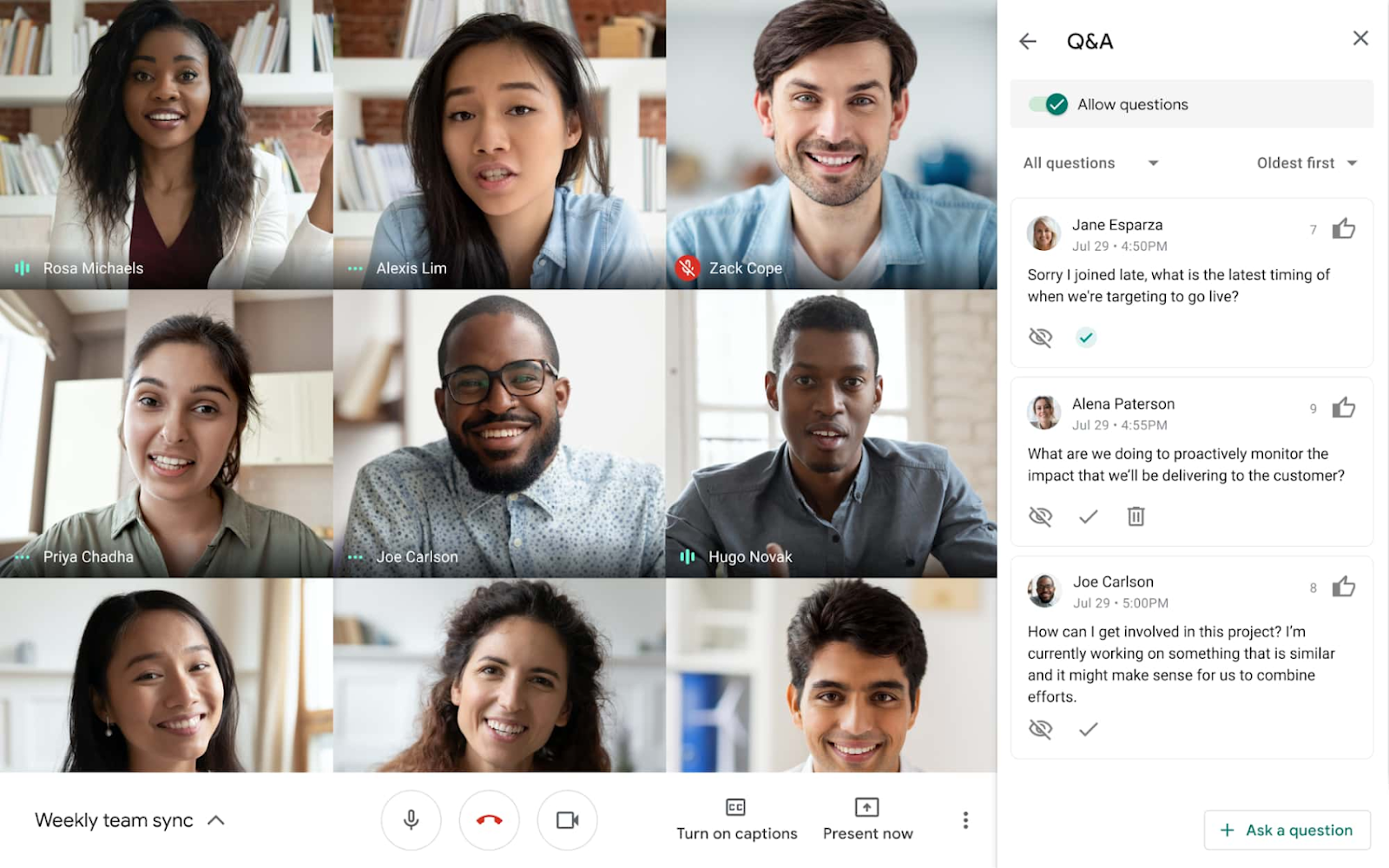
Meeting hosts can now enable the Q&A and poll features during live streamed meetings.
If you’re live streaming a video meeting, meeting hosts can now enable the Q&A and poll features, which previously were only offered in traditional Meet meetings. Expanding these features to live streamed meetings will help take your meetings to the next level with a more feature-rich, collaborative experience.
Release: Both • Rapid: 2023-06-28 • Scheduled: 2023-06-28 -
2023-06-28Comms & Meetings

New Google Calendar setting mutes notifications for the duration of your focus time directly in Calendar.
To increase concentration and bridge the gap between do not disturb and focus time, you can now mute notifications for the duration of your focus time directly in Calendar.
Release: Both • Rapid: 2023-06-28 • Scheduled: 2023-07-12 -
2023-06-28Comms & Meetings
Mute Google Chat notifications directly when creating focus time in Google Calendar.
Google Calendar now allows users to mute notifications for the duration of their focus time directly within the Calendar interface. By checking the 'Do not disturb' box when adding a Focus time entry, users can automatically synchronize their Calendar focus time with Google Chat's do not disturb setting to minimize distractions during heads-down work.
Release: Both • Rapid: 2023-06-28 • Scheduled: 2023-07-12 -
2023-06-27Comms & Meetings
.png)
Google Meet is introducing simplified access controls to replace the existing Quick access settings.
Google Meet is replacing 'Quick access' with three intuitive access levels: Open, Trusted, and Restricted. Meeting organizers can now explicitly control who can join a meeting without asking (knocking), with specific rules for organization members and invited guests. Additionally, hosts can configure whether guests are allowed to join the meeting before the host. This update also removes the Quick access setting from the Admin console and implements new default access behaviors based on the user's Workspace edition.
Release: Both • Rapid: 2023-07-17 • Scheduled: 2023-07-17 -
2023-06-26Comms & Meetings

Background blur and light adjustment are now available for Google Meet calls joined via virtual desktop infrastructure (VDI).
Users joining Google Meet meetings through a virtual desktop infrastructure (VDI) can now utilize background blur and automatic light adjustment. Background blur intelligently isolates the user from their surroundings, while light adjustment improves visibility for underexposed users. These features are applied after joining the call and help reduce the resource demand (CPU, GPU, and memory) on VDI environments, potentially allowing admins to reduce GPU resources for cost savings.
Release: Both • Rapid: 2023-06-26 • Scheduled: 2023-06-26 -
2023-06-26Comms & Meetings
.gif)
Introducing a new quick action to access popular features in Google Meet, such as video effects and reframing.
We are introducing a new quick action to access popular features in Google Meet. By hovering the mouse on top of your own video feed, you can access video effects such as immersive backgrounds or fun filters to bring more fun to your meetings and a reframing option to improve your visibility.
Release: Both • Rapid: 2023-06-26 • Scheduled: 2023-07-05 -
2023-06-26Comms & Meetings
If you’re using a virtual desktop infrastructure (VDI) to join a Google Meet meeting, you can now use background blur and light adjustment.
If you’re using a virtual desktop infrastructure (VDI) to join a Google Meet meeting, you can now use background blur and light adjustment. Background blur will intelligently separate you from the background, blurring your surroundings while keeping you clear and in focus. Light adjustment automatically detects when you appear underexposed and enhances the brightness to improve your visibility.
Release: Both • Rapid: 2023-06-26 -
2023-06-23Content & Collaboration

Adding flexibility to email collection in Google Forms
Google Forms has introduced more flexible email collection options. Form creators can now choose between Verified email collection (requiring user confirmation), Responder input (manual entry), or opting not to collect email addresses at all, replacing the previous simple on/off toggle.
Release: Both -
2023-06-23Content & Collaboration
Gain consensus from collaborators quickly with voting chips in Google Docs
Google Docs now supports smart chips containing emojis that act as voting indicators. This feature allows teams to rank or compare ideas more efficiently while collaborating within a document.
Release: Both -
2023-06-22Comms & Meetings

New companion mode check-in feature for Google Meet conference rooms.
Google Meet has introduced a companion mode check-in feature that allows users joining a meeting from a conference room to check in using their personal devices. This ensures that participants are identified by their individual names in the people panel and during interactions like hand raising or presenting, rather than being represented solely by the conference room's name, fostering a more inclusive and equitable hybrid meeting experience.
Release: Both • Rapid: 2023-06-22 • Scheduled: 2023-07-24 -
2023-06-22Comms & Meetings
Use companion mode to check-in to a Google Meet conference room, so everyone can know you by name
If you’re joining a meeting from a conference room, you can use companion mode on your personal device to check in to that specific room. Room check-in allows everyone on the call to easily identify who is in the conference room, rather than simply seeing the conference room name.
Release: Both • Rapid: 2023-06-22 • Scheduled: 2023-07-24 -
2023-06-21Comms & Meetings

Admins can now clear previously set default peripherals in the Admin console.
Admins now have the ability to clear previously set default peripherals from the peripheral tree on the device detail page in the Google Meet hardware Admin console. Previously, removing a default peripheral was only possible by assigning a different peripheral as the new default.
Release: Both • Rapid: 2023-06-21 • Scheduled: 2023-06-21 -
2023-06-21Comms & Meetings
Admins can now monitor additional Google Meet hardware issues in the Admin console.
Google has expanded the monitoring capabilities in the Admin console for Google Meet hardware. Admins can now detect and monitor issues such as missing displays, controllers, and default peripherals (camera, microphone, speaker, and whiteboard camera). These issues are visible in the peripheral status on the Device list page and the issue timeline, and they are supported by email and SMS alerts.
Release: Both • Rapid: 2023-06-21 • Scheduled: 2023-06-21 -
2023-06-20Admin & Security
Google Vault now supports custom retention rules based on Google Drive labels.
Google Vault now allows administrators to set fine-grained, file-level retention policies using Google Drive labels. This update enables the use of configurable label conditions such as 'label is,' 'label is not,' and 'label date is before,' and supports sub-labels as well as nested and conditional application of overlapping and distinct rules to enhance record retention management and compliance.
Release: Both • Rapid: 2023-06-20 • Scheduled: 2023-06-20 -
2023-06-20Admin & Security
Enhancing Google Vault file retention capabilities using Google Drive Labels
Google Drive labels are metadata your organization defines to help organize, find, and apply policies to files in Drive. As an administrator, you can create labels to apply to files stored in Drive. Starting today, Google Vault now supports custom retention rules based on Drive labels.
Release: Both • Rapid: 2023-06-20 • Scheduled: 2023-06-20