-
2022-01-13Comms & Meetings
Companion mode is now available on the web for users joining meetings via Google Meet hardware or Nest Hub Max.
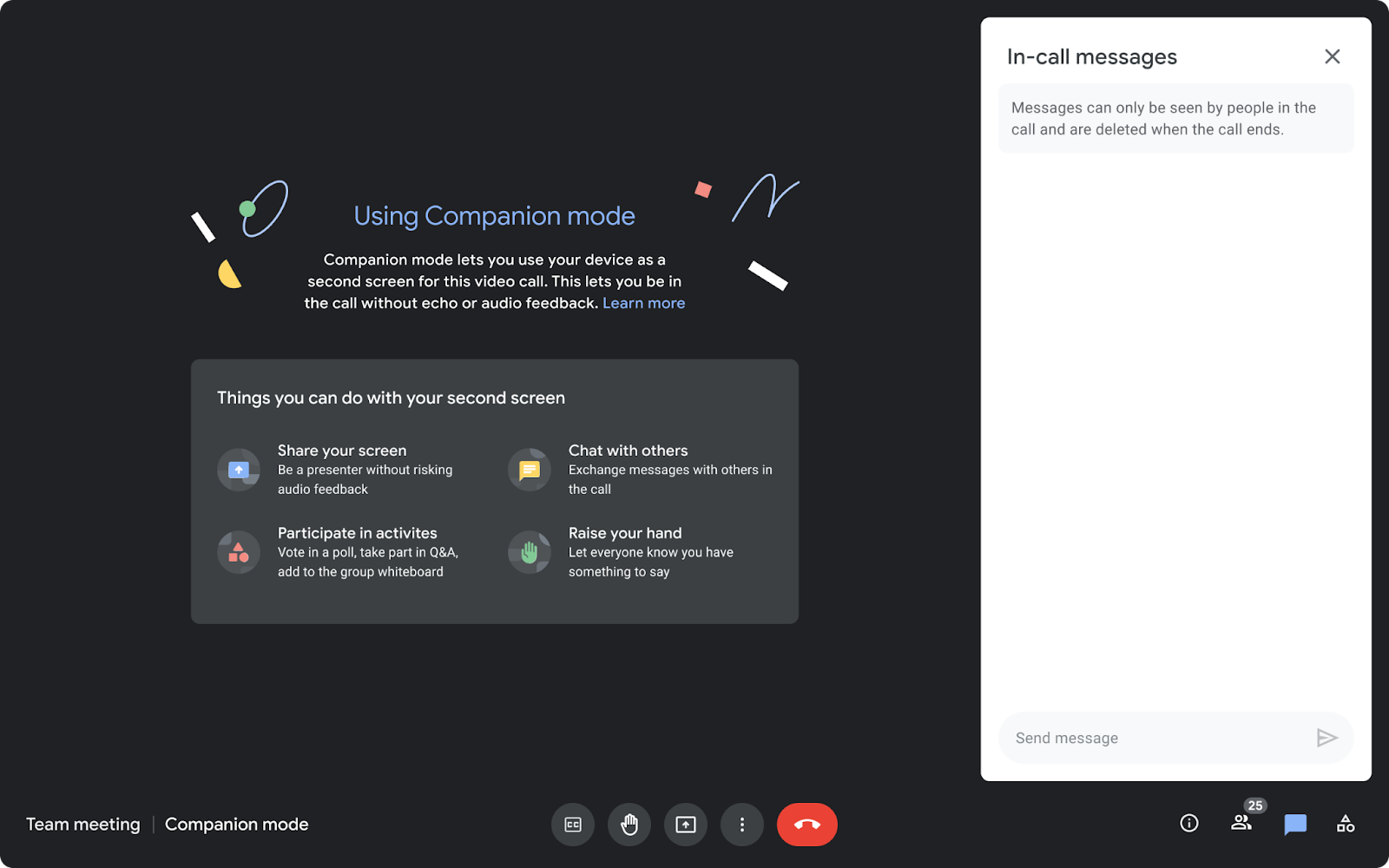
Companion mode allows users in hybrid meetings to connect via the web (using g.co/companion or g.co/present) while utilizing Google Meet hardware or Nest Hub Max for audio and video. This enables access to interactive features such as chat, screen sharing, hand raising, and polls without causing audio feedback, ensuring collaboration equity for all attendees regardless of their location.
Release: Both • Rapid: 2022-01-13 • Scheduled: 2022-01-27 -
2022-01-13Comms & Meetings
Beginning today, you can use Companion mode on the web when joining a meeting using Google Meet hardware or the Nest Hub Max.
Beginning today, you can use Companion mode on the web when joining a meeting using Google Meet hardware or the Nest Hub Max. Companion mode allows you to access interactive features and controls such as chat, screen sharing, hand raising, polls, host controls and more.
Release: Both • Rapid: 2022-01-13 • Scheduled: 2022-01-27 -
2022-01-12Comms & Meetings
Improvements to Google Meet hardware issue troubleshooting in the Admin console.
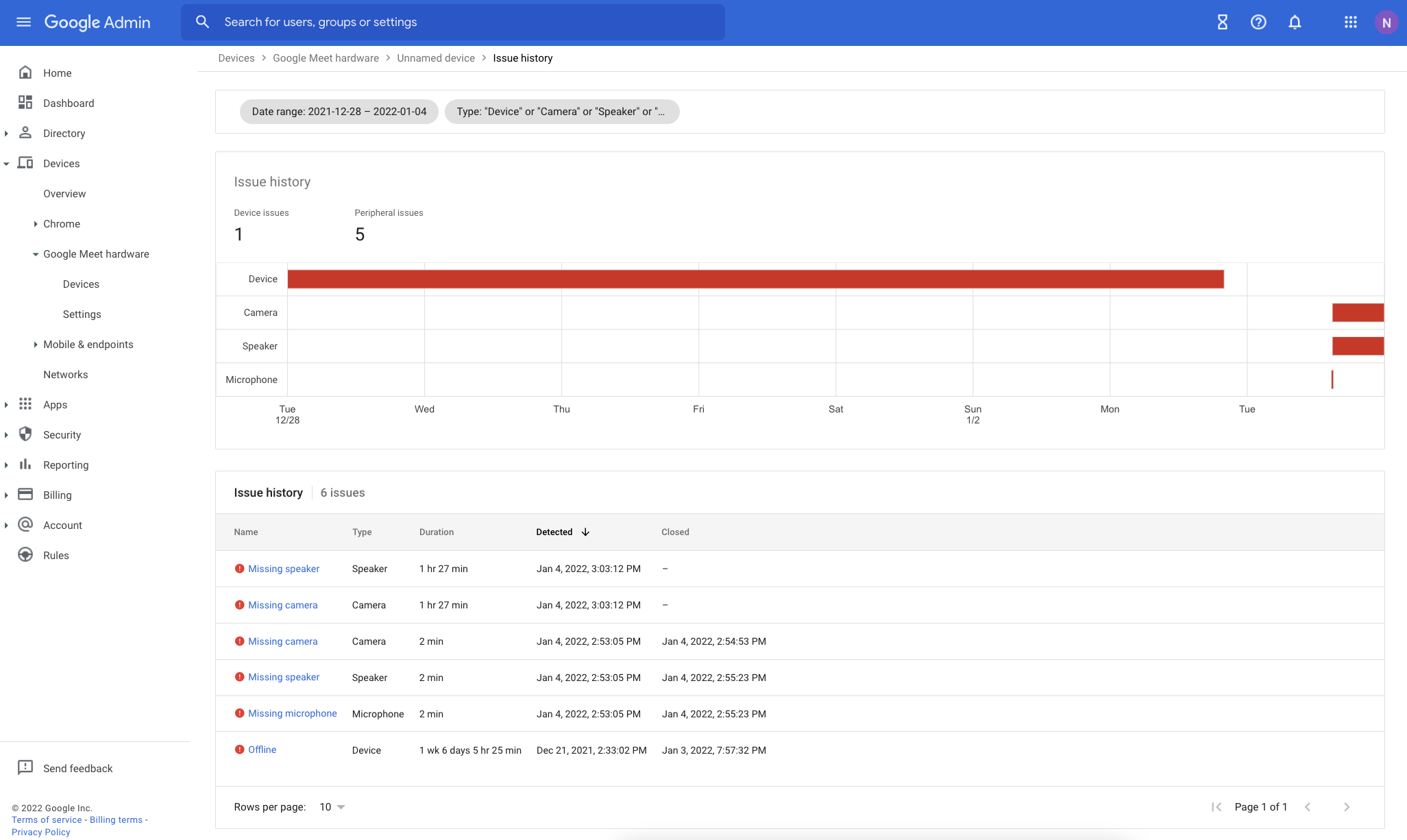
Google has enhanced the issue detection engine for Google Meet hardware to provide more reliable alerts and reduce false signals. The Admin console now includes several new troubleshooting tools: an Issue History page for tracking device health over time, quick-filters for the device list, a detailed issue sidebar with troubleshooting recommendations, and new columns for aggregated issue counts over the last 28 days.
Release: Both • Rapid: 2022-01-12 • Scheduled: 2022-01-12 -
2022-01-12Comms & Meetings
Live translated captions in Google Meet are now generally available for select Google Workspace editions.
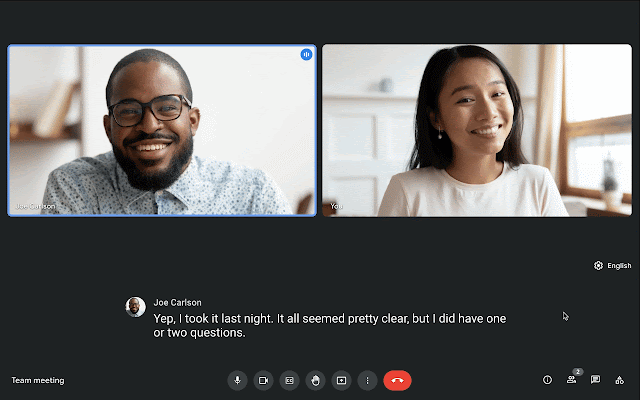
Google Meet has made live translated captions generally available for select Google Workspace editions, allowing participants to translate English meetings into French, German, Portuguese, and Spanish. This feature is available on both web and mobile devices and is designed to make video calls more inclusive and collaborative by removing language proficiency barriers.
Release: Both • Rapid: 2022-01-12 • Scheduled: 2022-01-12 -
2022-01-12Comms & Meetings
We’ve made several improvements to the issue detection engine which notifies admins about peripheral and connectivity issues in their Google Meet hardware fleet.
We’ve made several improvements to the issue detection engine which notifies admins about peripheral and connectivity issues in their Google Meet hardware fleet. These improvements will make alerts more reliable and cut down on noise and false signals.
Release: Both • Rapid: 2022-01-12 • Scheduled: 2022-01-12 -
2022-01-12Comms & Meetings
We’re now making live translated captions generally available for select Google Workspace editions.
In 2021, we announced a beta for live translated captions in Google Meet. We’re now making live translated captions generally available for select Google Workspace editions. Meeting participants can translate English meetings to: French, German, Portuguese, Spanish
Release: Both • Rapid: 2022-01-12 • Scheduled: 2022-01-12 -
2022-01-10Education
Google Classroom teachers can now export their grades to Follett Aspen, a third-party Student Information System (SIS).
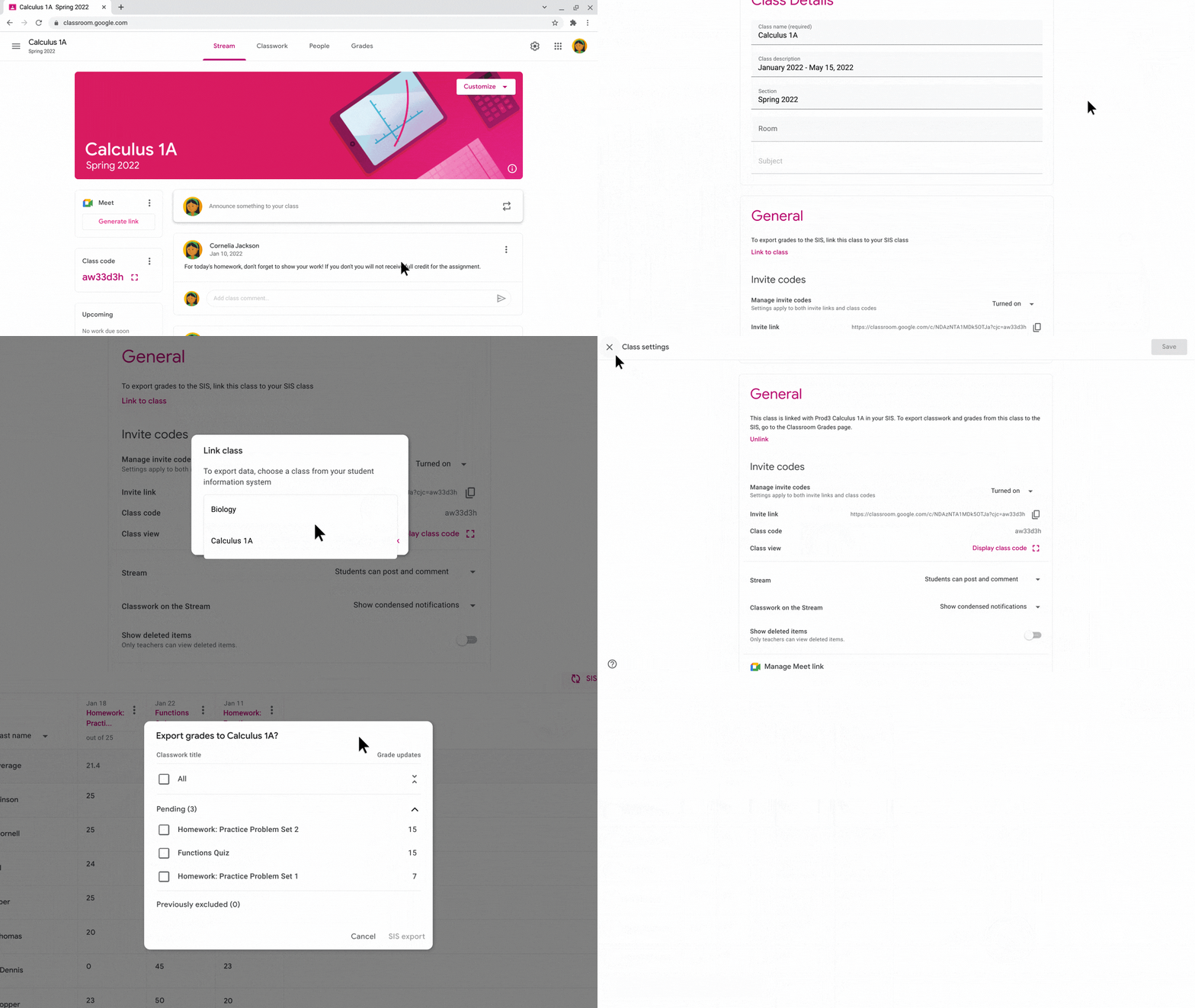
Google Classroom teachers can now export their grades to Follett Aspen, a third-party Student Information System (SIS). Grade export is a one-way information push that allows: Admins to establish a connection between their district SIS and Google Classroom, and configure export settings that apply to Google Classroom teachers. Teachers to manually link new or existing Google Classroom classes to their SIS, and push returned assignments and grades from Google Classroom.
Release: Both -
2022-01-10Education
Google Classroom now supports grade exporting to Follett Aspen SIS.
Google Classroom teachers in the United States and Canada can now export their grades to Follett Aspen, a third-party Student Information System (SIS). This one-way information push allows admins to establish connections and configure settings, while teachers can manually link classes and push returned assignments and grades, reducing duplicative work and keeping the SIS in sync.
Release: Both • Rapid: 2022-01-10 • Scheduled: 2022-01-10 -
2022-01-07Other
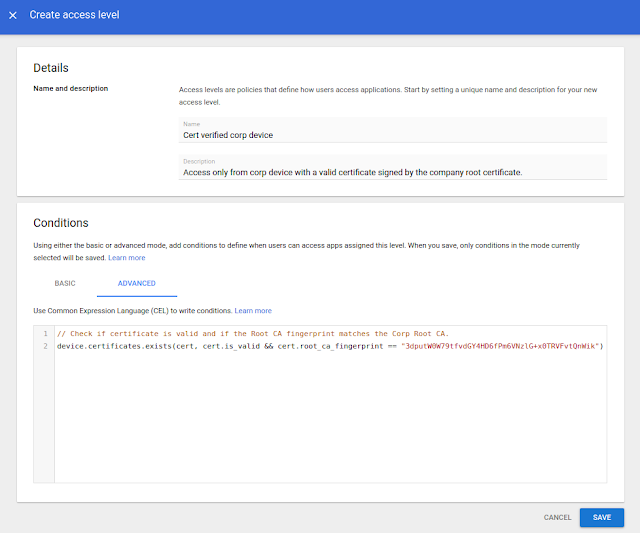
Use a new enterprise certificate condition to set context-aware access rules for company-managed devices
When configuring context-aware access rules, you can now use a new signal to determine whether a device is company-owned.
Release: Both • Rapid: 2022-01-07 • Scheduled: 2022-01-07 -
2022-01-07Content & Collaboration
PPTX file limit increase in Google Slides
Google Slides has increased the import limit for PPTX files using Office Editing mode from 100MB to 300MB. Once imported, users can save their edits back to the original PPTX file.
Release: Both • Rapid: 2022-01-07 • Scheduled: 2022-01-07 -
2022-01-07Other
When configuring context-aware access rules, you can now use a new signal to determine whether a device is company-owned.
When configuring context-aware access rules, you can now use a new signal to determine whether a device is company-owned. By using new enterprise certificates as an alternative context-aware signal to determine if a device is a company-managed asset, you can set more specific context-aware policies that are appropriate based on the trustworthiness of the device.
Release: Both -
2021-12-21Comms & Meetings
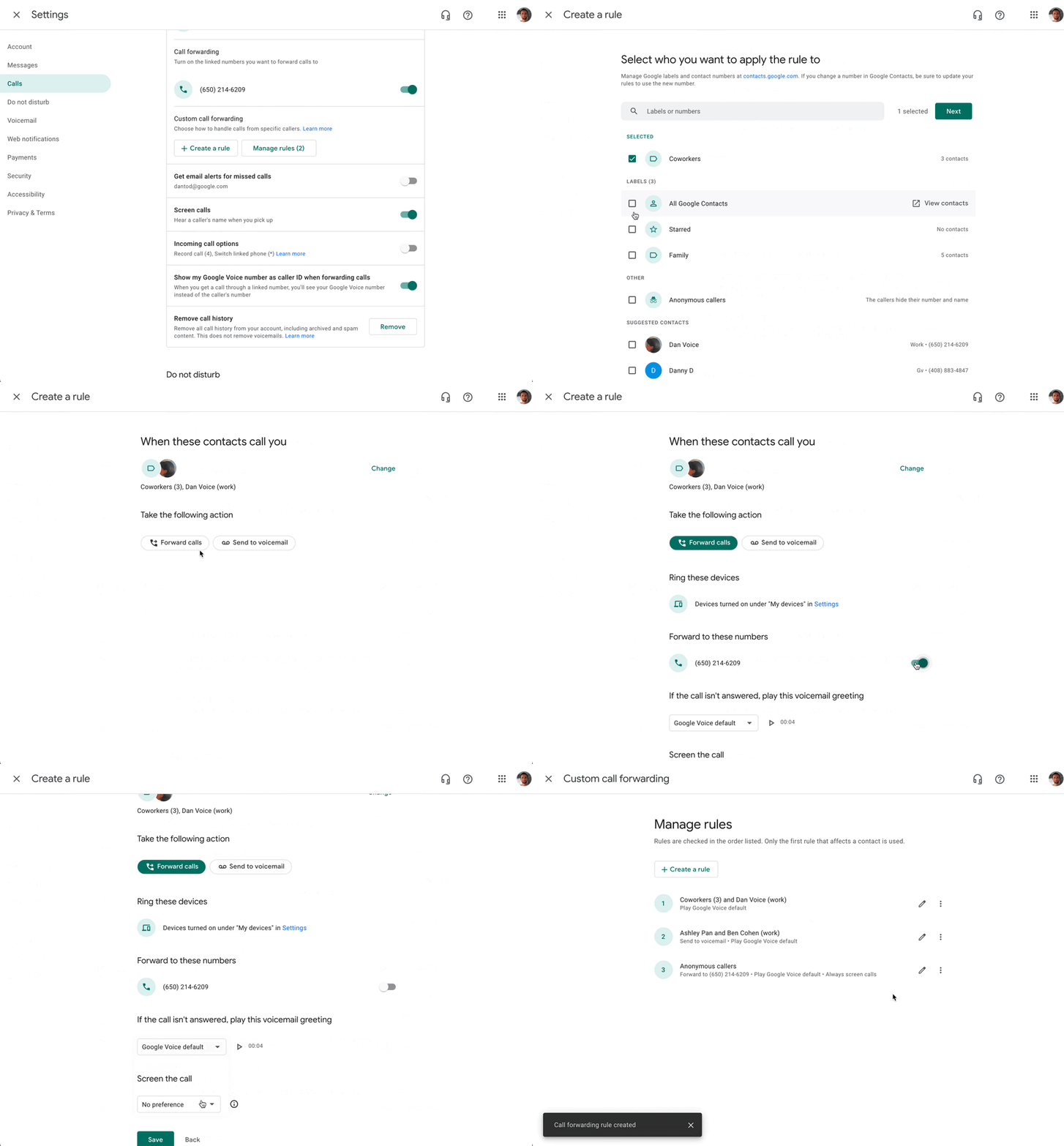
Set custom rules for incoming Google Voice calls.
Google Voice users can now create custom rules for handling incoming calls to improve workflow and productivity. These granular settings allow users to forward calls from specific contacts to linked phone numbers or voicemail, screen calls from specific contacts, set custom voicemail greetings for specific contacts, and apply these rules to either individual contacts or specific contact groups.
Release: Both • Rapid: 2021-12-21 • Scheduled: 2021-12-21 -
2021-12-17Content & Collaboration
The filmstrip in Google Slides is now collapsable
Editors in Google Slides can now collapse or expand the filmstrip as needed. Collapsing the filmstrip expands the current slide view for more focused editing, while expanding it allows users to view, navigate to, and edit other slides in the presentation.
Release: Both • Rapid: 2021-12-17 • Scheduled: 2021-12-17 -
2021-12-16Comms & Meetings
Dynamic groups can now be defined based on users' membership in Organizational Units (OUs).
Dynamic groups now support queries based on Organizational Units (OUs), which is now generally available. This allows admins to automatically manage group membership for users within specific OUs, such as creating a dynamic group for all users of a particular subsidiary, reducing manual administrative burden and increasing security.
Release: Both • Rapid: 2021-12-16 • Scheduled: 2021-12-16 -
2021-12-16Comms & Meetings
Making dynamic groups more powerful with custom user attributes and OrgUnit queries
Dynamic groups can now be defined by querying custom user attributes. This functionality is available as an open beta (no sign up required). dynamic groups can also be defined based on users’ membership in Organizational Units (OUs). This feature is now generally available.
Release: Both • Rapid: 2021-12-16 • Scheduled: 2021-12-16