-
2021-12-15Comms & Meetings
Admins can now configure custom screen saver policies for Google Meet hardware devices to use them as digital signage.
Google is providing admins with more control over screen savers on Google Meet hardware devices, enabling their use as digital signage. Admins can now set a publicly accessible URL to display when devices are inactive, define the number of minutes of inactivity before the screen saver appears, and specify how soon before the next meeting the screen saver is dismissed.
Release: Both • Rapid: 2021-12-15 • Scheduled: 2021-12-15 -
2021-12-15Comms & Meetings
Configure member restrictions for groups is now generally available.
Admins and group owners can now restrict group memberships based on whether members are internal or external to the organization, as well as by member type (service accounts, users, and other groups). This feature is available to Google Workspace Enterprise Standard, Enterprise Plus, Education Plus, and Cloud Identity Premium customers.
Release: Both • Rapid: 2021-12-15 • Scheduled: 2021-12-15 -
2021-12-14Comms & Meetings
Google Meet introduces automatic return of breakout room participants to the main meeting room.
Google Meet is enhancing breakout room management by allowing hosts and co-hosts to automatically move participants back to the main meeting room once the breakout session ends. This update includes a countdown banner to notify participants of the transition, improved visual indicators confirming the move, and the automatic disabling of cameras and microphones upon return to the main room to ensure a smooth transition.
Release: Both • Rapid: 2021-12-14 • Scheduled: 2021-12-14 -
2021-12-14Content & Collaboration
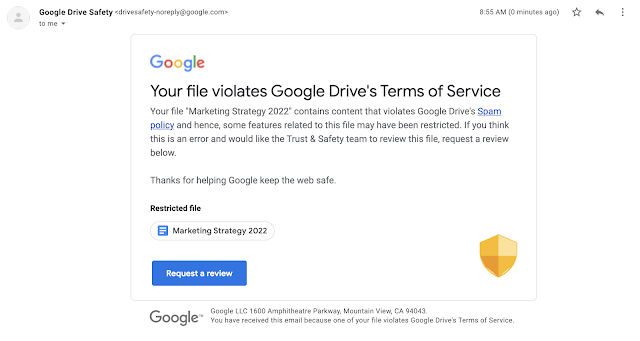
Google Drive now sends email notifications to owners when content is restricted for violating abuse program policies.
When a Google Drive file is identified as violating Google's Terms of Service or program policies, it may be restricted, which prevents sharing and removes public access. Now, the owner of the item, or the shared drive manager for items in shared drives, will receive an email notification informing them of the restriction and providing instructions on how to request a review if they believe the action was a mistake.
Release: Both • Rapid: 2021-12-14 • Scheduled: 2021-12-14 -
2021-12-14Comms & Meetings
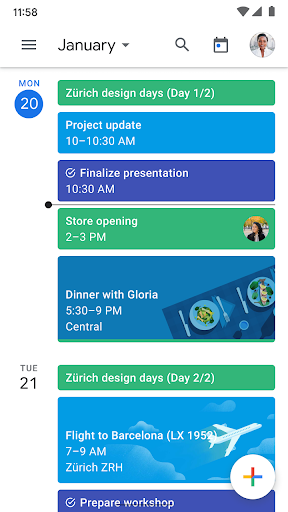
Account profile pictures added to Google Calendar on mobile for easier account identification and switching.
Google Calendar on mobile now displays the account profile picture in the top right corner, allowing users to quickly identify which account they are currently using. Clicking the profile picture enables users to toggle between enabled accounts, similar to other Google apps, while still maintaining visibility of events from all logged-in accounts.
Release: Both • Rapid: 2021-12-14 • Scheduled: 2021-12-14 -
2021-12-13Comms & Meetings
Improved 'Automatically add invitations' setting to prevent unwanted calendar events.
Google Calendar has updated the 'Automatically add invitations' setting, allowing users to choose whether invitations are always added to their calendar or only added after they have RSVP'd via the email invitation. This update provides better control over calendar clutter and visibility for those with shared calendar access, ensuring only relevant events appear.
Release: Both • Rapid: 2021-12-13 • Scheduled: 2021-12-13 -
2021-12-10Comms & Meetings
Quicker access to Google Workspace integrations in Google Chat via the + icon.
Users in Google Chat can now more easily access other Google Workspace products such as Drive, Docs, Sheets, Slides, Photos, and Calendar by hovering over the + icon at the start of the text box. This feature is initially available on the Web and Android, with iOS support expected in early 2022.
Release: Both • Rapid: 2021-12-09 • Scheduled: 2021-12-09 -
2021-12-09More
Admins can now install Google Workspace Marketplace applications for specific groups.
Google Workspace admins can now use the 'admin-install' functionality to install Marketplace applications for specific groups within their organization. Previously, admin-installing applications was only possible for organizational units or an entire domain, but this update allows for more granular distribution to specific subsets of users, such as sales, marketing, or legal teams.
Release: Both • Rapid: 2021-12-09 • Scheduled: 2021-12-09 -
2021-12-07Comms & Meetings
New built-in interoperability between Google Meet and Cisco Webex.
Google Meet is introducing built-in video conferencing interoperability with Cisco Webex, allowing users to join Webex meetings from Google Meet hardware devices and join Google Meet calls from supported Cisco Webex devices. While core video conferencing features are supported, some advanced features like polls, breakout rooms, and dual-screen support may be unavailable. Admins can enable or disable this feature for specific organizational units via the Google Meet Hardware Settings page in the Admin console.
Release: Both • Rapid: 2021-12-07 • Scheduled: 2021-12-07 -
2021-12-07Content & Collaboration
Google Forms API is now available in open beta.
The Google Forms API has transitioned to open beta, allowing developers in the Early Adopter Program to make their integrations available to the public without the need for individual end-user allowlisting. This API enables programmatic access to manage forms and quizzes, retrieve responses and grades, and receive push notifications, facilitating the development of real-time dashboards and automated business workflows.
Release: Both • Rapid: 2021-12-07 • Scheduled: 2021-12-07 -
2021-12-07Content & Collaboration
Labels-driven sharing restrictions via Workspace DLP integration are launching soon.
Admins will be able to configure sharing restrictions that apply to all files with a specific label. For example, DLP administrators can set rules to warn users when sharing files labeled as 'Internal' or block external sharing, downloads, and printing for files labeled as 'Top Secret'.
Release: Both -
2021-12-07Content & Collaboration
Automated classification for Drive labels using Workspace DLP is launching soon.
Automated classification allows organizations to automatically apply Drive labels to content based on administrator-defined rules and predefined content detectors. This reduces the risk of manual classification errors and helps scale data protection efforts by providing a safeguard against unlabeled content.
Release: Both -
2021-12-07Content & Collaboration
Drive labels are now generally available for custom content categorization.
Admins can now configure custom labels for their domain, which users can apply to files in Drive via the context menu, detail pane, or the File menu in Google Docs, Sheets, and Slides. This feature helps organizations categorize content and ensure files are handled correctly, including the ability to designate one 'badged label' for high visual prominence to remind users to handle sensitive files with care.
Release: Both • Rapid: 2021-12-07 • Scheduled: 2021-12-07 -
2021-12-07Content & Collaboration
New ways to customize tables in Google Docs, including pinned headers, row split prevention, easier arrangement, sorting, and a properties sidebar.
Google Docs is introducing several table customization features to improve data presentation. Users can now pin header rows to repeat across pages, prevent rows from splitting across page breaks, drag and drop rows and columns for easier arrangement, sort table rows to organize data, and use a new sidebar to manage table properties in real time.
Release: Both • Rapid: 2021-12-07 • Scheduled: 2021-12-22 -
2021-12-07Comms & Meetings
Set tasks to repeat in Google Calendar
Users can now set tasks to repeat in Google Calendar and customize recurrence schedules. This includes the ability to create tasks with recurrence rules, edit the recurrence rules of existing tasks, and set specific end conditions for those rules.
Release: Both • Rapid: 2021-12-07 • Scheduled: 2022-01-03