-
2021-11-04Other
Google Workspace Client-side encryption beta expanded to include Google Meet and Google Drive for desktop
Google is expanding the beta for Client-side encryption (CSE) to include Google Meet and Google Drive for desktop. This allows eligible customers to have direct control over encryption keys and the identity provider used to access them, enhancing data confidentiality and helping organizations meet strict data sovereignty and compliance requirements such as ITAR and CJIS.
Release: Both • Rapid: 2021-11-04 • Scheduled: 2021-11-04 -
2021-11-03Content & Collaboration
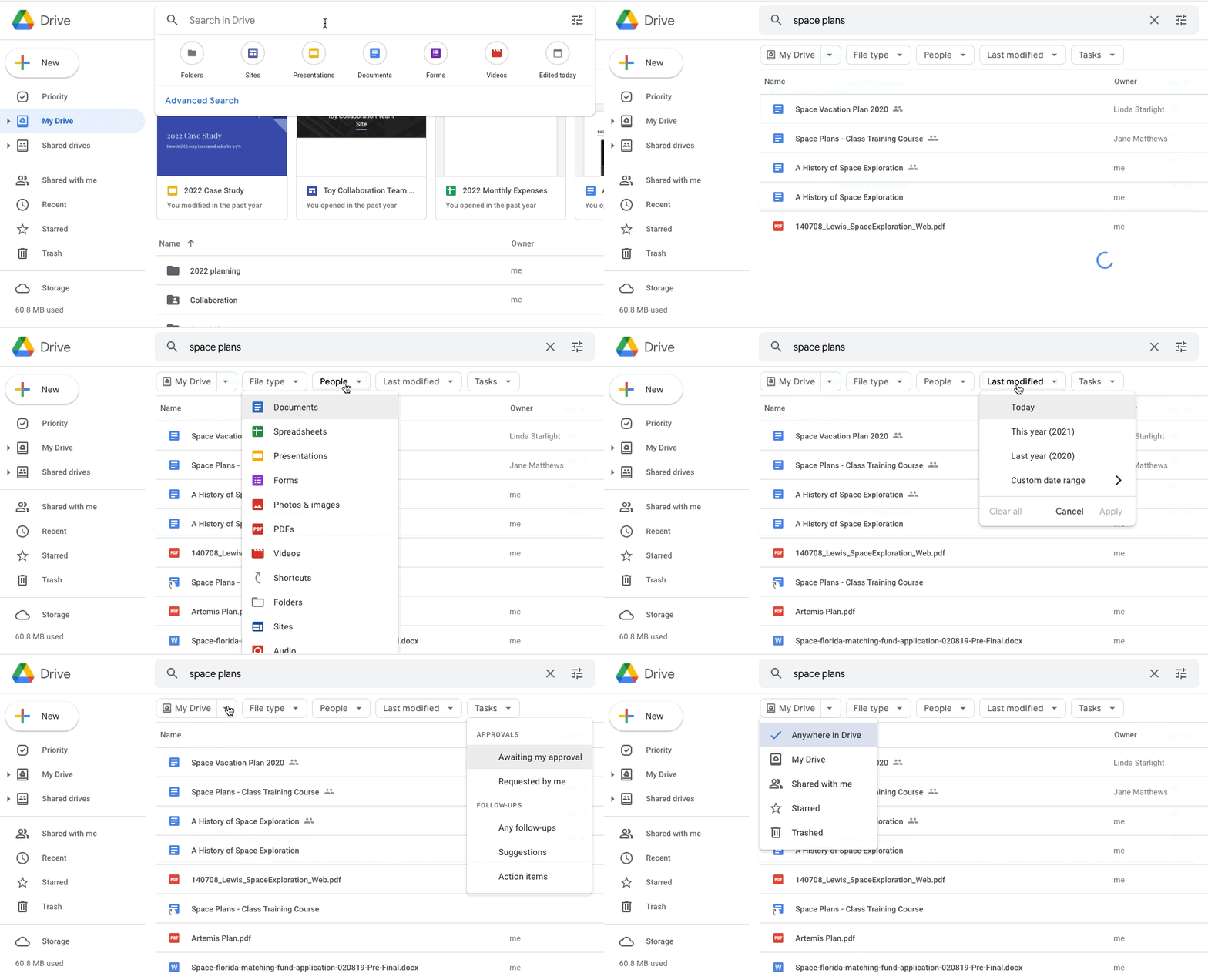
Google Drive introduces search chips in beta to help users refine search results.
Google Drive is launching a beta feature called search chips, which allows users to narrow down their search results more effectively. Users can filter results based on file type (e.g., Google Doc, PDF, or image), people, location (such as a shared drive or specific folder), last modified date, file titles, and shared drive labels, mirroring functionality already available in Gmail.
-
2021-11-02Content & Collaboration
New search and automated entry function for citations in Google Docs.
Google Docs has introduced a new feature that allows users to search for books and online sources to automatically populate citation attributes. This automation is designed to speed up the source creation process, ensure correct formatting, and reduce manual errors when managing citations within documents.
Release: Both • Rapid: 2021-11-02 • Scheduled: 2021-11-29 -
2021-10-29Content & Collaboration
New navigation menus in Google Sites
Site editors can now organize page and external links under new navigation menus by selecting 'New Menu', providing greater flexibility in structuring the navigation within their sites.
Release: Both • Rapid: 2021-10-29 • Scheduled: 2021-10-29 -
2021-10-26Content & Collaboration
Google Sheets is updating its menus to improve the findability of key features.
Google Sheets is updating its menu bar and right-click menus to make commonly-used features easier to locate. The update includes shortening menus to prevent them from being hidden off-screen, reorganizing features into more intuitive locations (such as adding freeze row/column to the right-click menu), shortening item descriptions for faster recognition, and adding icons. These changes affect all menus, including File, Edit, View, Insert, Format, Data, Tools, Extensions, Help, and Accessibility.
Release: Both • Rapid: 2021-10-26 • Scheduled: 2021-10-26 -
2021-10-26Other
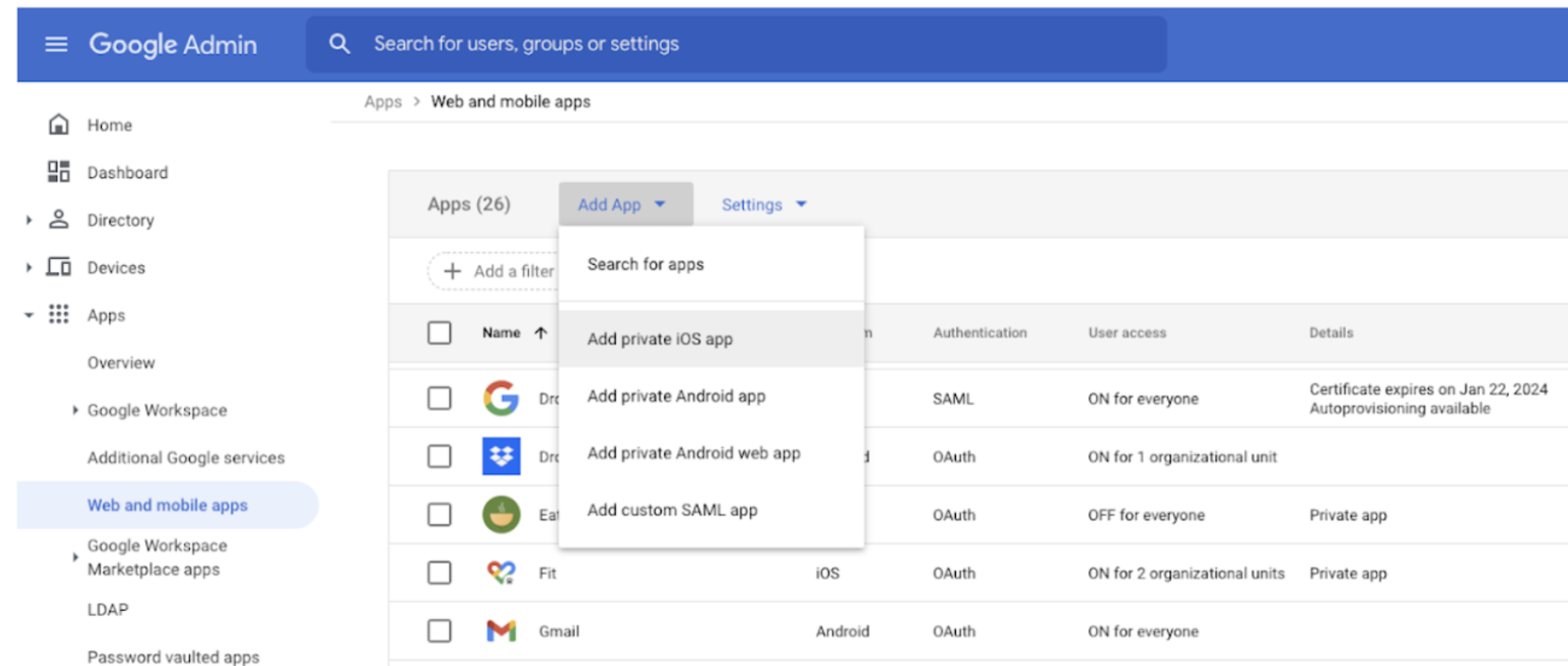
Admins can now upload, manage, and distribute private iOS applications to advanced managed devices.
Google Endpoint Management now allows administrators to upload and distribute private, internally developed iOS applications to advanced managed devices via the Admin console. This feature enables the secure distribution of in-house apps for productivity or company-specific information, and ensures that apps are automatically updated on users' devices whenever a new version is uploaded by the admin.
Release: Both • Rapid: 2021-10-26 • Scheduled: 2021-10-26 -
2021-10-22Content & Collaboration
Drive for desktop support for Apple silicon (M1) devices is now generally available.
Google has announced the general availability of Drive for desktop support for Apple Silicon (M1) devices. Following a beta period and subsequent functionality improvements, the feature is now available to all Google Workspace customers, G Suite Basic and Business customers, and users with personal Google accounts.
Release: Both • Rapid: 2021-10-22 • Scheduled: 2021-10-22 -
2021-10-21Comms & Meetings
Google Meet hosts can now lock participants' audio and video feeds.
Meeting hosts in Google Meet can now use Audio and Video Lock to turn off the microphones and/or cameras of other participants in both main and breakout rooms, preventing them from turning them back on until the host unlocks them. This feature provides hosts with more control to manage disruptive participants and decide levels of participation.
Release: Both • Rapid: 2021-10-21 • Scheduled: 2021-11-01 -
2021-10-20Comms & Meetings
Introduction of Focus time entry type in Google Calendar to block out time for individual work.
Google Calendar is introducing a new 'Focus time' entry type that allows users to block out and protect time for heads-down individual work. This feature features a distinct appearance with a headphones icon and provides the option to automatically decline conflicting events. Additionally, scheduled focus time is tracked in Time Insights, helping users manage their core work more effectively.
Release: Both • Rapid: 2021-10-20 • Scheduled: 2021-11-03 -
2021-10-19Content & Collaboration
Classic Google Sites editing and viewing will be disabled starting December 1, 2021, and January 1, 2022, respectively.
Google is replacing classic Google Sites with new Google Sites. Starting December 1, 2021, users will no longer be able to edit classic Google Sites. Beginning January 1, 2022, classic Sites will no longer be viewable unless they are converted to new Google Sites; any remaining classic Sites will be automatically archived to the owner's Google Drive or replaced with a draft in new Google Sites. Users are encouraged to migrate their sites by December 31, 2021.
Release: Both • Rapid: 2021-12-01 • Scheduled: 2021-12-01 -
2021-10-19Content & Collaboration
Introduction of a universal @ menu in Google Docs for easy insertion of smart chips, tables, images, and more.
Google Docs has introduced a universal insertion menu triggered by typing '@'. This menu allows users to quickly add smart chips to connect people, content, and events, as well as other content elements and formats like tables and images, directly into their documents to streamline the collaboration process.
Release: Both • Rapid: 2021-10-18 • Scheduled: 2021-11-01 -
2021-10-18More
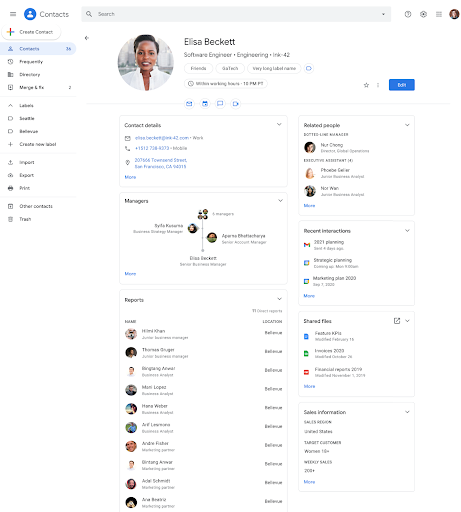
Google Contacts will include additional information about people in your organization, such as local time, working hours, non-manager relationships, shared files, and custom attributes.
Google Contacts will include additional information about people in your organization: local time, working hours, non-manager relationships, shared files, and custom attributes.
Release: Both • Rapid: 2021-10-18 • Scheduled: 2021-10-18 -
2021-10-18More
Google Contacts now displays additional organizational information including local time, working hours, non-manager relationships, shared files, and custom attributes.
Google Contacts is introducing several new information fields for users within an organization to provide better context about colleagues and stakeholders. These updates include the display of a user's local time, a visual indicator (crescent moon and purple banner) for working hours based on Google Calendar settings, the ability to view non-manager relationships such as administrative business partners, a list of shared Drive files, and organization-specific custom attributes like Team or Skills.
Release: Both • Rapid: 2021-10-18 • Scheduled: 2021-10-18 -
2021-10-18Comms & Meetings
Mark Google Chat direct messages and Spaces as read or unread on mobile and web.
Users can now mark Google Chat direct messages (DMs) or Spaces as read or unread on both mobile and web platforms. In 1:1 and group DMs, users can mark a thread as unread starting from a specific message by hovering over the message and clicking the mark as unread icon, helping them remember to return to the conversation later.
Release: Both • Rapid: 2021-10-18 • Scheduled: 2021-10-18 -
2021-10-14Comms & Meetings
New beta for data loss prevention (DLP) in Google Chat
Google has introduced a beta for data loss prevention (DLP) in Google Chat, allowing administrators to create custom policies to prevent sensitive and confidential information from leaking outside their organization. Admins can choose to either audit violations or block end users from sending sensitive content, and they will be alerted about policy violations to facilitate quick investigation and action.
Release: Rapid