All Google Calendar updates
172 updates to Google Calendar tracked so far.
-
2021-12-13Comms & Meetings
Improved 'Automatically add invitations' setting to prevent unwanted calendar events.
Google Calendar has updated the 'Automatically add invitations' setting, allowing users to choose whether invitations are always added to their calendar or only added after they have RSVP'd via the email invitation. This update provides better control over calendar clutter and visibility for those with shared calendar access, ensuring only relevant events appear.
Release: Both • Rapid: 2021-12-13 • Scheduled: 2021-12-13 -
2021-12-07Comms & Meetings
Set tasks to repeat in Google Calendar
Users can now set tasks to repeat in Google Calendar and customize recurrence schedules. This includes the ability to create tasks with recurrence rules, edit the recurrence rules of existing tasks, and set specific end conditions for those rules.
Release: Both • Rapid: 2021-12-07 • Scheduled: 2022-01-03 -
2021-10-20Comms & Meetings
Introduction of Focus time entry type in Google Calendar to block out time for individual work.
Google Calendar is introducing a new 'Focus time' entry type that allows users to block out and protect time for heads-down individual work. This feature features a distinct appearance with a headphones icon and provides the option to automatically decline conflicting events. Additionally, scheduled focus time is tracked in Time Insights, helping users manage their core work more effectively.
Release: Both • Rapid: 2021-10-20 • Scheduled: 2021-11-03 -
2021-10-05Comms & Meetings
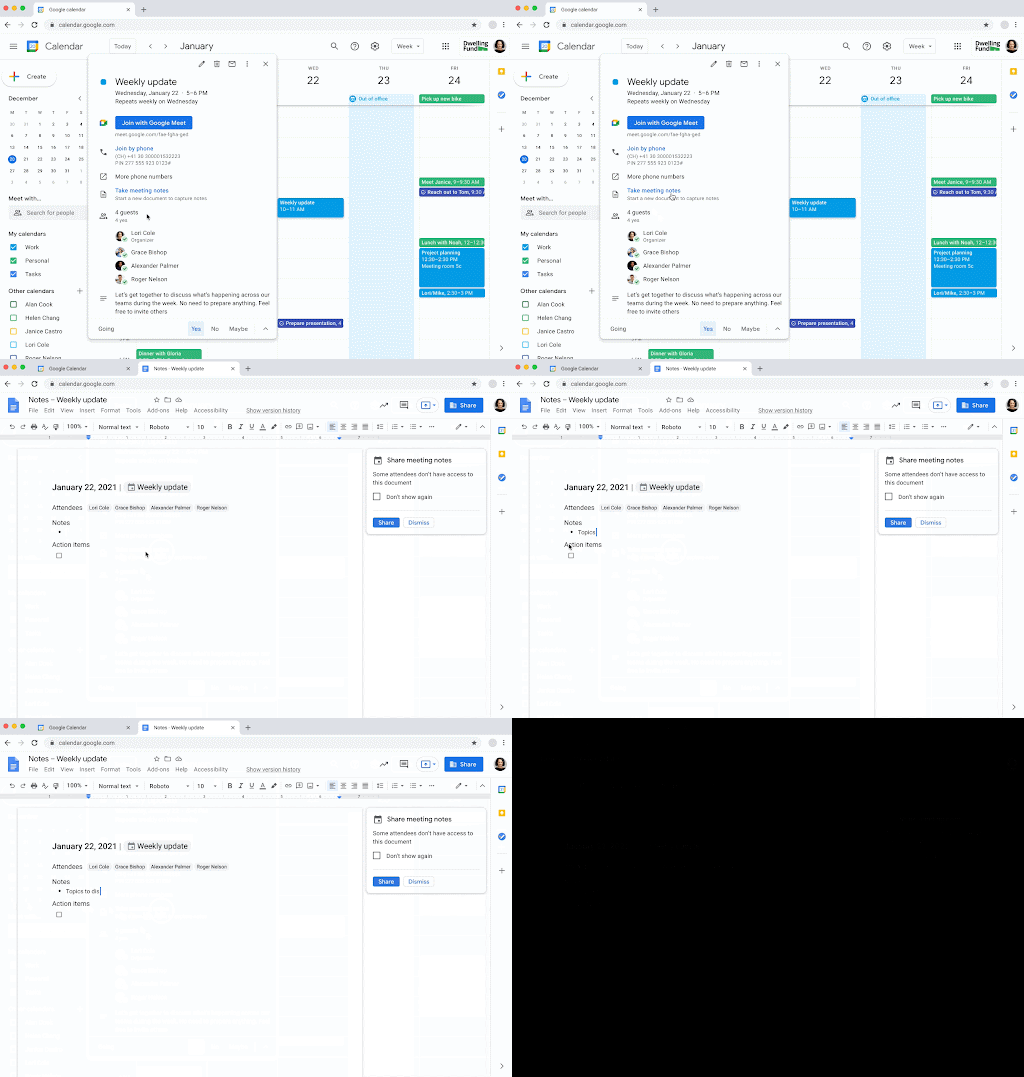
Create and share meeting notes documents directly from Google Calendar events.
Google Calendar now allows users to quickly start and share meeting notes documents for events. By using the 'Create meeting notes' button during event creation or the 'Take meeting notes' button in a scheduled event, a Google Doc is automatically generated, populated with event details, and attached to the calendar event. This integration streamlines the process of capturing notes and ensures easy navigation between the calendar event and the corresponding document.
Release: Both • Rapid: 2021-10-05 • Scheduled: 2021-10-19 -
2021-09-22Comms & Meetings
Easily create group chats with meeting participants directly from Google Calendar events.
Google is adding a Chat icon next to the guest list within Google Calendar events on both web and mobile. This allows users to quickly create a group chat containing all internal organization participants of a meeting, making it simpler to communicate before, during, or after the event without relying solely on email.
Release: Both • Rapid: 2021-09-20 • Scheduled: 2021-10-04 -
2021-08-30Comms & Meetings

Google Calendar introduces Time Insights to help users analyze how their time is spent in meetings.
Time Insights in Google Calendar provides a personalized, analytical experience on the web that allows users to see a breakdown of their time spent in meetings, identify meeting-heavy days, and see which collaborators they spend the most time with. This data is private to the user and helps in better planning and priority assessment.
Release: Both • Rapid: 2021-09-06 • Scheduled: 2021-09-20 -
2021-08-18Comms & Meetings

Users can now indicate their working location directly on their Google Calendar.
Starting August 30, 2021, Google Calendar users can set a weekly working location routine (such as working from home or the office) to help colleagues plan in-person collaboration in hybrid workplaces. Anyone with free/busy access to the user's calendar can view these locations, and the feature can be managed by admins at the domain or organizational unit level.
Release: Both • Rapid: 2021-08-30 • Scheduled: 2021-09-14 -
2020-06-23Comms & Meetings

Update Calendar Interop authentication with OAuth 2.0 to continue interoperation with Microsoft 365.
We’re enabling OAuth 2.0 authentication support for Google Calendar Interop with Microsoft Exchange Online (Microsoft 365). Calendar Interop is a feature that lets you sync events and availability between Google Calendar and Exchange Online.
Release: Both • Rapid: 2020-06-23 • Scheduled: 2020-06-23 -
2020-05-20Comms & Meetings
Change to the format of secondary Calendar and resource IDs
Starting June 3, 2020, the calendar IDs associated with newly created secondary calendars and resources will no longer include the G Suite account’s domain name. While this is a cosmetic change and does not affect Google Calendar functionality, users who maintain scripts that parse or extract domain names from these IDs will need to update their scripts to ensure continued operation.
Release: Both • Rapid: 2020-06-03 • Scheduled: 2020-06-03 -
2020-02-06Comms & Meetings
Coverage of user indices for Calendar in data regions
Gmail and Calendar construct user indices based on information in their accounts, similar to an index in a library, which lists information about all the books the library has available. This index is used to serve user search queries in Gmail and Calendar. These indices will now be covered by data regions.
Release: Both • Rapid: 2020-02-05 • Scheduled: 2020-02-05 -
2019-12-17Comms & Meetings

Rooms and resources in Google Calendar events are now listed in the guest list instead of the location field.
Google Calendar has updated where booked rooms and resources are displayed within an event. This information will now appear in the guest list and will no longer be duplicated in the location field. This change allows users to use the location field exclusively for the geographic address of the event, providing guests with a clearer understanding of where to go.
Release: Both • Rapid: 2019-12-17 • Scheduled: 2020-01-06 -
2019-12-16Comms & Meetings
Turning off less secure app access to G Suite accounts - Impact to Calendar
Limiting the ability for less secure apps (LSAs) to access G Suite account data. If you use CalDAV to give an app or device access to your calendar, switch to a method that supports OAuth. We recommend the Google Calendar app [Web/iOS/Android] as the most secure app to use with your G Suite account. If your G Suite account is linked to the calendar app in iOS or MacOS and uses only a password to login, you’ll need to remove and re-add your account to your device. When you add it back, select “sign in with Google” to automatically use OAuth.
Release: Both • Rapid: 2020-06-15 • Scheduled: 2020-06-15 -
2019-11-18Comms & Meetings

New Admin console setting to control whether Working Hours is enabled for users.
Google is adding a setting in the Admin console that allows administrators to control whether the Working Hours feature is enabled for users in their domain. This setting can be managed by navigating to Admin console > Apps > G Suite > Settings for Calendar > Sharing Settings, where a new checkbox 'Allow users to set working hours' has been added. The setting is enabled by default and can be configured at the organizational unit level.
Release: Both • Rapid: 2019-11-18 • Scheduled: 2019-11-18 -
2019-03-11Comms & Meetings
Recurring Calendar events will migrate their video conferencing from classic Hangouts to Meet.
Migrating the video conferencing for recurring Calendar events from classic Hangouts to Meet. Previously, new events scheduled in Calendar used Meet. Now this change updates previously scheduled events in Calendar as well.
Release: Both • Rapid: 2019-03-11 • Scheduled: 2019-03-25 -
2018-06-06Comms & Meetings

Google Calendar now indicates when all guests have declined a meeting.
Google Calendar now provides a visual indication when all guests have declined a meeting, allowing users to identify events with no attendance without checking event details or RSVP emails. From this indication, users can choose to cancel the meeting, reschedule it, or dismiss the notification.
Release: Both • Rapid: 2018-06-06 • Scheduled: 2018-06-06


