All Google Chat updates
204 updates to Google Chat tracked so far.
-
2023-09-26Comms & Meetings

The new “Manage apps” and “Manage webhooks” options will allow space managers to control the ability of space members to add and remove apps and webhooks to a space.
We’re adding two new controls to the list of space manager capabilities in Google Chat that were introduced earlier this year to ensure effective conversations take place in spaces. The new “Manage apps” and “Manage webhooks” options will allow space managers to control the ability of space members to add and remove apps and webhooks to a space.
Release: Both • Rapid: 2023-09-26 • Scheduled: 2023-09-26 -
2023-09-26Comms & Meetings
New full screen view for managing apps and webhooks in Google Chat spaces.
A new full screen view is now available on the web version of Google Chat, allowing space managers to view all installed apps and webhooks within a space in one place.
Release: Both • Rapid: 2023-09-26 • Scheduled: 2023-09-26 -
2023-09-26Comms & Meetings
Updated '@' mentions dialog notification in Google Chat spaces.
Google Chat has updated the '@' mentions dialog notification to provide specific explanations as to why a particular user or app cannot be added to a space.
Release: Both • Rapid: 2023-09-26 • Scheduled: 2023-09-26 -
2023-09-26Comms & Meetings
New 'Manage apps' and 'Manage webhooks' controls for Google Chat space managers.
Google Chat is introducing two new controls for space managers: 'Manage apps' and 'Manage webhooks'. These options allow space managers to control whether space members have the ability to add or remove apps and webhooks within a space.
Release: Both • Rapid: 2023-09-26 • Scheduled: 2023-09-26 -
2023-09-19Comms & Meetings

Google Chat introduces message bubbles to differentiate between incoming and outgoing messages.
Google Chat is introducing message bubbles to help users more easily distinguish between incoming and outgoing messages in the chat stream. Incoming messages will be aligned to one side with a solid color background, while outgoing messages will be aligned to the opposite side with a different color background, improving the overall visual organization of conversations.
Release: Both • Rapid: 2023-09-19 • Scheduled: 2023-10-03 -
2023-09-18Comms & Meetings
.png)
Add Google Groups to spaces in Google Chat for automated membership syncing.
Google Chat is introducing the ability for space managers and authorized users to add Google Groups to a space. Once a group is added, its members are automatically added to the space, and any subsequent changes to the group's membership are automatically reflected in the space, significantly simplifying the management of large member lists.
Release: Both • Rapid: 2023-10-17 • Scheduled: 2023-11-01 -
2023-09-08Comms & Meetings

Expanding autocorrect to Google Chat on web
Google Chat on web now automatically corrects misspelled words to reduce typos. Corrected words are indicated with a gray underline, similar to the functionality found in Gmail and Google Docs. This feature is rolling out to all English users.
Release: Both • Rapid: 2023-09-08 • Scheduled: 2023-09-08 -
2023-09-01Comms & Meetings
In-line replies now available within announcement spaces in Google Chat on web
Users of Google Chat on the web can now utilize in-line replies specifically within announcement spaces, facilitating more organized conversations.
Release: Scheduled -
2023-09-01Comms & Meetings
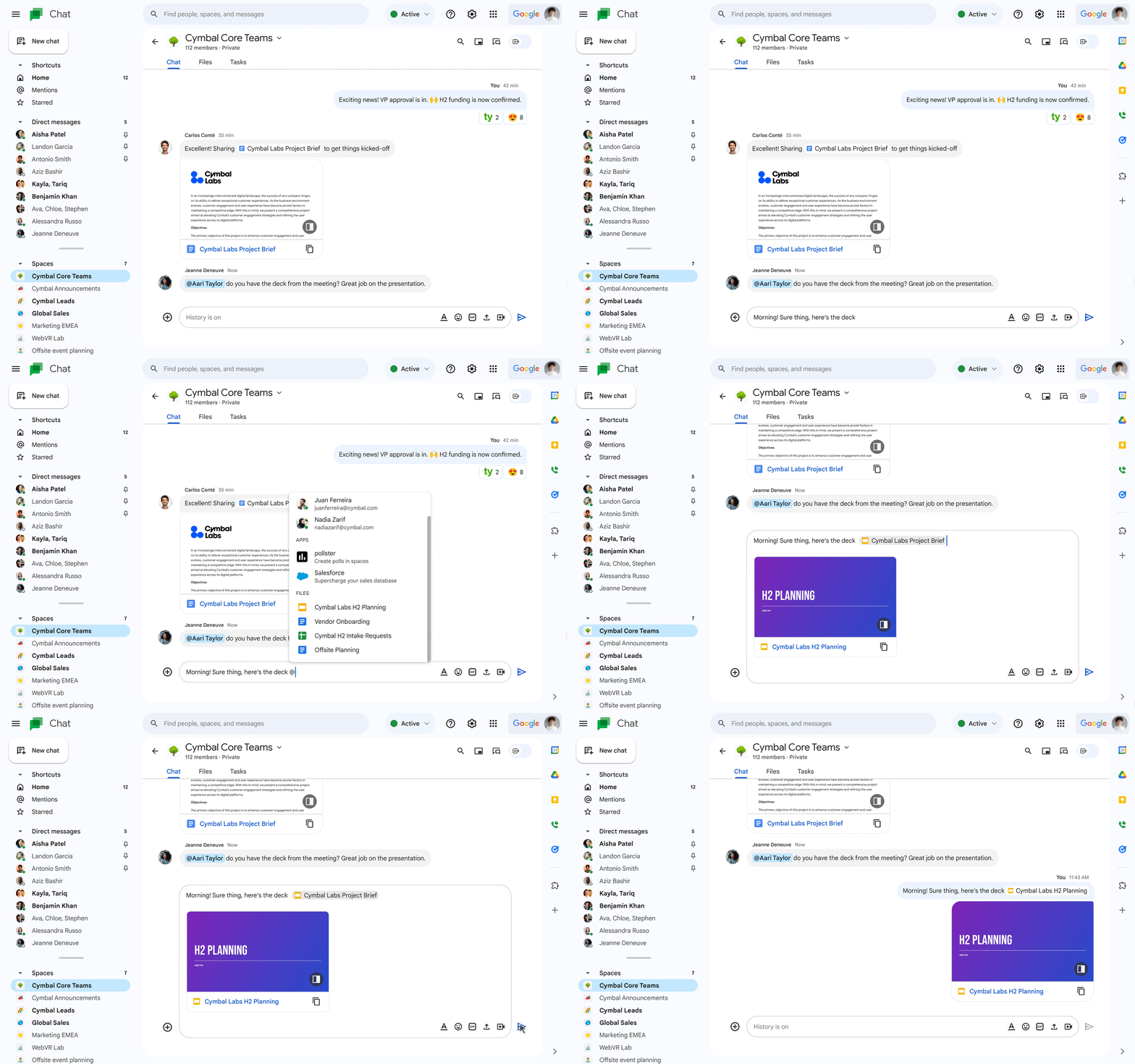
Smart chips are now available in Google Chat on web for easier file sharing.
Google Chat on web now supports smart chips, allowing users to insert files directly into messages by typing '@' followed by the file name. This feature reduces friction by eliminating the need to find files in Drive and copy-paste URLs, providing a compact and readable way to share collaborative documents. While mobile users can receive and click on smart chips, they cannot insert them at this time.
Release: Both • Rapid: 2023-09-01 • Scheduled: 2023-09-15 -
2023-08-29Comms & Meetings
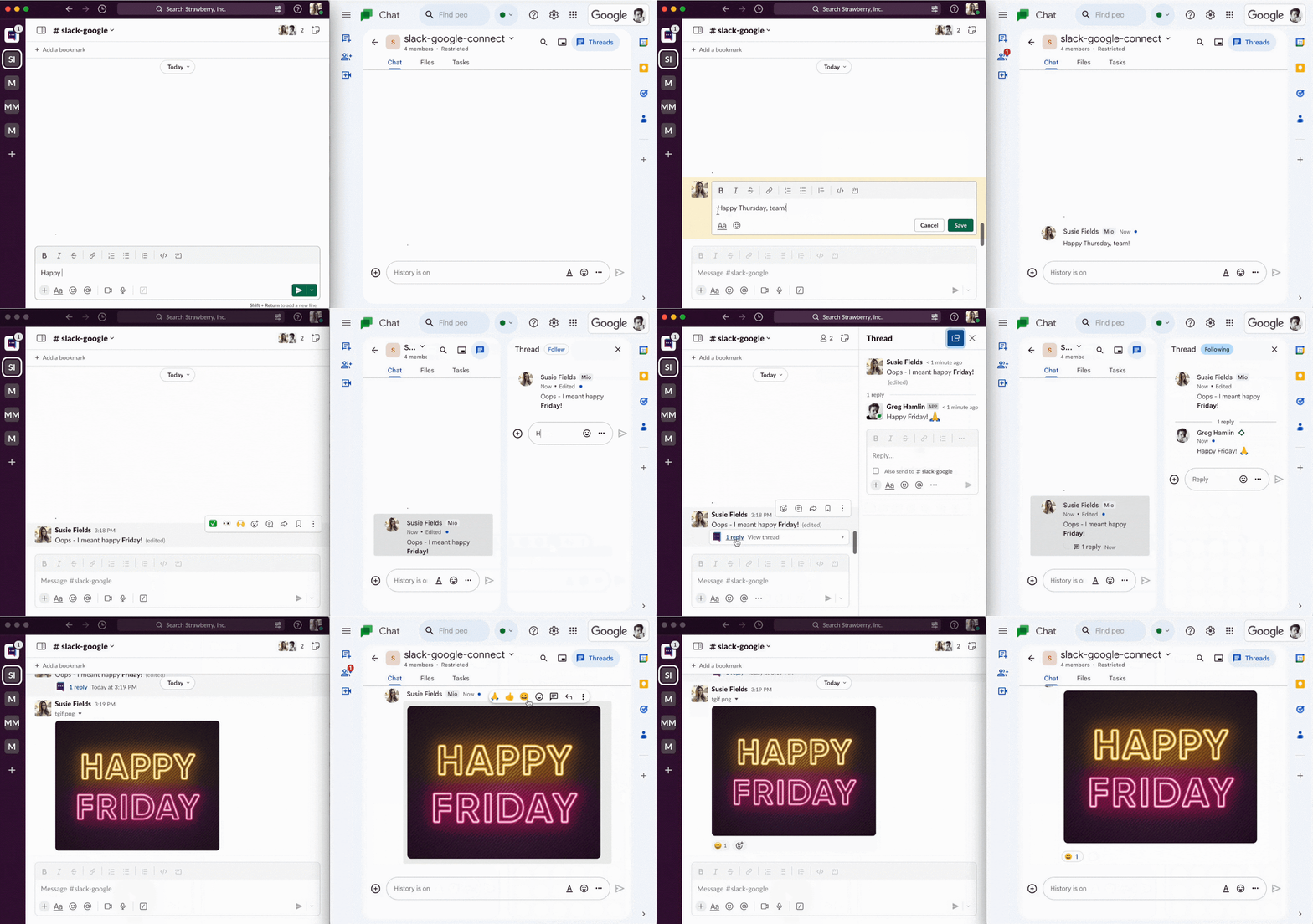
Use Mio to enable messaging interoperability between Google Chat and other platforms such as Slack and Teams.
If your organization uses a mixture of messaging tools, you can now use Mio to enable messaging interoperability between Google Chat and other platforms such as Slack and Teams. This is available now in beta, with general availability expected in early 2024.
Release: Beta -
2023-08-29Comms & Meetings
Google Chat now supports messaging interoperability with platforms like Slack and Microsoft Teams via Mio.
Google is partnering with Mio to enable messaging interoperability between Google Chat and other platforms such as Slack and Microsoft Teams. This integration allows organizations using a mixture of messaging tools to streamline communication, reduce silos, and avoid missed messages. The feature is currently available in beta, with general availability expected in early 2024 for various Google Workspace editions including Business, Enterprise, Frontline, and Nonprofits.
Release: Both -
2023-08-25Comms & Meetings
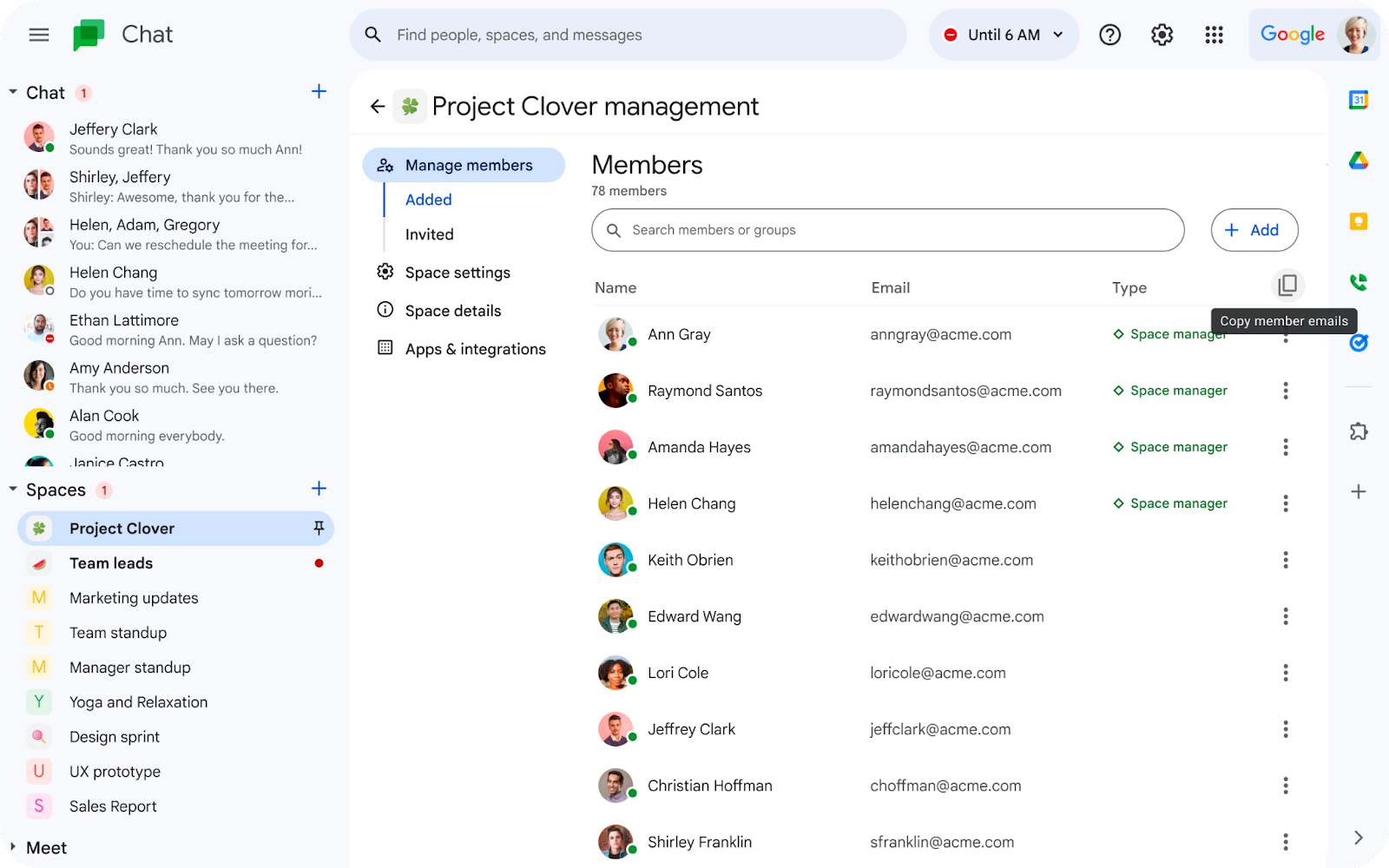
Copy space member email addresses in Google Chat
Space managers and members can now copy the email addresses of members in a space on Google Chat. This option is enabled by default for spaces with 100 members or less, while it is disabled for spaces with more than 100 members.
Release: Both -
2023-08-24Comms & Meetings

Adding a new Workday app for Google Chat that allows you to perform quick actions in Workday.
We’re adding a new Workday app for Google Chat that allows you to perform quick actions in Workday, such as requesting time off, filing expense reports and looking up colleague's information, all without leaving Google Chat.
Release: Both -
2023-08-24Comms & Meetings
Introducing the Workday app for Google Chat.
Google has introduced a new Workday app for Google Chat that allows users to perform quick actions within Workday—such as requesting time off, filing expense reports, and looking up colleague information—directly from the Google Chat interface.
Release: Both • Rapid: 2023-08-24 • Scheduled: 2023-08-24 -
2023-08-23Comms & Meetings

Google Chat spaces now support message view counts.
Google Chat is introducing view counts for messages in spaces, allowing members to see how many people have viewed a specific message. Users can access this information by hovering over a message, selecting the three-dot menu, and clicking 'See message views'. This feature applies to messages sent on or after August 1, 2023, though it is not available for in-line replies.
Release: Both • Rapid: 2023-08-23 • Scheduled: 2023-08-23