All Google Chat updates
204 updates to Google Chat tracked so far.
-
2024-08-26Comms & Meetings

Now set up workflows, like sending an onboarding email to a customer that’s added as a new member to a space, or sending a message to a space when a new file is added to a Google Drive, Dropbox, or Box folder using IFTTT and UKG Flow
Chat users can now set up workflows, like sending an onboarding email to a customer that’s added as a new member to a space, or sending a message to a space when a new file is added to a Google Drive, Dropbox, or Box folder.
Release: Both • Rapid: 2024-08-26 • Scheduled: 2024-08-26 -
2024-02-26Comms & Meetings

Participant avatars for unread threads in the conversation view in Google Chat.
In order to provide you with more context upfront, you will now see participant avatars for unread threads in the conversation view. Without having to click to open the thread side panel, it will now be much easier to decide which threads to read and reply to.
Release: Both • Rapid: 2024-02-26 • Scheduled: 2024-02-26 -
2024-02-26Comms & Meetings
Easily identify which unread threads are most relevant to you in Google Chat
You will now see participant avatars for unread threads in the conversation view. Without having to click to open the thread side panel, it will now be much easier to decide which threads to read and reply to.
Release: Both • Rapid: 2024-02-26 • Scheduled: 2024-02-26 -
2024-02-21Comms & Meetings

End users can now discover and install Google Chat apps from the Google Workspace Marketplace.
End users can now discover and install Google Chat apps from the Google Workspace Marketplace. Additionally, users can now open the Google Workspace Marketplace directly from within Chat.
Release: Both -
2024-01-25Comms & Meetings

Improvements to space creation in Google Chat: preventing duplicate space names and configuring spaces for specific use cases.
Two improvements are made to the space creation flow in Google Chat: preventing duplicate space names and providing a method to configure spaces for Collaboration or Announcements.
Release: Both • Rapid: 2024-01-25 • Scheduled: 2024-02-12 -
2024-01-22Comms & Meetings

Manage reported Google Chat content from the new moderation tool in the Admin console.
A centralized location for reviewing and taking action on reported Google Chat content is introduced in the Admin console under Apps > Google Workspace > Moderation, alongside the email quarantine tool for Gmail.
Release: Both • Rapid: 2024-01-22 • Scheduled: 2024-01-22 -
2024-01-19Comms & Meetings

Star messages in Google Chat is now available on Android and iOS mobile devices.
Starred messages, an additional shortcut in the redesigned Google Chat navigation panel that helps you stay on top of your most important messages, is now available on Android and iOS mobile devices.
Release: Both • Rapid: 2024-01-19 • Scheduled: 2024-01-19 -
2023-09-29Comms & Meetings

Visibility of thread participants via avatars in Google Chat.
Google Chat will add the ability to see avatars of users who have replied to a specific thread, providing better context on who is participating in the discussion.
Release: Scheduled -
2023-09-29Comms & Meetings
New 'Home' shortcut for managing Chat messages and followed threads.
A new 'Home' view is coming to Google Chat, serving as a central hub to manage messages, catch up on followed threads, and filter for unread conversations.
Release: Scheduled -
2023-09-29Comms & Meetings
Introduction of a resizable threads sidebar in Google Chat.
Google Chat will introduce a resizable threads panel, allowing users to adjust the sidebar size to better fit their screen or increase focus on the most important threads.
Release: Scheduled -
2023-09-29Comms & Meetings
Existing topic-based spaces in Google Chat are transitioning to in-line threading.
Google Chat is upgrading all existing spaces organized by conversation topic to an in-line threaded experience to provide a more continuous conversation flow. The migration begins September 30, 2023, and is expected to be completed by March 2024. During the upgrade, spaces may be briefly inaccessible, and messages will be rearranged chronologically with separators indicating where new topics began.
Release: Scheduled • Scheduled: 2023-09-30 -
2023-09-28Comms & Meetings
On September 30, 2023, all existing spaces organized by conversation topic will be upgraded to the in-line threaded experience.
On September 30, 2023, we will begin taking the next step toward a single, streamlined flow of conversation in Google Chat: all existing spaces organized by conversation topic will be upgraded to the in-line threaded experience. We’d like to share more information regarding the migration, what to expect, as well as what’s next for Google Chat.
Release: Scheduled • Scheduled: 2023-09-30 -
2023-09-27Comms & Meetings
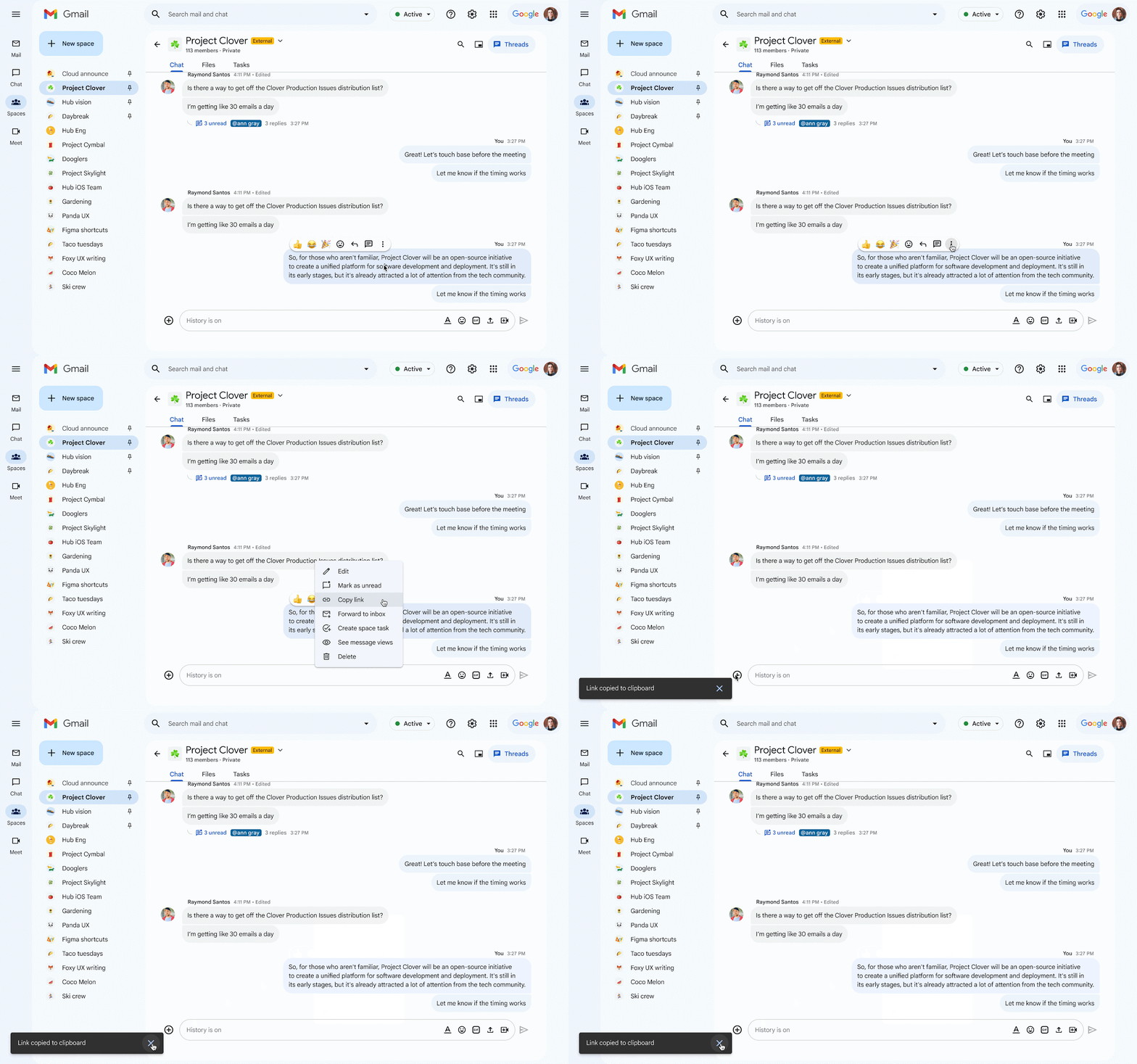
Introducing message linking, an additional feature that helps teams collaborate more effectively.
Building upon the recent updates in Google Chat, such as message views, in-line replies and larger spaces, we’re introducing message linking, an additional feature that helps teams collaborate more effectively. To generate links to messages easier so that others can reference a particular topic or announcement, we’ve added a “Copy link” option for all messages posted in spaces, group messages and direct messages.
Release: Both • Rapid: 2023-09-27 • Scheduled: 2023-10-11 -
2023-09-27Comms & Meetings
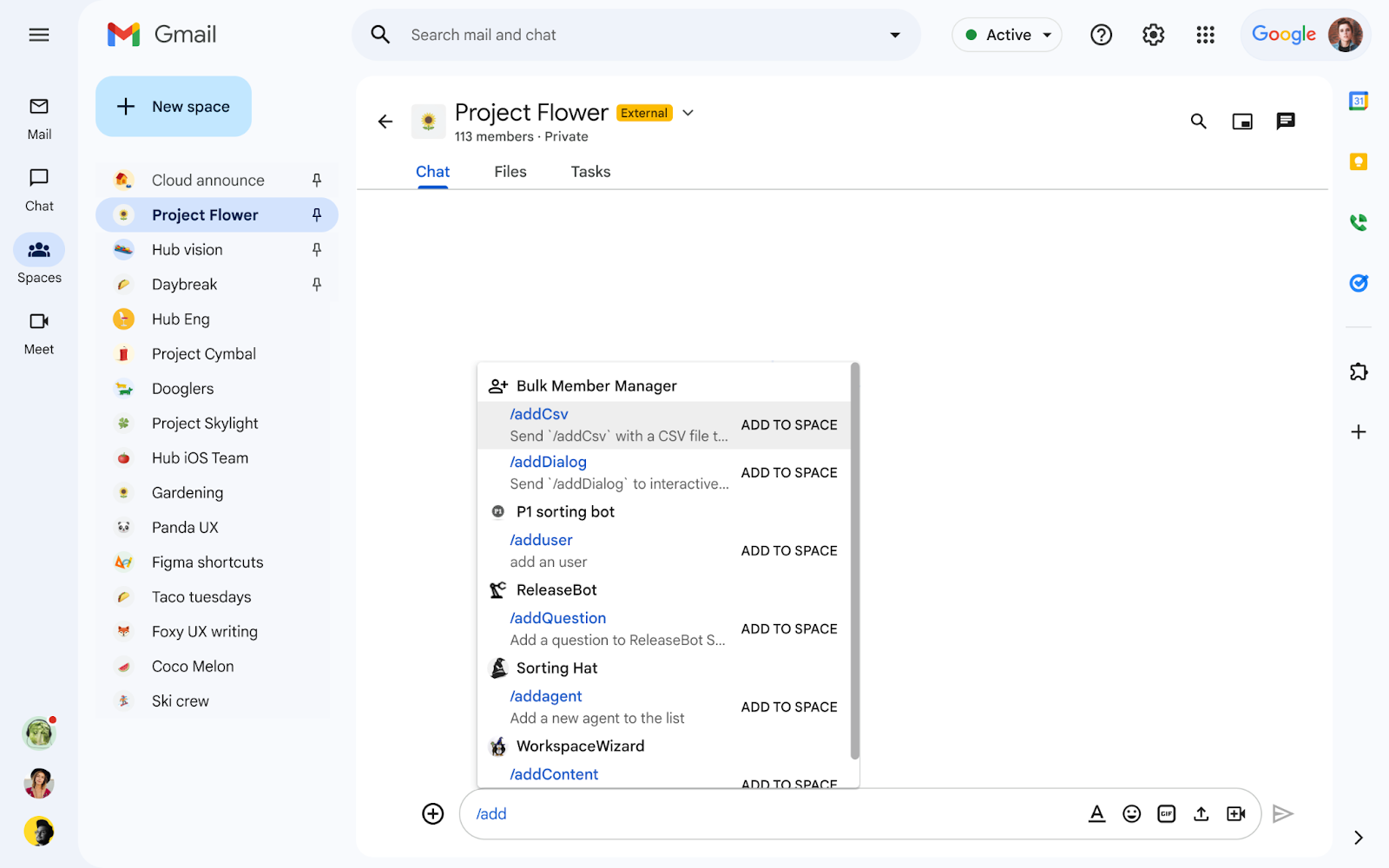
We’re introducing a new app for Google Chat called Bulk Member Manager that enables space managers and space members to easily add or remove members to or from a space in bulk.
We’re introducing a new app for Google Chat called Bulk Member Manager that enables space managers and space members, who have permission to manage members, to easily add or remove members to or from a space in bulk. In addition to the new membership search feature and the ability to add up to 50,000 members to spaces in Google Chat, this update will help you better organize people, topics, and projects to help ensure effective conversations take place in spaces.
Release: Both -
2023-09-27Comms & Meetings
Introduction of the Bulk Member Manager app for Google Chat to add or remove members in bulk.
Google Chat has introduced the Bulk Member Manager app, enabling space managers and authorized members to efficiently add or remove members from a space in bulk. The app supports slash commands such as /addDialog and /removeDialog for copy-pasting email addresses, as well as /addCsv and /removeCsv for processing .csv attachments.
Release: Both • Rapid: 2023-09-27 • Scheduled: 2023-09-27