All Google Chat updates
204 updates to Google Chat tracked so far.
-
2024-11-15Comms & Meetings
Send video messages in Google Chat
Users can now send video messages directly within Google Chat, providing a more dynamic way to communicate with colleagues.
Release: Scheduled -
2024-11-14Comms & Meetings

Respond to conversations without leaving the home view in Google Chat
We’re introducing a split pane in the home view of Chat that allows users to respond directly to a space, group or direct message without ever navigating away from the home view in Chat.
Release: Both • Rapid: 2024-11-14 • Scheduled: 2024-12-02 -
2024-11-14Comms & Meetings
respond directly to a space, group or direct message without ever navigating away from the home view in Chat.
Using the split pane, you can now respond directly to a space, group or direct message without ever navigating away from the home view in Chat.
Release: Both • Rapid: 2024-12-02 • Scheduled: 2024-11-14 -
2024-11-14Comms & Meetings
Respond to conversations without leaving the home view in Google Chat using the new split pane.
Google Chat is introducing a split pane in the home view, allowing users to respond directly to spaces, group chats, or direct messages without navigating away from the home view. Users can access the split pane by clicking on a message, expand the conversation to full screen, or toggle the split pane mode via the home header.
Release: Both • Rapid: 2024-11-14 • Scheduled: 2024-12-02 -
2024-11-08Comms & Meetings

Select Google Chat settings can now be applied at the group level
Admins now have more granular control by applying specific Google Chat settings—such as third-party archiving, file sharing, app installation, GIF picker, auto-deletion, and history—at the group level instead of only at the Organizational Unit (OU) level.
Release: Both -
2024-11-08Comms & Meetings
Import data into group chats using the Google Chat API
Google Workspace developers can now generally use the spaces.create method in import mode to create group chats when migrating from other messaging platforms to Google Chat.
Release: Both -
2024-11-01Comms & Meetings

Reducing noise from unfollowed threads in Google Chat
New activity, such as unread messages from threads you do not follow, will no longer bold and appear at the top of your conversation lists.
Release: Both -
2024-11-01Comms & Meetings
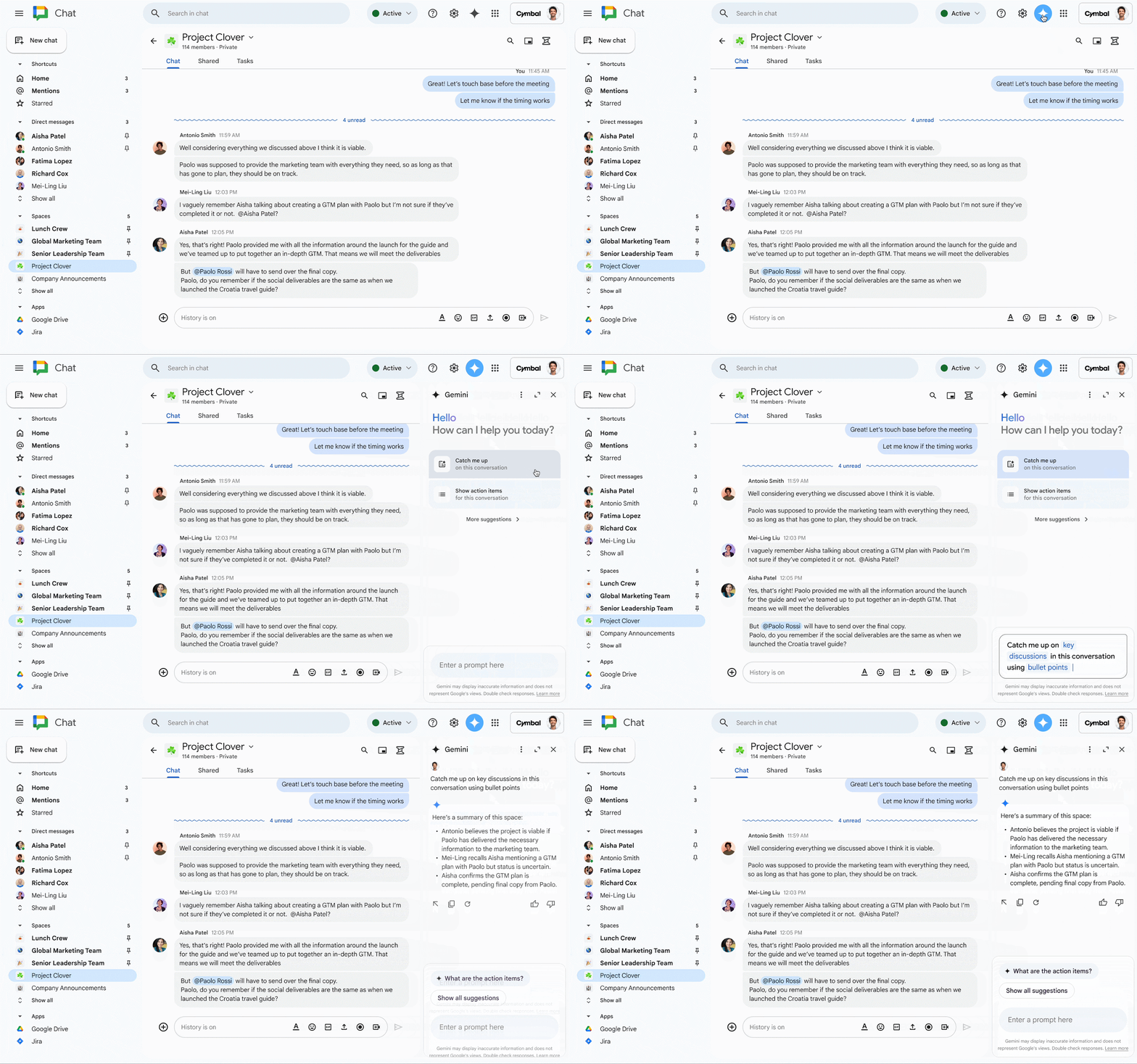
Expanding Gemini in Chat to help users collaborate more effectively in their spaces, group messages and direct messages.
Gemini in the side panel of Chat enables you to better collaborate with your team by helping you quickly catch up on missed conversations, capture action items, or search for key details that are easy to miss in a fast-moving space.
Release: Both • Rapid: 2024-11-01 • Scheduled: 2024-11-01 -
2024-11-01Comms & Meetings
Reducing noise from unfollowed threads in Google Chat
To help users focus on relevant conversations, Google Chat is removing visual cues from threads that are not followed. New activity in unfollowed threads will no longer be bolded or appear at the top of the conversation list.
Release: Both • Rapid: 2024-11-01 • Scheduled: 2024-11-01 -
2024-10-30Comms & Meetings

new setting that allows you to control the visual density of screen elements
With this option, you’ll notice: Message bubbles that are aligned in the same direction for both sender and recipient, Wider message bubbles, Padding in the left bar, conversation list, and home.
Release: Both • Rapid: 2024-10-30 • Scheduled: 2024-10-30 -
2024-10-30Comms & Meetings
Google Chat introduces a new density setting allowing users to choose between 'Comfortable' and 'Compact' views.
Google Chat is introducing a new density setting to give users more control over the visual layout of their screen. Users can choose between 'Comfortable' mode, which follows Material Design 3 with distinct message bubbles, and 'Compact' mode, which reduces scrolling by aligning message bubbles and adjusting padding. This setting is available on the web and integrates with Gmail's density settings.
Release: Both • Rapid: 2024-10-30 • Scheduled: 2024-12-02 -
2024-10-21Comms & Meetings

Gemini now provides summaries of unread conversations in the Google Chat home view.
Google Chat is introducing a new feature powered by Gemini that allows users to see a quick, bulleted synopsis of unread messages directly from the home view. By clicking the 'Summarize' button on the web or long-pressing on mobile, users can quickly review recent activity across group conversations, spaces, or threads to determine where to focus their attention.
Release: Both • Rapid: 2024-10-21 • Scheduled: 2024-10-21 -
2024-10-14Comms & Meetings

Import data from Meta Workplace to Google Chat using CloudFuze.
Google has introduced a new migration solution from partner CloudFuze that enables companies using Meta Workplace to migrate their data to Google Chat. This integration allows for the transfer of communities, groups, individual members, admins, community posts, attachments, and reactions, while maintaining original historical timestamps to preserve the knowledge repository.
Release: Both • Rapid: 2024-10-14 • Scheduled: 2024-10-14 -
2024-10-11Comms & Meetings

Admins can now create email addresses for Google Chat spaces from the Admin console.
Google Workspace admins can now generate email addresses for Google Chat spaces by navigating to Google Chat > 'Manage spaces' > selecting a space > 'Space settings' > 'Generate email'. Additionally, email conversations sent to spaces will now be displayed in threads rather than as separate cards in the message stream, with threading rolling out starting October 17, 2024.
Release: Both • Rapid: 2024-10-11 • Scheduled: 2024-10-11 -
2024-09-10Comms & Meetings

the Shared tab is now available in 1:1 direct messages and group messages
Today, we’re excited to announce that the Shared tab is now available in 1:1 direct messages and group messages, enabling easier collaboration across all conversation types.
Release: Both • Rapid: 2024-09-16 • Scheduled: 2024-09-10