All Google Classroom updates
99 updates to Google Classroom tracked so far.
-
2022-09-02Education
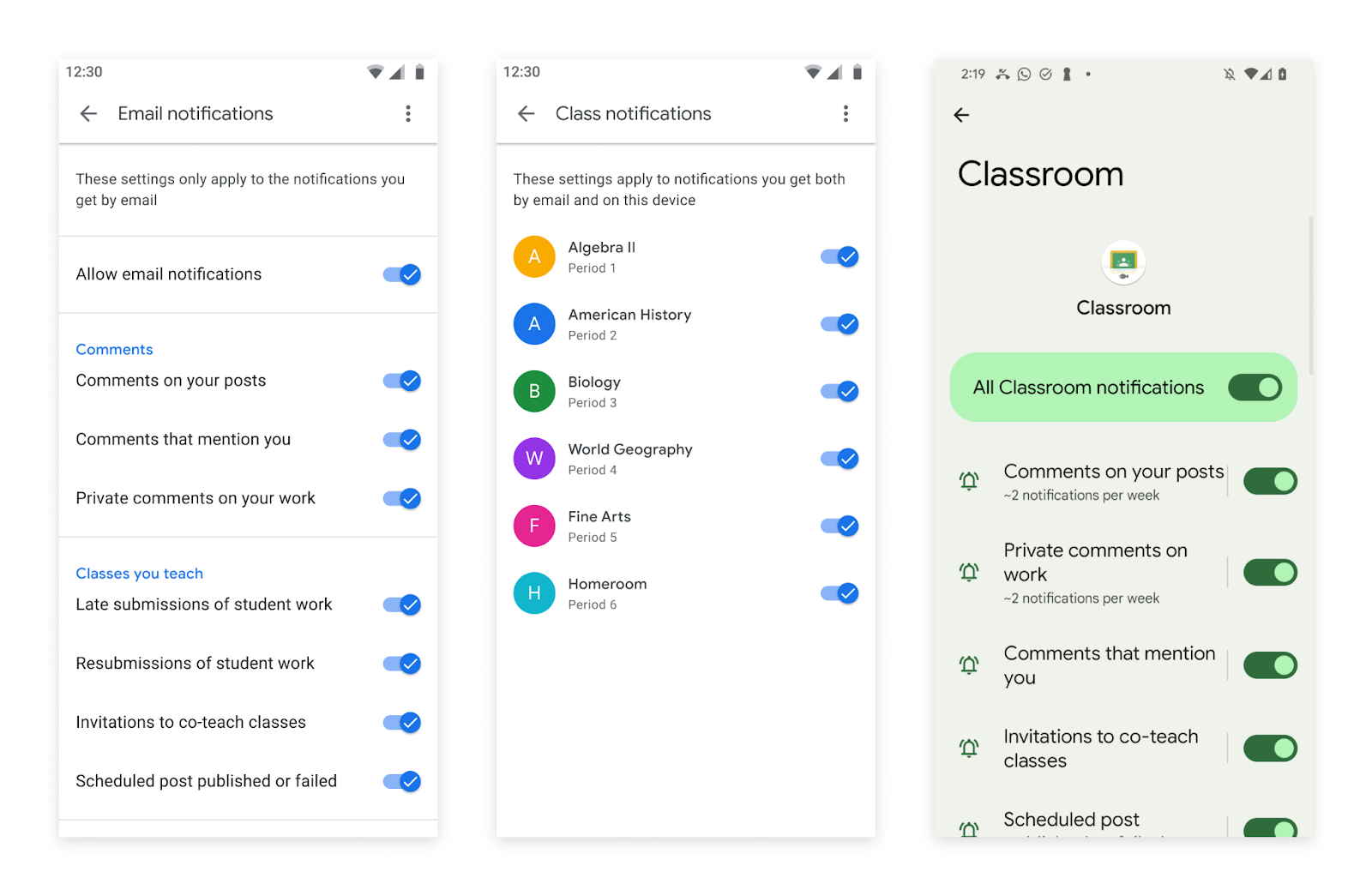
Tailor email notifications from Android or iOS mobile devices for Google Classroom.
Users can now tailor their email notifications from Android or iOS mobile devices, in addition to setting preferences for Classroom push notifications. The text for all push notifications has been updated and Classroom action options enhanced.
Release: Both -
2022-01-24Education
Originality reports are now available for Google Slides files.
Google Classroom has expanded the originality reports feature to include Google Slides files, allowing students and teachers to compare work against billions of web pages and books to ensure academic integrity. This feature is available for all Google Workspace for Education users; however, Education Fundamentals accounts are limited to 5 reports per class, while unlimited reports are available for Teaching and Learning Upgrade or Education Plus customers.
Release: Both • Rapid: 2022-01-24 • Scheduled: 2022-01-24 -
2022-01-10Education
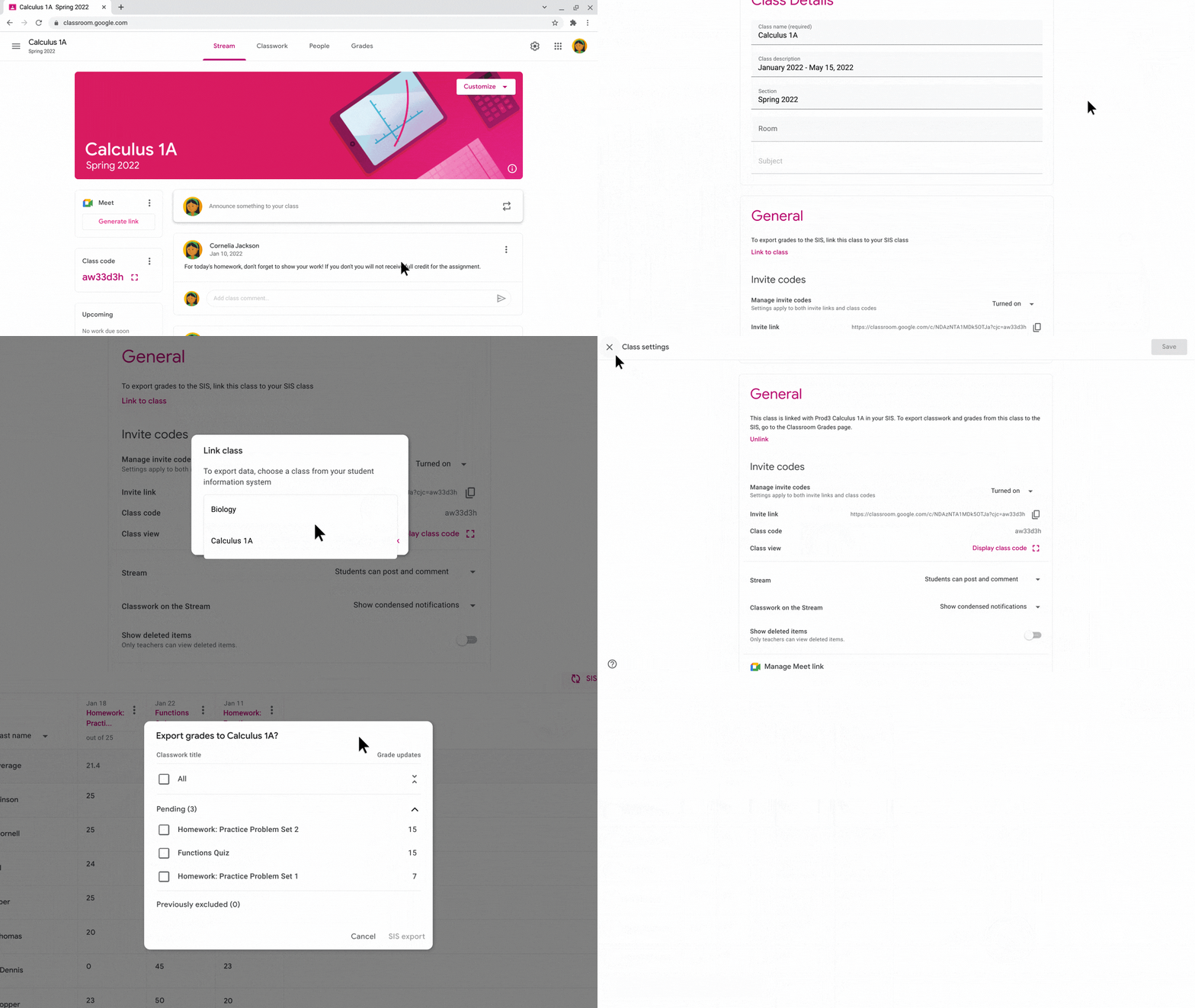
Google Classroom teachers can now export their grades to Follett Aspen, a third-party Student Information System (SIS).
Google Classroom teachers can now export their grades to Follett Aspen, a third-party Student Information System (SIS). Grade export is a one-way information push that allows: Admins to establish a connection between their district SIS and Google Classroom, and configure export settings that apply to Google Classroom teachers. Teachers to manually link new or existing Google Classroom classes to their SIS, and push returned assignments and grades from Google Classroom.
Release: Both -
2022-01-10Education
Google Classroom now supports grade exporting to Follett Aspen SIS.
Google Classroom teachers in the United States and Canada can now export their grades to Follett Aspen, a third-party Student Information System (SIS). This one-way information push allows admins to establish connections and configure settings, while teachers can manually link classes and push returned assignments and grades, reducing duplicative work and keeping the SIS in sync.
Release: Both • Rapid: 2022-01-10 • Scheduled: 2022-01-10 -
2021-10-04Education

Google Classroom video meetings are now easier and more secure with new Google Meet integration features.
Google has introduced several improvements to Google Meet within Google Classroom to enhance security and management. Key updates include placing the Class Meet link on the side of the class stream for easier access, implementing a waiting room for students until the teacher joins, requiring guests not on the class roster to ask for admission, and automatically granting co-host status to designated co-teachers to allow them to start meetings independently.
Release: Both • Rapid: 2021-10-04 • Scheduled: 2021-10-04 -
2021-09-09Education

Classroom activity logs now exportable to BigQuery with Data Studio templates.
For Education Standard and Plus customers, admins can now export Classroom audit log data from the Admin console to BigQuery for advanced querying. To assist with data visualization, Google has provided a customizable Data Studio report template.
Release: Both • Rapid: 2021-09-09 • Scheduled: 2021-09-09 -
2021-09-09Education
New Classroom audit logs available in the Admin console.
Google Workspace for Education admins can now access Classroom audit logs in the Admin console to track specific activities within their domain, such as identifying who removed a student from a class or who archived a class on a specific date.
Release: Both • Rapid: 2021-09-09 • Scheduled: 2021-09-09 -
2020-01-21Education
Originality reports and rubrics now generally available for Google Classroom users
Originality reports check a student's work for matches across billions of web pages and books. A rubric is a scoring framework that makes it easier for educators to evaluate student assignments, set clear expectations, and provide actionable feedback.
Release: Both • Rapid: 2020-02-03 • Scheduled: 2020-02-03 -
2020-01-21Education
Rubrics are now generally available for Google Classroom users.
Rubrics provide a scoring framework that helps educators evaluate student assignments, set clear expectations, and provide actionable feedback. Educators can create rubrics during assignment creation, reuse rubrics from previous assignments, and export or import rubrics to share with other instructors.
Release: Both • Rapid: 2020-02-03 • Scheduled: 2020-02-03 -
2020-01-21Education

Originality reports are now generally available for Google Classroom users.
Originality reports allow instructors to check student work for matches across billions of web pages and books to evaluate academic integrity and provide constructive feedback. Students can also use these reports to identify missed citations or poor paraphrasing before final submission. The feature is available for G Suite for Education and G Suite Enterprise for Education users.
Release: Both • Rapid: 2020-02-03 • Scheduled: 2020-02-03 -
2015-09-02Education
Launch of the Share to Classroom Chrome extension for pushing websites to students.
Google has launched the Share to Classroom Chrome extension, enabling teachers to instantly 'push' a website to all their students' devices during class. The extension also allows students to push websites to their teachers and is available to Google Apps for Education and Google Apps for Nonprofits customers using Google Classroom across Chromebooks, Macs, and PCs.
Release: Both • Rapid: 2015-09-02 • Scheduled: 2015-09-02 -
2015-08-24Education
Ability to attach Google Forms to posts and assignments.
Teachers and students will soon be able to attach Google Forms from Google Drive directly to posts and assignments, providing a streamlined way to distribute tests, quizzes, or surveys and view answers.
Release: Both -
2015-08-24Education
Optional due dates for assignments.
Teachers now have the option to create assignments without due dates, which is useful for long-term projects or student-driven assignments.
Release: Both • Rapid: 2015-08-24 • Scheduled: 2015-08-24 -
2015-08-24Education
Option to bump posts to the top of the stream.
Teachers can now move any older post to the top of the class stream to ensure that important items are easily visible to students.
Release: Both • Rapid: 2015-08-24 • Scheduled: 2015-08-24 -
2015-08-24Education
Automatic Google Calendar integration for classes.
Google Classroom will automatically create a calendar for each class. All assignments with due dates will be automatically added and updated on these calendars, which can be viewed within Classroom or via Google Calendar.
Release: Both