Google Docs updates from July 2015
6 updates to Google Docs were tracked in July 2015.
-
2015-07-27Content & Collaboration
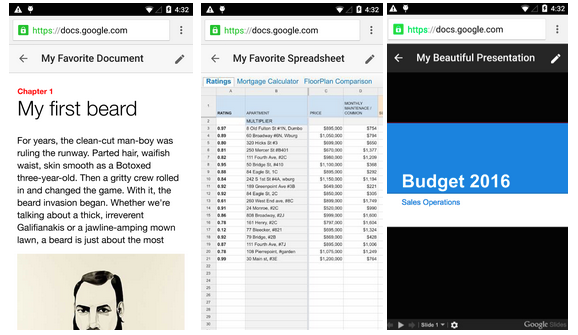
New uniform interface for Google Docs, Sheets, and Slides viewers on the mobile web.
Google is introducing a simpler and more uniform interface for the viewers of Google Docs, Sheets, and Slides on the mobile web to ensure a consistent user experience across these three products.
Release: Both • Rapid: 2015-07-27 • Scheduled: 2015-07-27 -
2015-07-27Content & Collaboration
Editing Google Docs files on the mobile web is being replaced by the mobile app.
To encourage the use of the more robust mobile app, Google is removing the ability to edit Google Docs files on the mobile web. Users attempting to edit Docs files on the mobile web will now be directed to the app or prompted to download it.
Release: Both • Rapid: 2015-07-27 • Scheduled: 2015-07-27 -
2015-07-20Other
Clearer indication of 'View' and 'Comment' access in Google Docs editors
Google is introducing UI tweaks to Google Docs, Sheets, Slides, and Drawings to make it more apparent when a user has only 'View' or 'Comment' access. Users with 'View only' access will see a new blue button in the toolbar, while those with 'Comment only' access (in Sheets, Slides, and Drawings) will see a green button, both of which allow the user to easily request edit access from the file owner.
Release: Both • Rapid: 2015-07-20 • Scheduled: 2015-08-03 -
2015-07-09Content & Collaboration
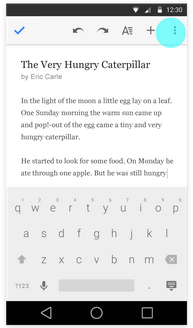
Easier file renaming in Android apps
Users can now edit document, spreadsheet, and presentation titles directly from the overflow menu in the top right corner of the Google Docs, Sheets, and Slides apps for Android, making renaming files faster and simpler.
Release: Both • Rapid: 2015-07-09 • Scheduled: 2015-07-09 -
2015-07-09Content & Collaboration
Improved comment and suggestion handling in Office Compatibility Mode for Android
In the Google Docs app for Android, users can now reply to comments when working in Office Compatibility Mode. Additionally, suggestions and comments in this mode now appear in the Comments panel in the order they were made, rather than grouped by type.
Release: Both • Rapid: 2015-07-09 • Scheduled: 2015-07-09 -
2015-07-06Content & Collaboration

New download functionality for Microsoft Office files in Google Docs, Sheets, and Slides.
The Office Compatibility Mode extension in Chrome now includes a feature that allows users to instantly download a local copy of edited Microsoft Office files. This functionality is accessible via the File drop-down menu and a button in the top right corner of the screen, making it easier for users to share files in Microsoft Office format or upload them via webforms.
Release: Both • Rapid: 2015-07-06 • Scheduled: 2015-07-06