All Google Drive updates
222 updates to Google Drive tracked so far.
-
2023-05-26Content & Collaboration

Find what you need faster with new Google Drive organizational options
Google Drive for Web is introducing new organizational options, including a drop-down menu in grid and list layouts to choose if folders appear 'on top' or 'mixed with files,' and new display options within the Search view.
Release: Both • Rapid: 2023-05-26 • Scheduled: 2023-06-07 -
2023-05-24Content & Collaboration

Developers will now be able to fully control file expirations via the Google Drive API for files in shared drives.
To expand upon this, we’re adding the option to set expirations on files that reside in shared drives using the Google Drive API. Specifically, developers will now be able to fully control file expirations via the API (creating, reading, updating, deleting), and users will be able to see, but not edit file expirations in the sharing dialog.
Release: Both -
2023-05-24Content & Collaboration
Set expirations for files in shared drives using Google Drive API
Google is expanding the ability to set expiring access to files located in shared drives via the Google Drive API. Developers can now fully control file expirations (creating, reading, updating, and deleting) through the API, while end users will be able to view these expirations in the sharing dialog, although they cannot edit them directly.
Release: Both • Rapid: 2023-05-24 • Scheduled: 2023-05-24 -
2023-05-12Content & Collaboration
Shared drives are being introduced to Google Workspace Business Starter.
As a benefit of the transition to pooled storage, Business Starter customers will gain access to shared drives, enabling better team collaboration through shared file storage and access. While users can create shared drives and add members, certain advanced admin-level and security controls will not be available for the Business Starter edition. This feature will become available after pooled storage has rolled out to all existing Business Starter customers.
Release: Both -
2023-05-12Content & Collaboration
Google Workspace Business Starter is transitioning from per-user storage to pooled storage.
Google is updating the storage model for Business Starter from per-user storage to pooled storage, allowing storage to be shared across the entire organization. This change simplifies storage management and provides admins with better monitoring tools. New customers will have pooled storage starting May 15, 2023, and existing customers will transition starting May 22, 2023.
Release: Both • Rapid: 2023-05-15 • Scheduled: 2023-05-15 -
2023-05-10Content & Collaboration

Google Drive introduces a dedicated spam folder for unwanted and abusive shared files.
Google Drive is introducing a dedicated spam folder to host unwanted files shared with users that contain spam or abusive content. Automatic classifiers will redirect suspected spam, and users can manually move Drive, Docs, Sheets, Slides, Sites, and Forms files in and out of the folder. Once a file is moved to spam, the user is unsubscribed from notifications and comments, and the file is permanently removed after 30 days.
Release: Both • Rapid: 2023-05-24 • Scheduled: 2023-05-24 -
2022-05-26Content & Collaboration

You can now use familiar keyboard shortcuts to copy, cut and paste Google Drive files in your Chrome browser.
This saves you time by allowing you to copy one or more files and move them to new locations in Drive, and across multiple tabs, with fewer clicks.
Release: Both • Rapid: 2022-05-26 • Scheduled: 2022-06-13 -
2022-05-25Content & Collaboration
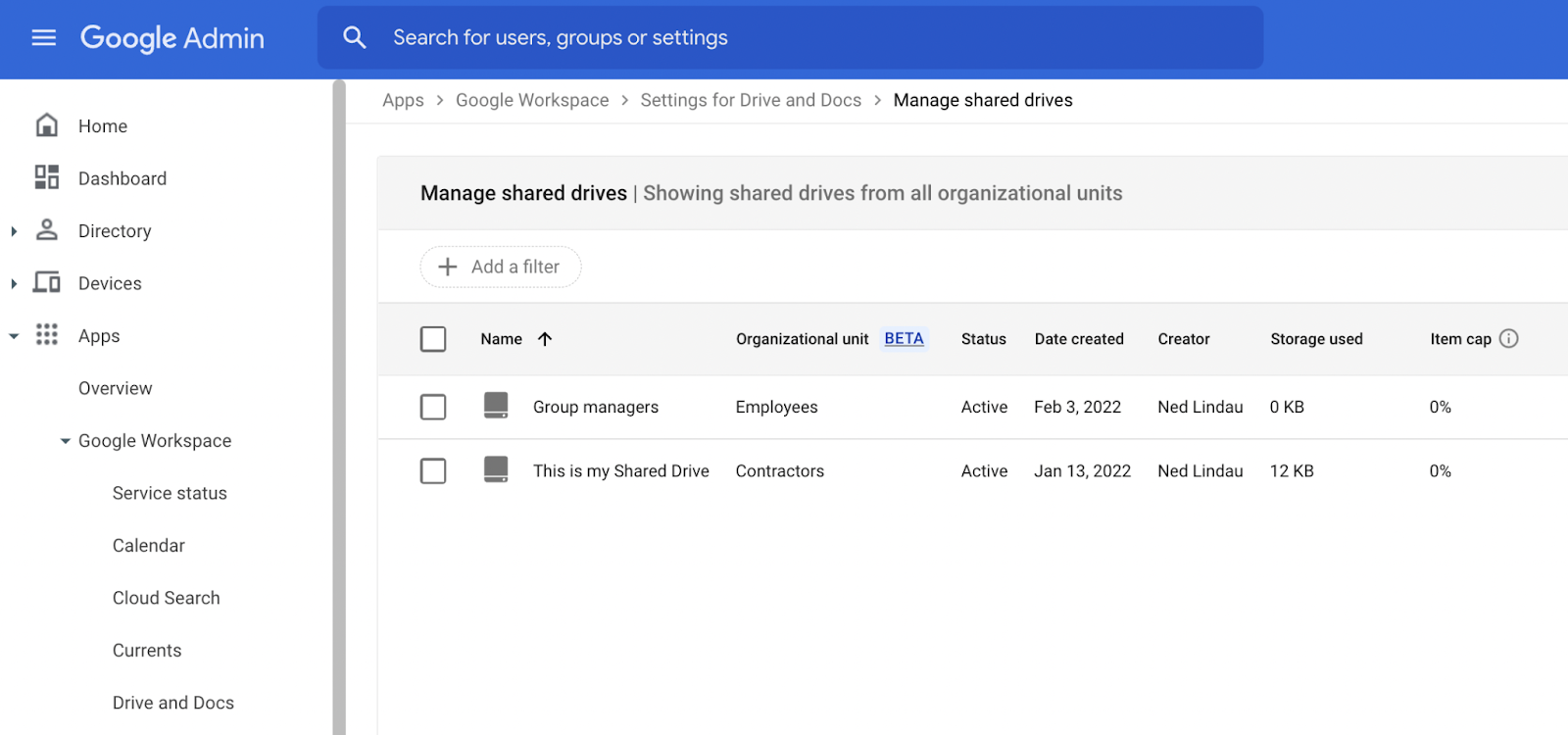
Admins can now place shared drives into sub organizational units (OUs) in open beta.
Doing so enables admins to configure sharing policies, data regions, access management, and more at a granular level.
Release: Beta • Rapid: 2022-05-25 • Scheduled: 2022-05-25 -
2022-02-28Content & Collaboration
New intelligent content-based detection and additional regional security detectors for data loss prevention.
Admins can use data loss prevention to create and apply rules to control what content your users can share in Google Drive files outside your organization, helping to prevent unintended exposure of sensitive information. These additional detectors, along with intelligent based scanning, help to further secure your environment and sensitive data.
Release: Both • Rapid: 2022-02-28 • Scheduled: 2022-02-28 -
2022-01-28Content & Collaboration
Automated classification with Google Workspace DLP and labels-driven sharing restrictions are now generally available.
Automated classification with Google Workspace DLP and labels-driven sharing restrictions are now generally available. A new Admin console setting can now automatically apply up to 5 labels to all new files your users create, or to all newly created files owned by specific parts of your organization.
Release: Both • Rapid: 2022-02-04 • Scheduled: 2022-02-04 -
2022-01-28Content & Collaboration
Automated classification of Google Drive files using DLP rules.
Automated classification is now generally available, enabling organizations to automatically add Drive labels to content based on administrator-defined DLP rules and predefined content detectors. This allows admins to configure rules that warn users or block external sharing, downloads, and printing for files labeled as confidential or internal.
Release: Both • Rapid: 2022-02-04 • Scheduled: 2022-02-04 -
2022-01-28Content & Collaboration
Automated classification with Google Workspace DLP and labels-driven sharing restrictions are now generally available.
A new Admin console setting can now automatically apply up to 5 labels to all new files your users create, or to all newly created files owned by specific parts of your organization. Automated classification can help organizations automatically add Drive labels to content based on administrator-defined DLP rules and predefined content detectors.
Release: Both • Rapid: 2022-02-04 • Scheduled: 2022-02-04 -
2022-01-27Content & Collaboration
From the URL bar in Google Drive, you can now quickly access key pages and functions.
When navigating into the Google Drive web application from the URL bar by hitting the "Tab" key, you can access buttons like "Skip to main content", "Keyboard shortcuts", and "Accessibility feedback"from the bar at the top of the page.
Release: Both • Rapid: 2022-01-27 • Scheduled: 2022-01-27 -
2022-01-27Content & Collaboration
New navigation bar functions for improved accessibility in Google Drive.
Google Drive has introduced new navigation bar functions that allow users to quickly access key pages and accessibility features. By pressing the 'Tab' key when navigating from the URL bar, users can now access buttons such as 'Skip to main content', 'Keyboard shortcuts', and 'Accessibility feedback' at the top of the page.
Release: Both • Rapid: 2022-01-27 • Scheduled: 2022-01-27 -
2022-01-20Content & Collaboration

If a user opens a potentially suspicious or dangerous file in Google Drive, we will display a warning banner to help protect them and their organization from malware, phishing and ransomware.
If a user opens a potentially suspicious or dangerous file in Google Drive, we will display a warning banner to help protect them and their organization from malware, phishing and ransomware. These warnings are already available when opening Google Docs, Sheets, Slides, and Drawings.
Release: Both • Rapid: 2022-01-20 • Scheduled: 2022-01-20

