All Google Drive updates
222 updates to Google Drive tracked so far.
-
2022-01-20Content & Collaboration

Warning banners in Google Drive alert users of suspicious files
Google Drive will now display warning banners when a user opens a potentially suspicious or dangerous file to help protect users and their organizations from malware, phishing, and ransomware. This functionality complements existing warnings already present in Google Docs, Sheets, Slides, and Drawings.
Release: Both • Rapid: 2022-01-20 • Scheduled: 2022-01-20 -
2021-12-14Content & Collaboration
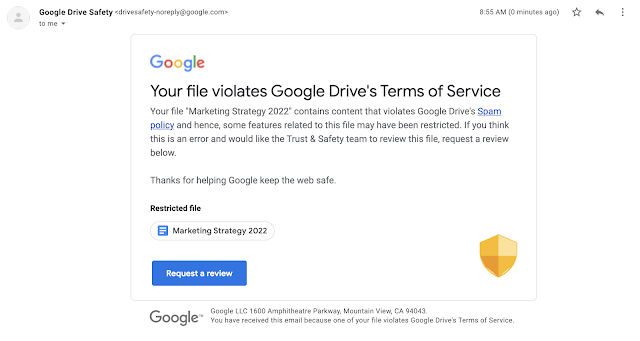
Google Drive now sends email notifications to owners when content is restricted for violating abuse program policies.
When a Google Drive file is identified as violating Google's Terms of Service or program policies, it may be restricted, which prevents sharing and removes public access. Now, the owner of the item, or the shared drive manager for items in shared drives, will receive an email notification informing them of the restriction and providing instructions on how to request a review if they believe the action was a mistake.
Release: Both • Rapid: 2021-12-14 • Scheduled: 2021-12-14 -
2021-12-07Content & Collaboration
Labels-driven sharing restrictions via Workspace DLP integration are launching soon.
Admins will be able to configure sharing restrictions that apply to all files with a specific label. For example, DLP administrators can set rules to warn users when sharing files labeled as 'Internal' or block external sharing, downloads, and printing for files labeled as 'Top Secret'.
Release: Both -
2021-12-07Content & Collaboration
Automated classification for Drive labels using Workspace DLP is launching soon.
Automated classification allows organizations to automatically apply Drive labels to content based on administrator-defined rules and predefined content detectors. This reduces the risk of manual classification errors and helps scale data protection efforts by providing a safeguard against unlabeled content.
Release: Both -
2021-12-07Content & Collaboration
Drive labels are now generally available for custom content categorization.
Admins can now configure custom labels for their domain, which users can apply to files in Drive via the context menu, detail pane, or the File menu in Google Docs, Sheets, and Slides. This feature helps organizations categorize content and ensure files are handled correctly, including the ability to designate one 'badged label' for high visual prominence to remind users to handle sensitive files with care.
Release: Both • Rapid: 2021-12-07 • Scheduled: 2021-12-07 -
2021-11-09Content & Collaboration
Google Drive user blocking now extends to comments and mentions.
Google is enhancing the user blocking feature in Google Drive to prevent notifications when there is an @-mention between a user and a blocked user in comments or action items across Google Docs, Sheets, and Slides. This restriction applies to both email and in-app notifications, making the blocking feature more comprehensive and predictable.
Release: Both • Rapid: 2021-11-09 • Scheduled: 2021-11-09 -
2021-11-03Content & Collaboration
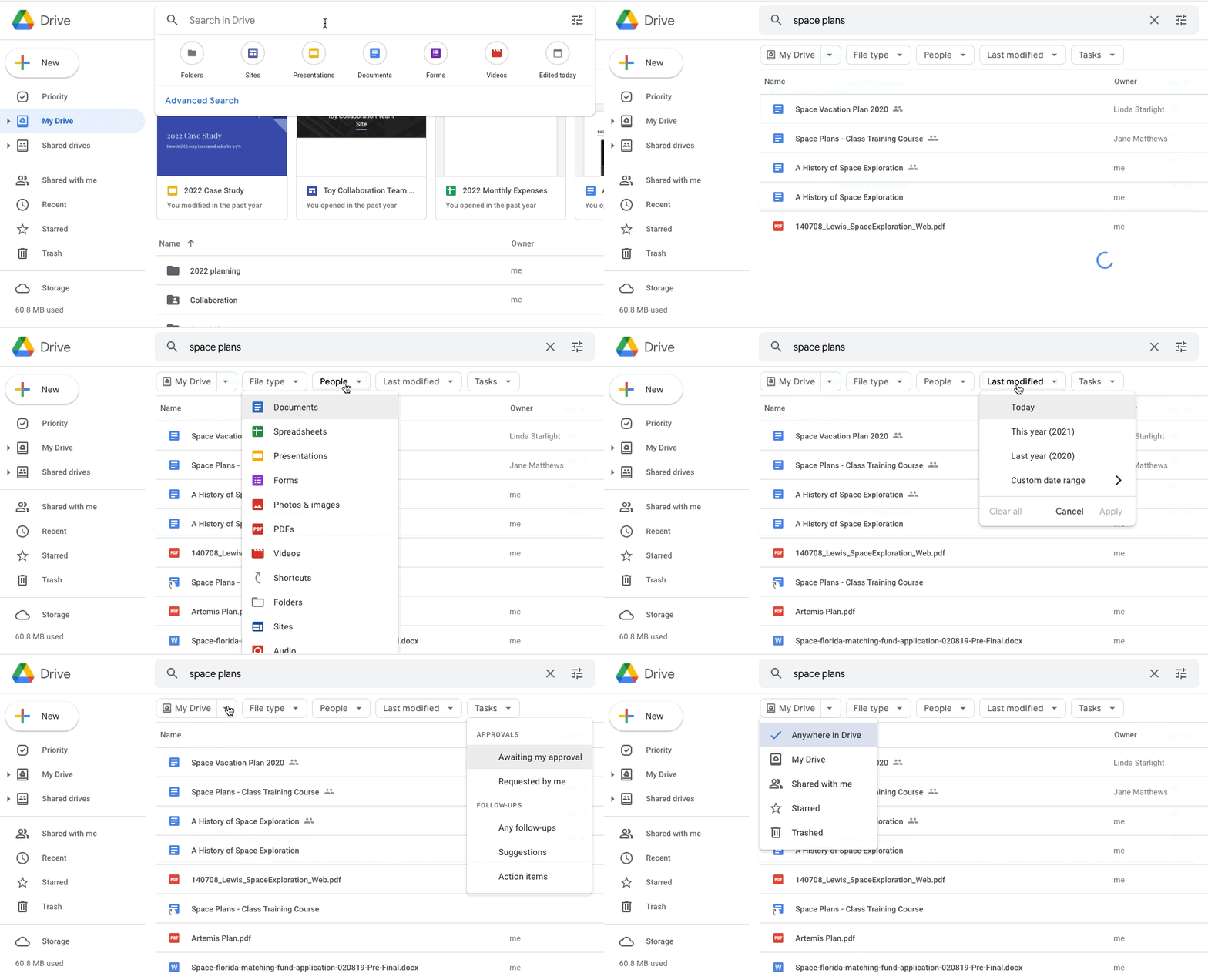
Google Drive introduces search chips in beta to help users refine search results.
Google Drive is launching a beta feature called search chips, which allows users to narrow down their search results more effectively. Users can filter results based on file type (e.g., Google Doc, PDF, or image), people, location (such as a shared drive or specific folder), last modified date, file titles, and shared drive labels, mirroring functionality already available in Gmail.
-
2021-10-22Content & Collaboration
Drive for desktop support for Apple silicon (M1) devices is now generally available.
Google has announced the general availability of Drive for desktop support for Apple Silicon (M1) devices. Following a beta period and subsequent functionality improvements, the feature is now available to all Google Workspace customers, G Suite Basic and Business customers, and users with personal Google accounts.
Release: Both • Rapid: 2021-10-22 • Scheduled: 2021-10-22 -
2021-10-01Content & Collaboration
Quickly access Google Drive files in Chrome browser.
We’re adding a card onto the New Tab Page in your Chrome browser that will surface relevant files from your Google Drive, making it easier and more efficient to find the files you need.
Release: GA • Rapid: 2021-10-01 • Scheduled: 2021-10-01 -
2021-09-29Content & Collaboration

Adding a card onto the New Tab Page in your Chrome browser that will surface relevant files from your Google Drive.
End users will be able to access their highest priority Drive files straight from the Chrome Desktop new tab page.
Release: Both • Rapid: 2021-09-29 • Scheduled: 2021-09-29 -
2021-09-17Content & Collaboration
Google Drive user blocks will no longer apply to users in trusted domains.
Google is updating the user blocking feature in Google Drive so that blocks can no longer be applied to users within trusted domains. Any existing blocks for users in trusted domains will no longer be enforced within Google Drive, although they will continue to be enforced in other Google apps and services.
Release: Both • Rapid: 2021-09-17 • Scheduled: 2021-09-17 -
2021-09-02Content & Collaboration
ChromeOS users can now manage offline access for Google Docs, Sheets, and Slides via the Files app.
ChromeOS users can now use the native Files app on their Chromebooks to select Google Docs, Sheets, and Slides files to be available offline. This update streamlines the process by eliminating the requirement to open the Google Drive or Google Docs web interfaces to manage offline file availability.
Release: Both • Rapid: 2021-09-02 • Scheduled: 2021-09-14 -
2021-09-02Content & Collaboration
Easily make all files types available offline in Google Drive
Today, we are announcing more ways to make sure you can make them all accessible to you even when your internet connection is unavailable.
Release: Both • Rapid: 2021-09-02 • Scheduled: 2021-09-14 -
2021-08-02Content & Collaboration
Shared links to Microsoft Office files in Drive now open directly in Google Docs, Sheets, or Slides.
When creating links to shared Microsoft Office files stored in Google Drive, the files will now open directly in the corresponding Google editor (Docs, Sheets, or Slides) instead of opening in a preview mode first. This streamlines the editing and collaboration process. Additionally, this update modifies the alternateLink and webViewLink fields for shared links within the Google Drive API.
Release: Both • Rapid: 2021-07-30 • Scheduled: 2021-07-30 -
2021-07-12Content & Collaboration

Backup and Sync users should begin transitioning to Drive for desktop
Now, we want to provide a more detailed timeline for this transition
Release: Both • Rapid: 2021-07-19 • Scheduled: 2021-07-19