Google Meet updates from June 2023
19 updates to Google Meet were tracked in June 2023.
-
2023-06-28Comms & Meetings
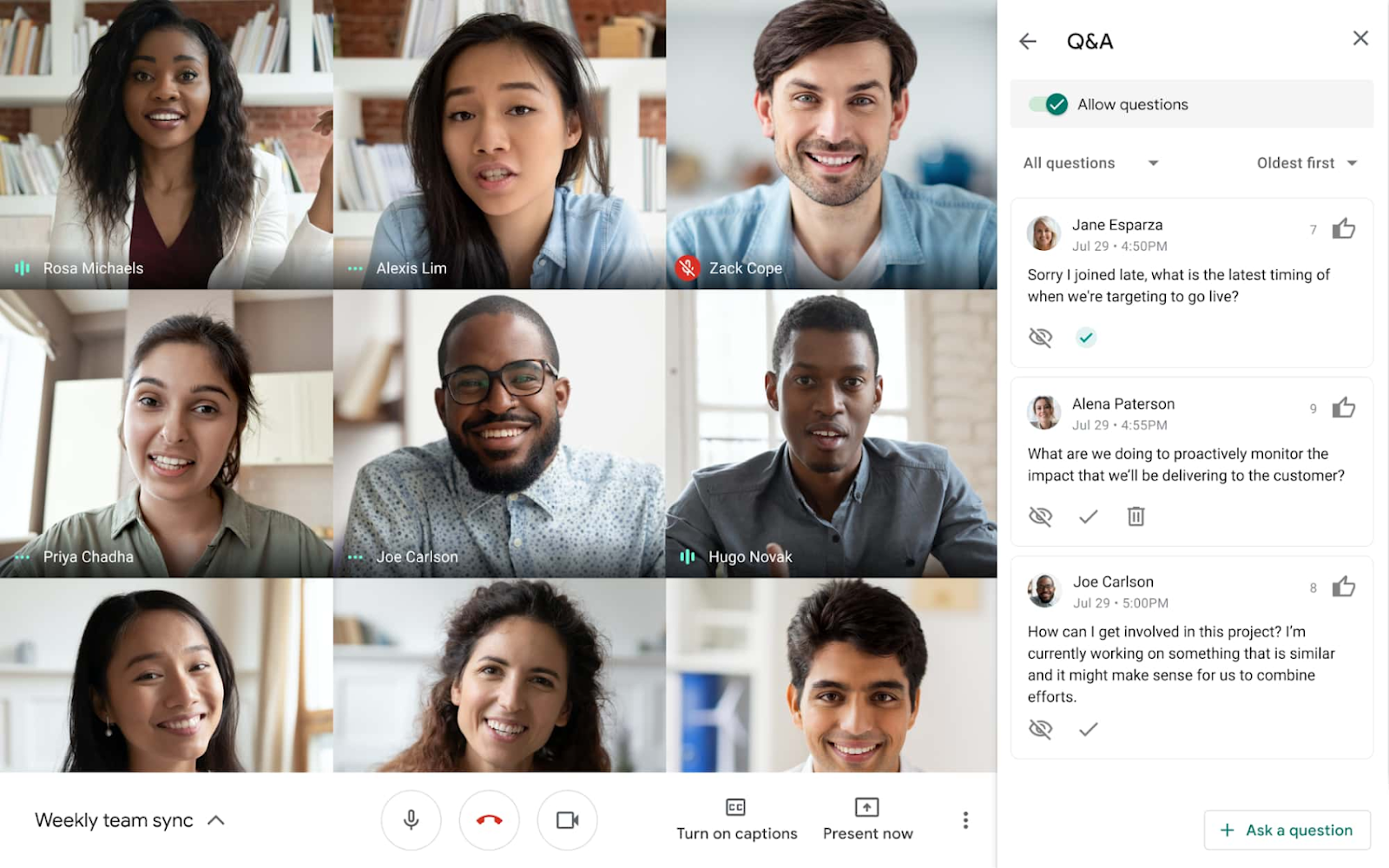
Polls and Q&A features are now available for Google Meet live streams.
Meeting hosts can now enable Q&A and poll features during live-streamed Google Meet meetings, expanding capabilities that were previously only available in traditional Meet meetings. These tools allow hosts to better engage audiences, gather real-time feedback, and provide a structured way for participants to ask and upvote questions without disrupting the flow of the presentation.
Release: Both • Rapid: 2023-06-28 • Scheduled: 2023-06-28 -
2023-06-28Comms & Meetings
Meeting hosts can now enable the Q&A and poll features during live streamed meetings.
If you’re live streaming a video meeting, meeting hosts can now enable the Q&A and poll features, which previously were only offered in traditional Meet meetings. Expanding these features to live streamed meetings will help take your meetings to the next level with a more feature-rich, collaborative experience.
Release: Both • Rapid: 2023-06-28 • Scheduled: 2023-06-28 -
2023-06-27Comms & Meetings
.png)
Google Meet is introducing simplified access controls to replace the existing Quick access settings.
Google Meet is replacing 'Quick access' with three intuitive access levels: Open, Trusted, and Restricted. Meeting organizers can now explicitly control who can join a meeting without asking (knocking), with specific rules for organization members and invited guests. Additionally, hosts can configure whether guests are allowed to join the meeting before the host. This update also removes the Quick access setting from the Admin console and implements new default access behaviors based on the user's Workspace edition.
Release: Both • Rapid: 2023-07-17 • Scheduled: 2023-07-17 -
2023-06-26Comms & Meetings

Background blur and light adjustment are now available for Google Meet calls joined via virtual desktop infrastructure (VDI).
Users joining Google Meet meetings through a virtual desktop infrastructure (VDI) can now utilize background blur and automatic light adjustment. Background blur intelligently isolates the user from their surroundings, while light adjustment improves visibility for underexposed users. These features are applied after joining the call and help reduce the resource demand (CPU, GPU, and memory) on VDI environments, potentially allowing admins to reduce GPU resources for cost savings.
Release: Both • Rapid: 2023-06-26 • Scheduled: 2023-06-26 -
2023-06-26Comms & Meetings
.gif)
Introducing a new quick action to access popular features in Google Meet, such as video effects and reframing.
We are introducing a new quick action to access popular features in Google Meet. By hovering the mouse on top of your own video feed, you can access video effects such as immersive backgrounds or fun filters to bring more fun to your meetings and a reframing option to improve your visibility.
Release: Both • Rapid: 2023-06-26 • Scheduled: 2023-07-05 -
2023-06-26Comms & Meetings
If you’re using a virtual desktop infrastructure (VDI) to join a Google Meet meeting, you can now use background blur and light adjustment.
If you’re using a virtual desktop infrastructure (VDI) to join a Google Meet meeting, you can now use background blur and light adjustment. Background blur will intelligently separate you from the background, blurring your surroundings while keeping you clear and in focus. Light adjustment automatically detects when you appear underexposed and enhances the brightness to improve your visibility.
Release: Both • Rapid: 2023-06-26 -
2023-06-22Comms & Meetings

New companion mode check-in feature for Google Meet conference rooms.
Google Meet has introduced a companion mode check-in feature that allows users joining a meeting from a conference room to check in using their personal devices. This ensures that participants are identified by their individual names in the people panel and during interactions like hand raising or presenting, rather than being represented solely by the conference room's name, fostering a more inclusive and equitable hybrid meeting experience.
Release: Both • Rapid: 2023-06-22 • Scheduled: 2023-07-24 -
2023-06-22Comms & Meetings
Use companion mode to check-in to a Google Meet conference room, so everyone can know you by name
If you’re joining a meeting from a conference room, you can use companion mode on your personal device to check in to that specific room. Room check-in allows everyone on the call to easily identify who is in the conference room, rather than simply seeing the conference room name.
Release: Both • Rapid: 2023-06-22 • Scheduled: 2023-07-24 -
2023-06-21Comms & Meetings

Admins can now clear previously set default peripherals in the Admin console.
Admins now have the ability to clear previously set default peripherals from the peripheral tree on the device detail page in the Google Meet hardware Admin console. Previously, removing a default peripheral was only possible by assigning a different peripheral as the new default.
Release: Both • Rapid: 2023-06-21 • Scheduled: 2023-06-21 -
2023-06-21Comms & Meetings
Admins can now monitor additional Google Meet hardware issues in the Admin console.
Google has expanded the monitoring capabilities in the Admin console for Google Meet hardware. Admins can now detect and monitor issues such as missing displays, controllers, and default peripherals (camera, microphone, speaker, and whiteboard camera). These issues are visible in the peripheral status on the Device list page and the issue timeline, and they are supported by email and SMS alerts.
Release: Both • Rapid: 2023-06-21 • Scheduled: 2023-06-21 -
2023-06-13Comms & Meetings
Several closed caption languages in Google Meet have moved out of beta.
Google Meet has removed the beta tag from closed captioning for Dutch, Italian, Japanese, Korean, Portuguese, and Russian, as these languages have been validated.
Release: Both • Rapid: 2023-06-13 • Scheduled: 2023-06-13 -
2023-06-13Comms & Meetings
Google Meet adds new target languages for translated captions from English.
Google Meet now supports translating meetings spoken in English into Dutch, Indonesian, Turkish, and Vietnamese. These newly supported languages are currently denoted with a beta tag.
Release: Both • Rapid: 2023-06-13 • Scheduled: 2023-06-13 -
2023-06-13Comms & Meetings
Google Meet expands closed captioning support to include seven new languages.
To improve inclusivity, Google Meet has expanded its closed captioning support to include French Canadian (web only), Indonesian, Polish, Romanian, Thai, Turkish, and Vietnamese.
Release: Both • Rapid: 2023-06-13 • Scheduled: 2023-06-13 -
2023-06-12Comms & Meetings
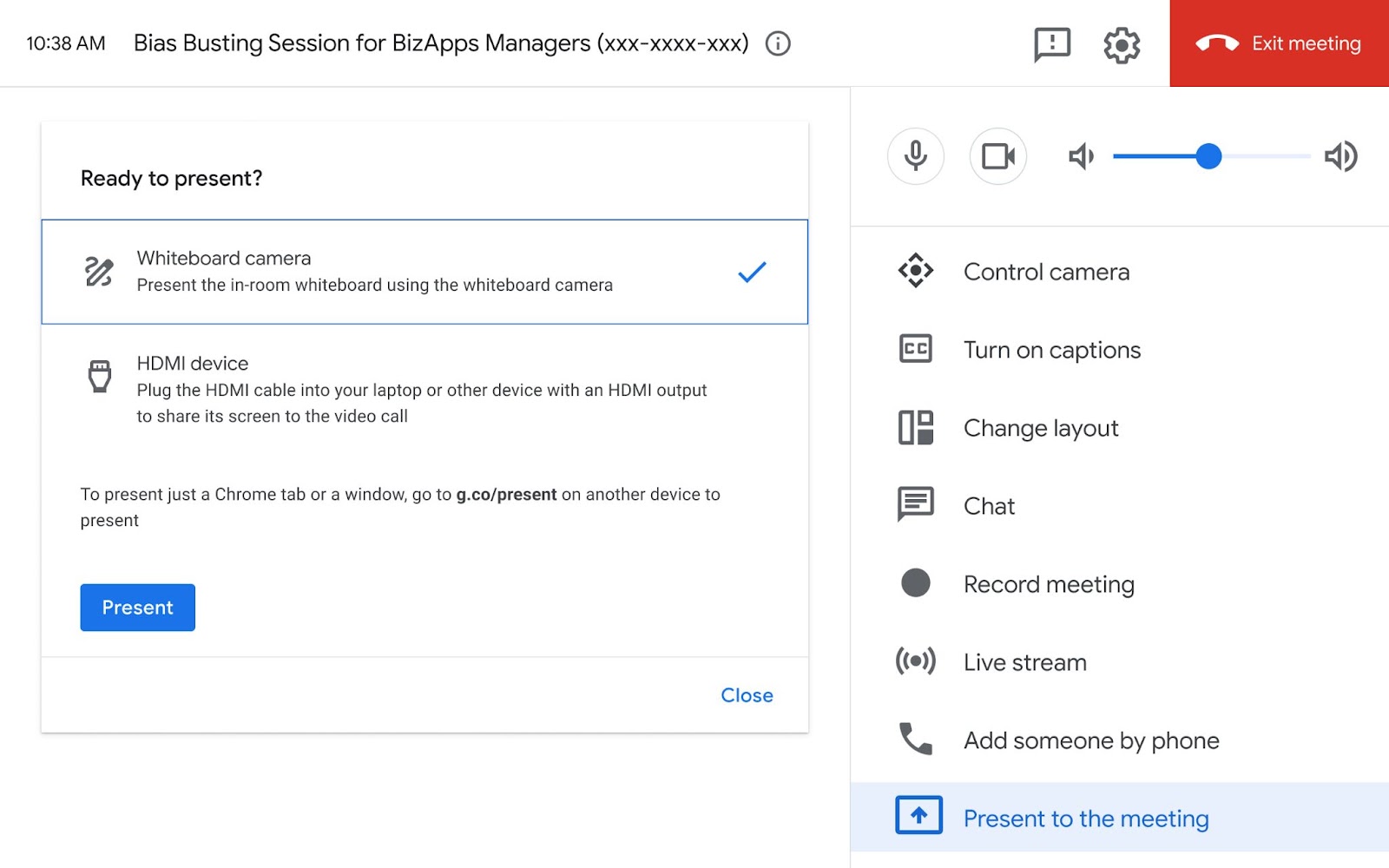
Google Meet Hardware now supports whiteboard cameras, starting with the Logitech Scribe.
Google Meet Hardware has introduced support for whiteboard cameras, with the Logitech Scribe being the first certified device. This update allows in-person meeting participants to share content written on a physical whiteboard as a presentation, ensuring remote colleagues can see the brainstorming process in real-time. Users can access this feature through an updated touch controller UI by selecting 'Present to the meeting' and then choosing the 'Whiteboard camera' option.
Release: Both • Rapid: 2023-06-19 • Scheduled: 2023-06-19 -
2023-06-07Comms & Meetings

Enhanced picture-in-picture experience for Google Meet in Chrome.
Google is updating the picture-in-picture (PiP) experience for Google Meet in Chrome to be more engaging and feature-rich. Users can now raise their hand, use the meeting chat, toggle captions, resize the PiP window more effectively, and access flexible layouts directly from the PiP window, offering greater flexibility when screen sharing or navigating between screens.
Release: Both • Rapid: 2023-06-07 • Scheduled: 2023-06-07