All Google Docs updates
216 updates to Google Docs tracked so far.
-
2023-08-04Content & Collaboration
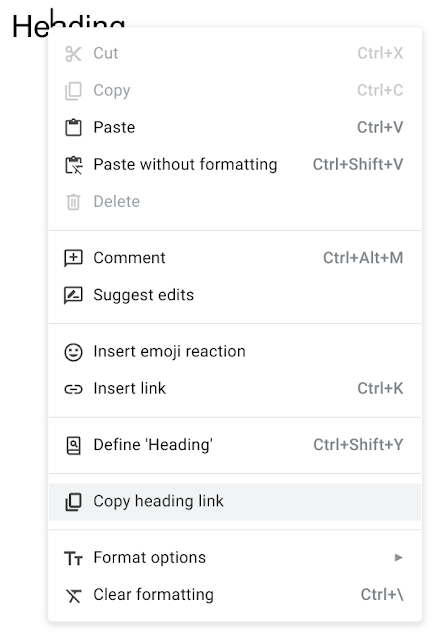
Linkable headings now available in Google Docs
To improve the shareability of longer documents, Google Docs now allows users to copy links to specific headings. Users can right-click a heading and select 'Copy heading link' to share a direct link to that section of the document.
Release: Both -
2023-07-24Content & Collaboration
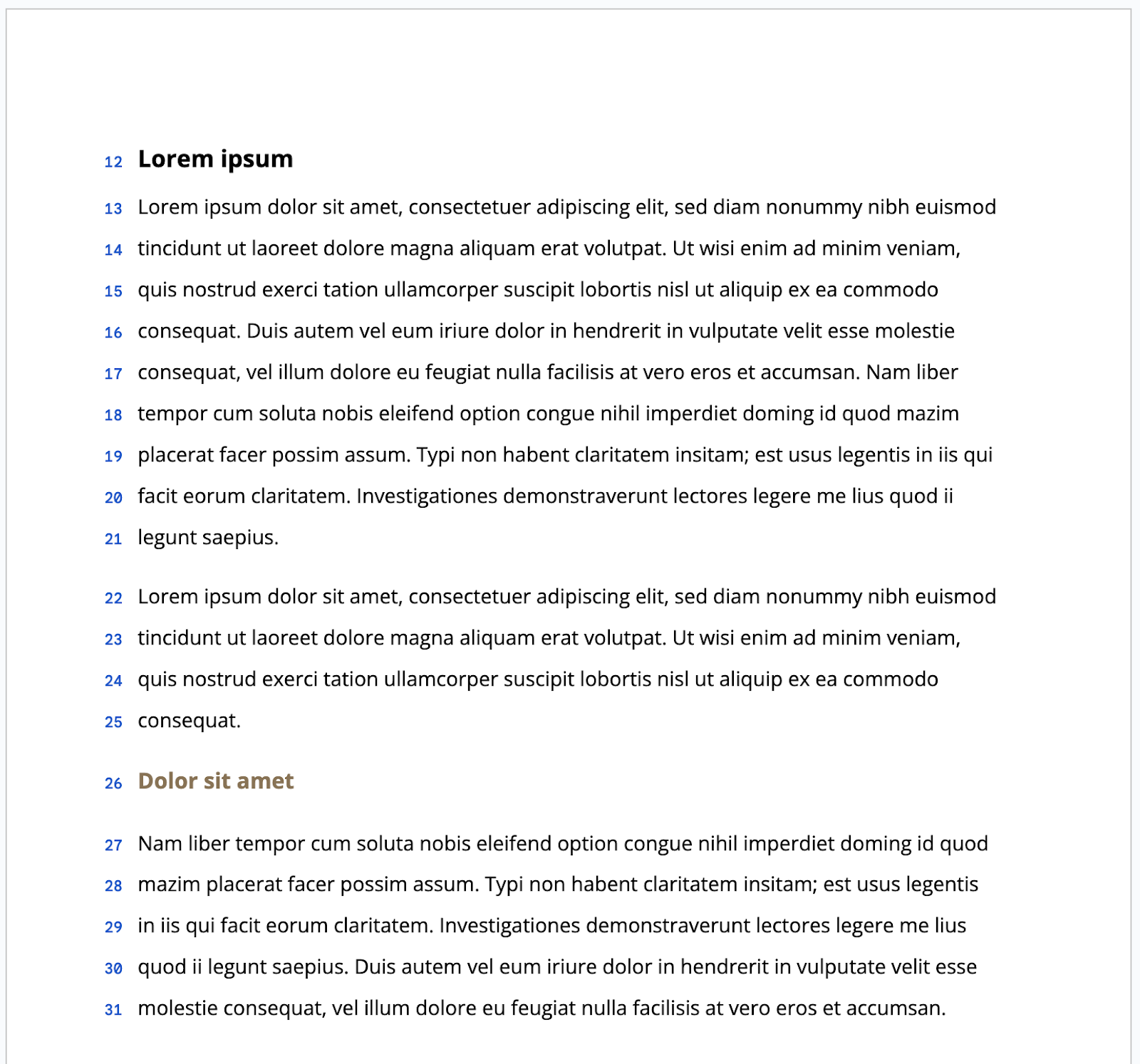
We’ve introduced the option to display line numbers within Docs that are set to paged mode.
In addition to previous updates that give you more control over formatting in Google Docs, such as viewing non-printing characters and enhancements to content organization, we’re introducing the option to display line numbers within Docs that are set to paged mode.
Release: Both • Rapid: 2023-07-24 • Scheduled: 2023-08-07 -
2023-07-24Content & Collaboration
Google Docs now allows users to display and configure line numbers in paged mode.
Google Docs has introduced the option to display line numbers for documents set to paged mode. These numbers are automatically calculated and can be configured for the entire document, a specific page, or a specific section, and are preserved when printing. This feature is designed to make it easier to reference specific content positions, especially when collaborating on long or complex documents.
Release: Both • Rapid: 2023-07-24 • Scheduled: 2023-08-07 -
2023-07-21Content & Collaboration

Alt text option added to the Image options sidebar in Docs, Sheets, Slides, and Drawings.
Google is improving the discoverability of the alternative text feature by adding the Alt text option directly to the Image options sidebar in Google Docs, Sheets, Slides, and Drawings. Previously, users had to right-click an image and select 'Alt text' to input descriptions.
Release: Both • Rapid: 2023-07-21 • Scheduled: 2023-07-21 -
2023-07-07Content & Collaboration

Revamped first open experience for Google Docs on Android foldable and tablet devices.
The Google Docs app for Android foldable and tablet devices now opens directly in edit mode. This update includes a more visible formatting toolbar, an I-beam cursor, and automatic on-screen keyboard exposure when tapping, unless a physical keyboard is connected.
Release: Both • Rapid: 2023-07-07 • Scheduled: 2023-07-07 -
2023-06-30Content & Collaboration
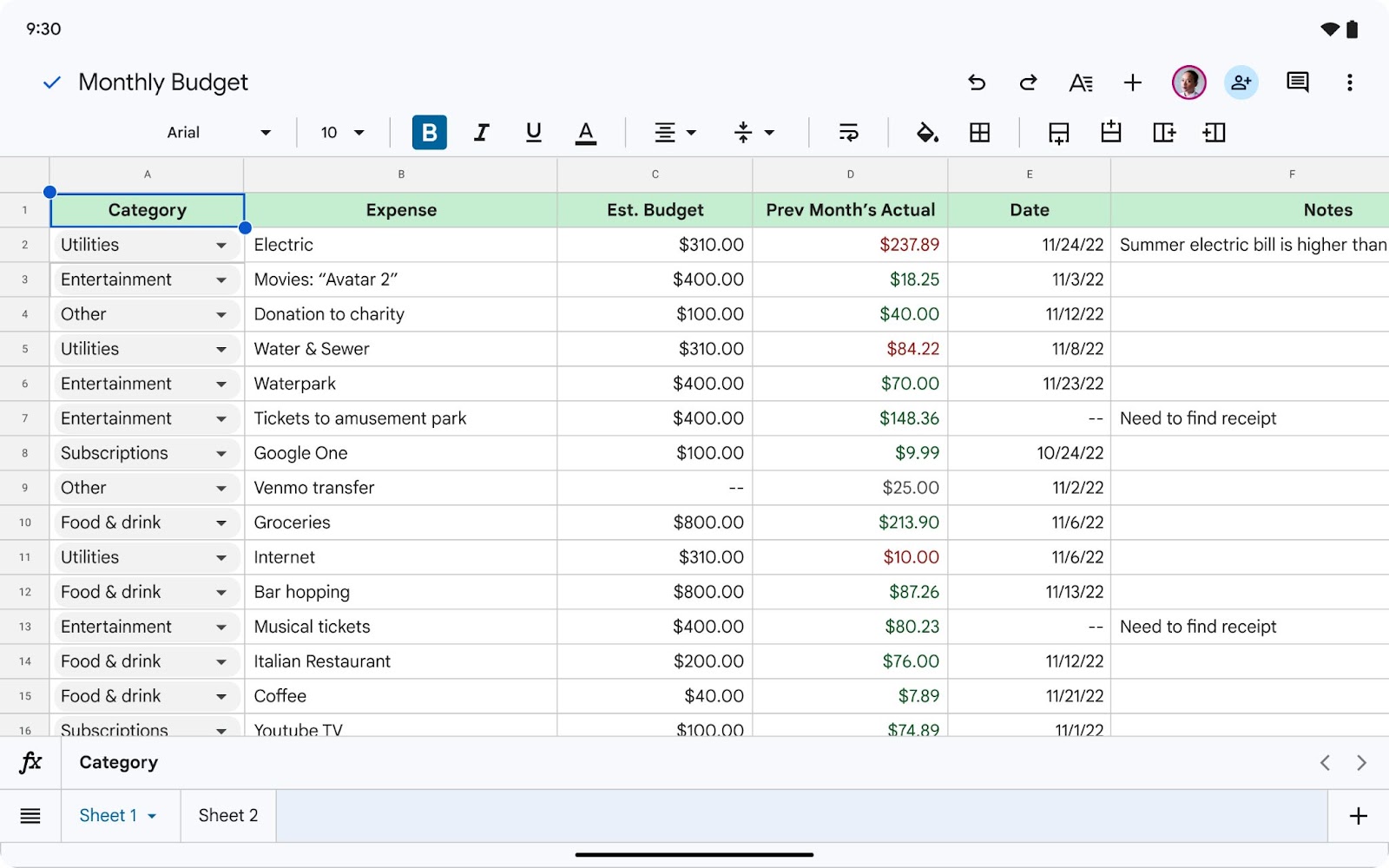
Ability to paste HTML elements into Google Docs on Android.
To improve the user experience on large screen devices, Google is introducing the ability for users to copy HTML elements to the clipboard and paste them into a Google Doc on Android while maintaining the original formatting elements.
Release: Both • Rapid: 2023-06-30 • Scheduled: 2023-06-30 -
2023-06-23Content & Collaboration

Gain consensus from collaborators quickly with voting chips in Google Docs
Google Docs now supports smart chips containing emojis that act as voting indicators. This feature allows teams to rank or compare ideas more efficiently while collaborating within a document.
Release: Both -
2023-06-16Content & Collaboration

Third-party smart chips are now generally available in Google Docs.
Google Docs has introduced third-party smart chips, enabling users to integrate and preview critical information from external applications directly within their documents. By installing partner add-ons from the Google Workspace Marketplace and pasting a link from a supported third-party source (such as Atlassian, Figma, Miro, or Whimsical), users can convert links into smart chips by pressing 'tab', streamlining workflows and collaboration.
Release: Both • Rapid: 2023-06-16 • Scheduled: 2023-06-16 -
2023-06-14Content & Collaboration
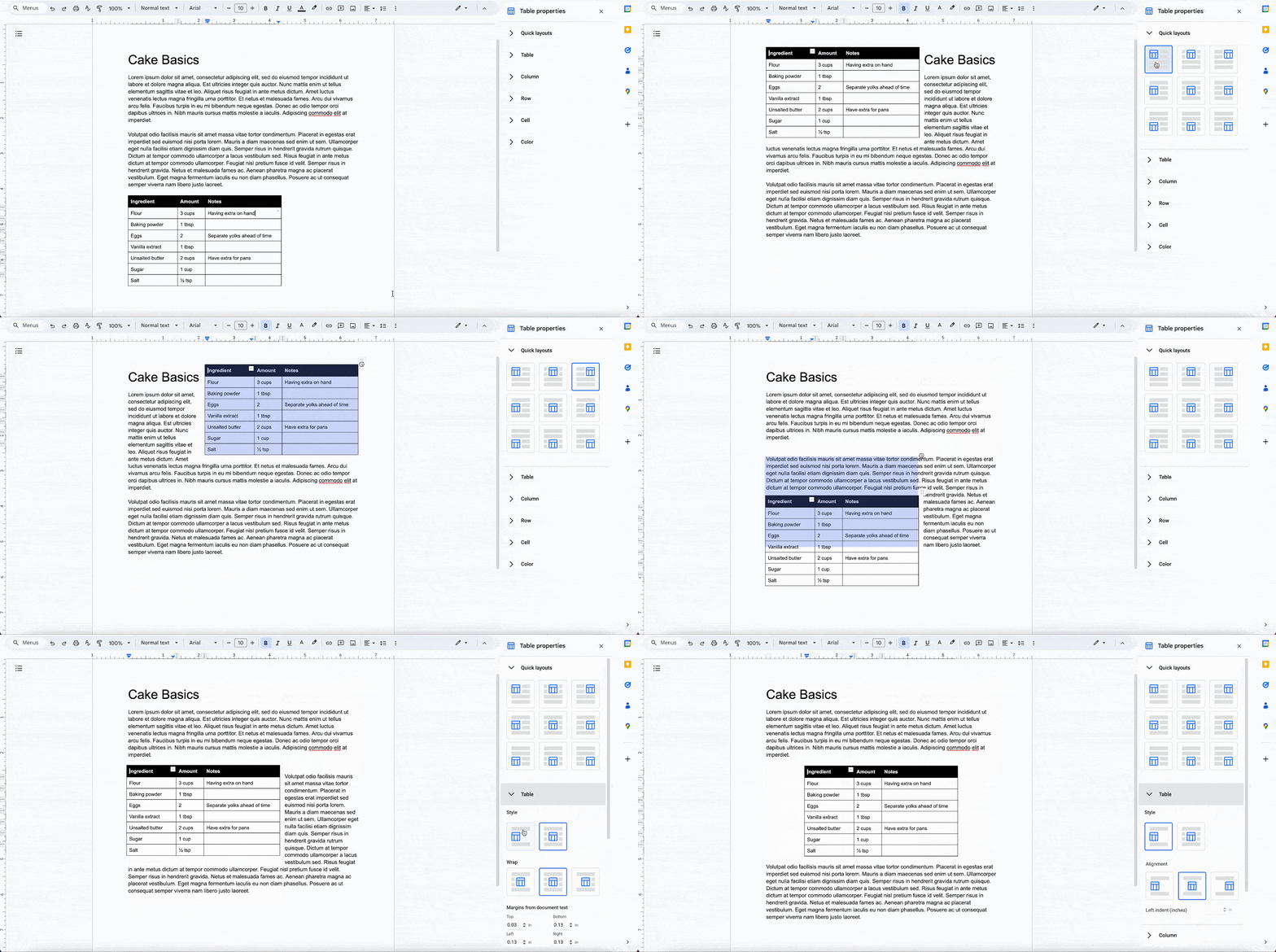
Improved table positioning and layout options in Google Docs pages format.
Google Docs is introducing enhanced table positioning options for documents set in pages format, enabling users to drag tables to specific locations, wrap text around tables (with adjustable directions and margins), set fixed positions, and utilize quick layouts for preset positioning. Additionally, the import and export functionality for Microsoft Word documents with tables has been improved to ensure better consistency.
Release: Both • Rapid: 2023-06-14 • Scheduled: 2023-07-31 -
2023-06-09Content & Collaboration

View documents in paginated mode on Android devices
Google Docs on tablets and foldable devices will now open in paginated mode by default, unless the document is specifically set to pageless. This ensures a more cohesive visual design and consistent page breaks between the web, tablet, and foldable versions of the app.
Release: Both • Rapid: 2023-06-09 • Scheduled: 2023-06-09 -
2023-06-02Content & Collaboration

Vertical context menu for Google Docs and Slides on Android
Google is improving the experience on large screen Android devices by adding the ability to access a vertical context menu when using mouse right-clicking in the Google Docs and Slides apps.
Release: Both -
2023-05-23Content & Collaboration

Introducing variable chips, a new feature that makes document creation for things like invoices, contracts, or broader communications much easier.
Today, we’re introducing variable chips, a new feature that makes document creation for things like invoices, contracts, or broader communications much easier. Simply pre-define and insert placeholders such as a client name, contract number, or an address, and then update it throughout an entire document by editing the value in one place.
Release: Both • Rapid: 2023-05-23 • Scheduled: 2023-06-05 -
2023-05-23Content & Collaboration
Introduction of variable chips in Google Docs to simplify document creation with dynamic placeholders.
Google Docs is introducing variable chips, a new feature that allows users to pre-define and insert placeholders—such as client names, contract numbers, or addresses—and update them throughout an entire document by editing the value in one place. This makes the creation of templates for invoices, contracts, and broader communications more straightforward.
Release: Both • Rapid: 2023-05-23 • Scheduled: 2023-06-05 -
2023-05-19Content & Collaboration

New timer and time-of-day chips in Google Docs
Google Docs is introducing new timer chips to help users timebox activities and ensure productivity, as well as a time-of-day chip that can be added to date chips by typing "@today" and selecting "Set time".
Release: Both • Rapid: 2023-05-19 • Scheduled: 2023-05-31 -
2023-05-17Content & Collaboration
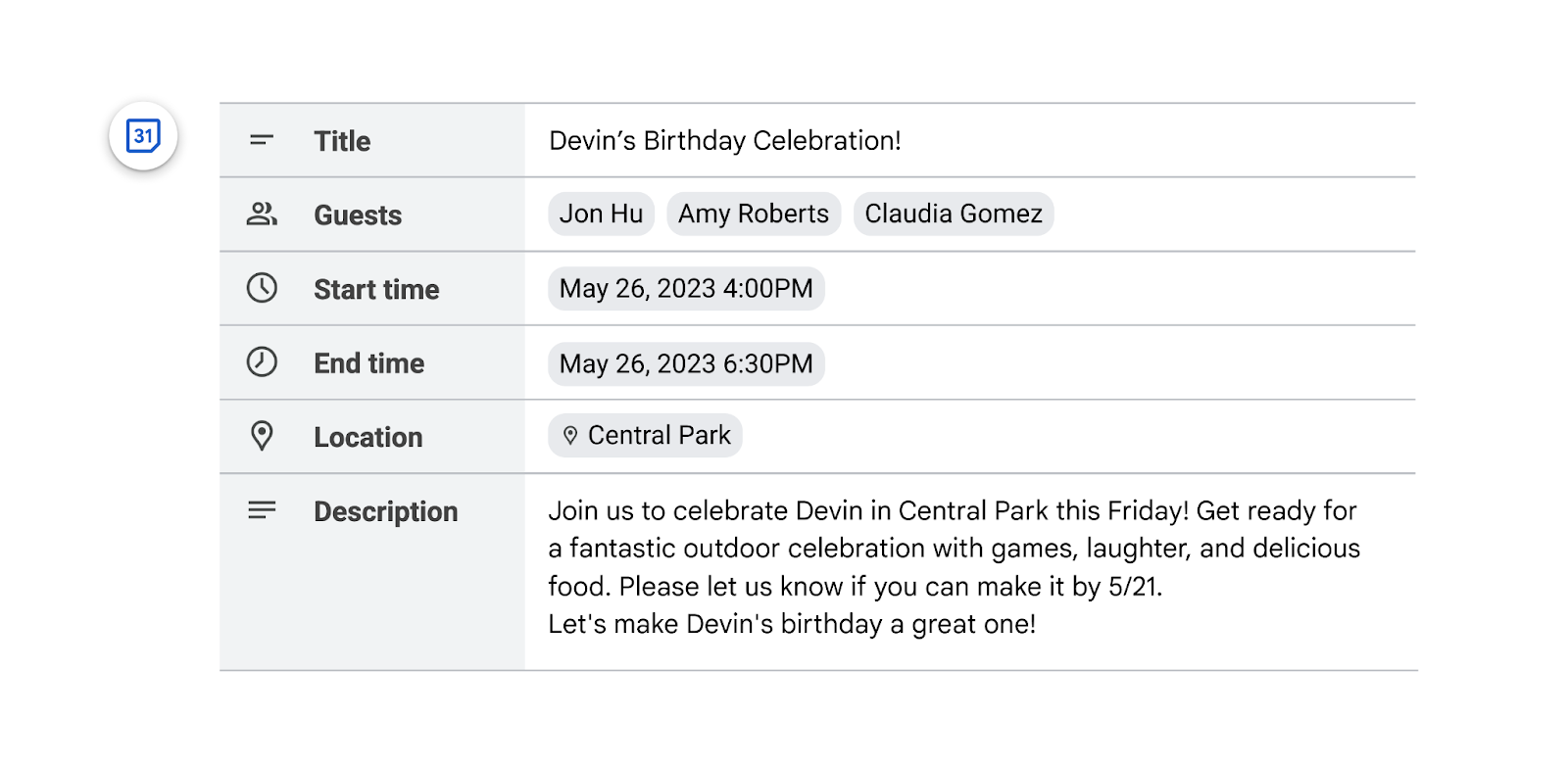
Collaborate on Google Calendar invites using a new building block in Google Docs.
Google Docs has introduced a new building block that allows users to collaborate with others to draft calendar invites. This feature is useful for stakeholders to coordinate dates, times, attendees, and event descriptions before sending. Users can access this by typing '@Calendar event draft' or navigating to Insert > Building blocks > Calendar event draft, and then clicking the Calendar icon to transfer the details to Google Calendar.
Release: Both • Rapid: 2023-05-17 • Scheduled: 2023-05-30