All Google Docs updates
216 updates to Google Docs tracked so far.
-
2023-05-16Content & Collaboration

Introduction of custom building blocks in Google Docs for reusable content.
Google Docs now allows users to create custom building blocks by saving specific snippets of text, tables, and chips as reusable components. These blocks are stored in a dedicated Google Drive folder and can be easily inserted into other documents using the '@' menu, streamlining workflows for common templates like project kickoffs or checklists.
Release: Both • Rapid: 2023-05-16 • Scheduled: 2023-06-05 -
2023-04-25Content & Collaboration

Rolling out an enhanced tool finder at the top of Google Docs, Sheets, and Slides to make it easier for users to discover commonly used tools and features.
Starting today, we’re rolling out an enhanced tool finder at the top of Google Docs, Sheets, and Slides to make it easier for users to discover commonly used tools and features. These refined tool-finding capabilities aim to help you quickly locate relevant features or functionality using your own words.
Release: Both • Rapid: 2023-04-25 • Scheduled: 2023-06-21 -
2023-01-09Content & Collaboration
Improvements to voice typing in Google Docs
Improving the features that enable you to type and edit by speaking in Google Docs. These enhancements will help reduce transcription errors and minimize lost audio during transcription. The improvements also include expanded availability to most major browsers.
Release: Both • Rapid: 2023-01-09 • Scheduled: 2023-02-06 -
2022-09-02Content & Collaboration
Insert Google Maps place chips into Google Docs using the @ menu.
You can now insert Google Maps place chips into your Docs using the @ menu, in addition to pasting a Maps link directly into the document.
Release: Both • Rapid: 2022-08-22 • Scheduled: 2022-09-08 -
2022-08-15Content & Collaboration

More control over accessibility preferences in Google Docs
Improving the ability to adjust your accessibility preferences for Docs separately. Rather than having the same accessibility settings apply across these products, you’re now able to set preferences for each product individually. We expect this change to make it easier to ensure accessibility settings are personalized to best meet each user’s needs.
Release: Both • Rapid: 2022-08-15 • Scheduled: 2022-08-29 -
2022-04-05Content & Collaboration
The new emoji reactions feature provides a less formal alternative to comments to express your opinions about document content.
Giving and receiving feedback is a key collaborative workflow in Google Docs. The new emoji reactions feature provides a less formal alternative to comments to express your opinions about document content.
Release: Both • Rapid: 2022-04-05 • Scheduled: 2022-04-20 -
2022-03-29Content & Collaboration
Improved announcements for braille comments and highlights in Google Docs
Improved how comments and highlighted text are announced with braille support enabled in Google Docs. This change makes it easier for users of assistive technology, including screen readers and refreshable braille displays, to interact with comments in documents and identify text with background colors.
Release: Both • Rapid: 2022-03-29 • Scheduled: 2022-04-11 -
2022-01-24Content & Collaboration
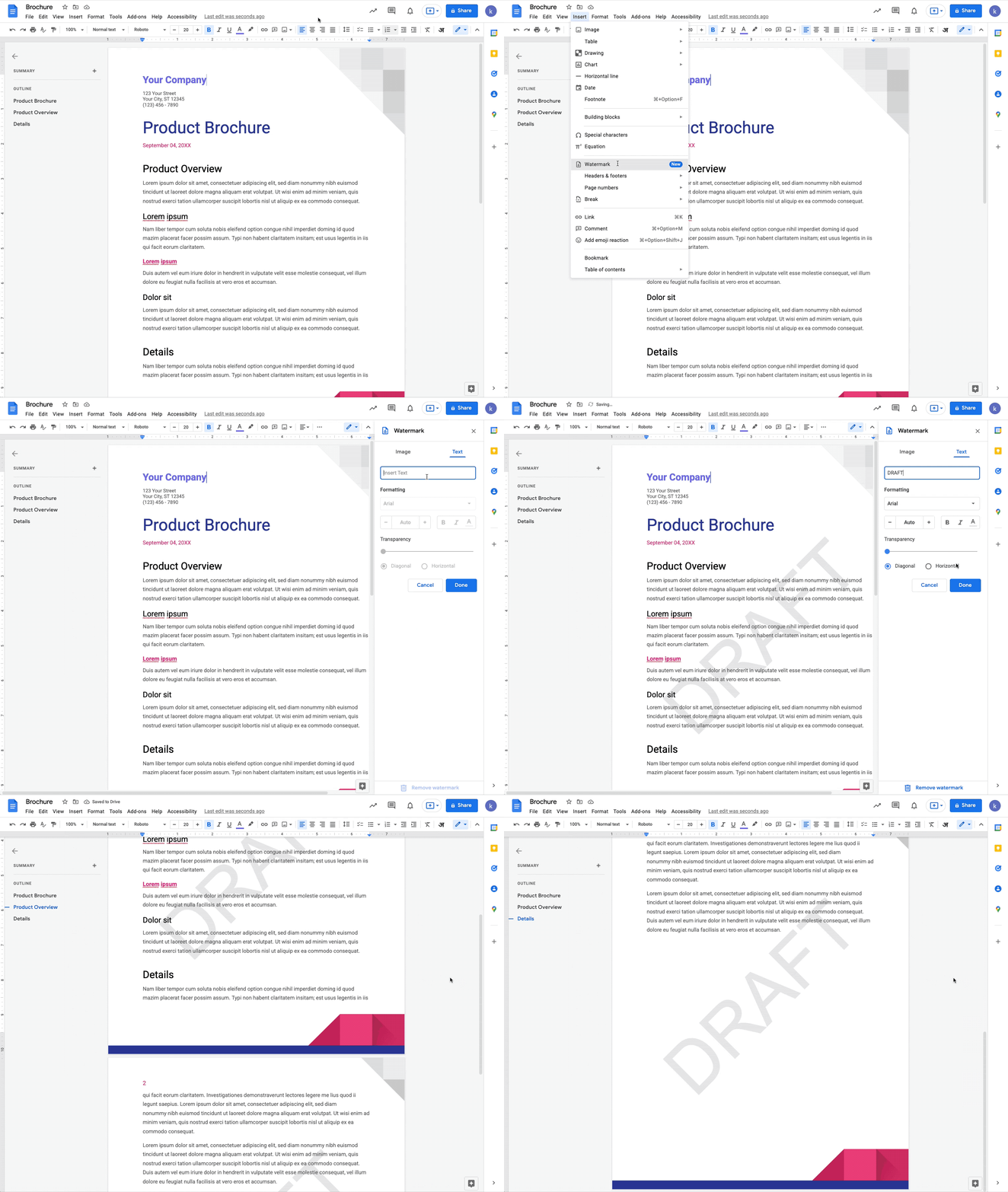
You can now add a text watermark to your documents in Google Docs.
You can now add a text watermark to your documents in Google Docs. Additionally, when working with Microsoft Word documents, text watermarks will be preserved when importing or exporting your files.
Release: Both • Rapid: 2022-01-24 • Scheduled: 2022-02-14 -
2022-01-24Content & Collaboration
Add or import text watermarks in Google Docs.
Google Docs now allows users to add text watermarks that repeat on every page, which is useful for marking documents as 'Confidential' or 'Draft'. Furthermore, text watermarks are preserved when importing or exporting Microsoft Word documents.
Release: Both • Rapid: 2022-01-24 • Scheduled: 2022-02-14 -
2022-01-20Content & Collaboration
You can mark a paragraph to always begin on a new page with the new “Add page break before” option in Google Docs on mobile.
You can mark a paragraph to always begin on a new page with the new “Add page break before” option in Google Docs. This is particularly useful if you want certain paragraph styles to always create a new page such as titles, subtitles, or headings.
Release: Both • Rapid: 2022-01-20 • Scheduled: 2022-01-20 -
2022-01-20Content & Collaboration
Add a page break before paragraphs in Google Docs on mobile.
Google Docs for Android and iOS now supports the 'Add page break before' option for paragraphs, allowing users to ensure specific styles like titles or headings always start on a new page. This update also enables Google Docs to retain this formatting when importing or exporting Microsoft Word and other third-party documents.
Release: Both • Rapid: 2022-01-20 • Scheduled: 2022-01-20 -
2021-12-07Content & Collaboration
New ways to customize tables in Google Docs, including pinned headers, row split prevention, easier arrangement, sorting, and a properties sidebar.
Google Docs is introducing several table customization features to improve data presentation. Users can now pin header rows to repeat across pages, prevent rows from splitting across page breaks, drag and drop rows and columns for easier arrangement, sort table rows to organize data, and use a new sidebar to manage table properties in real time.
Release: Both • Rapid: 2021-12-07 • Scheduled: 2021-12-22 -
2021-11-08Content & Collaboration
Request and review formal document approvals in Google Docs, Sheets, and Slides.
Google is rolling out a feature that allows users to request and review formal approvals on Google Docs, Sheets, and Slides. Approvers can approve, reject, add comments, or edit documents within the secure Google Workspace environment. To maintain document integrity, files are locked once all reviewers have provided their approval. If any edits are made during the approval process, all reviewers are notified and must re-approve the latest version of the file.
Release: Both • Rapid: 2021-11-15 • Scheduled: 2021-11-24 -
2021-11-02Content & Collaboration
New search and automated entry function for citations in Google Docs.
Google Docs has introduced a new feature that allows users to search for books and online sources to automatically populate citation attributes. This automation is designed to speed up the source creation process, ensure correct formatting, and reduce manual errors when managing citations within documents.
Release: Both • Rapid: 2021-11-02 • Scheduled: 2021-11-29 -
2021-10-19Content & Collaboration
Introduction of a universal @ menu in Google Docs for easy insertion of smart chips, tables, images, and more.
Google Docs has introduced a universal insertion menu triggered by typing '@'. This menu allows users to quickly add smart chips to connect people, content, and events, as well as other content elements and formats like tables and images, directly into their documents to streamline the collaboration process.
Release: Both • Rapid: 2021-10-18 • Scheduled: 2021-11-01