All Google Docs updates
216 updates to Google Docs tracked so far.
-
2021-09-27Content & Collaboration
Comment size increasing in Google Docs
Increased the comment width to a maximum of 50 characters, a +43% increase in width. Comment width will intelligently scale based on your browser window to maximize the use of available screen space.
Release: Both • Rapid: 2021-09-27 • Scheduled: 2021-09-27 -
2021-09-27Content & Collaboration
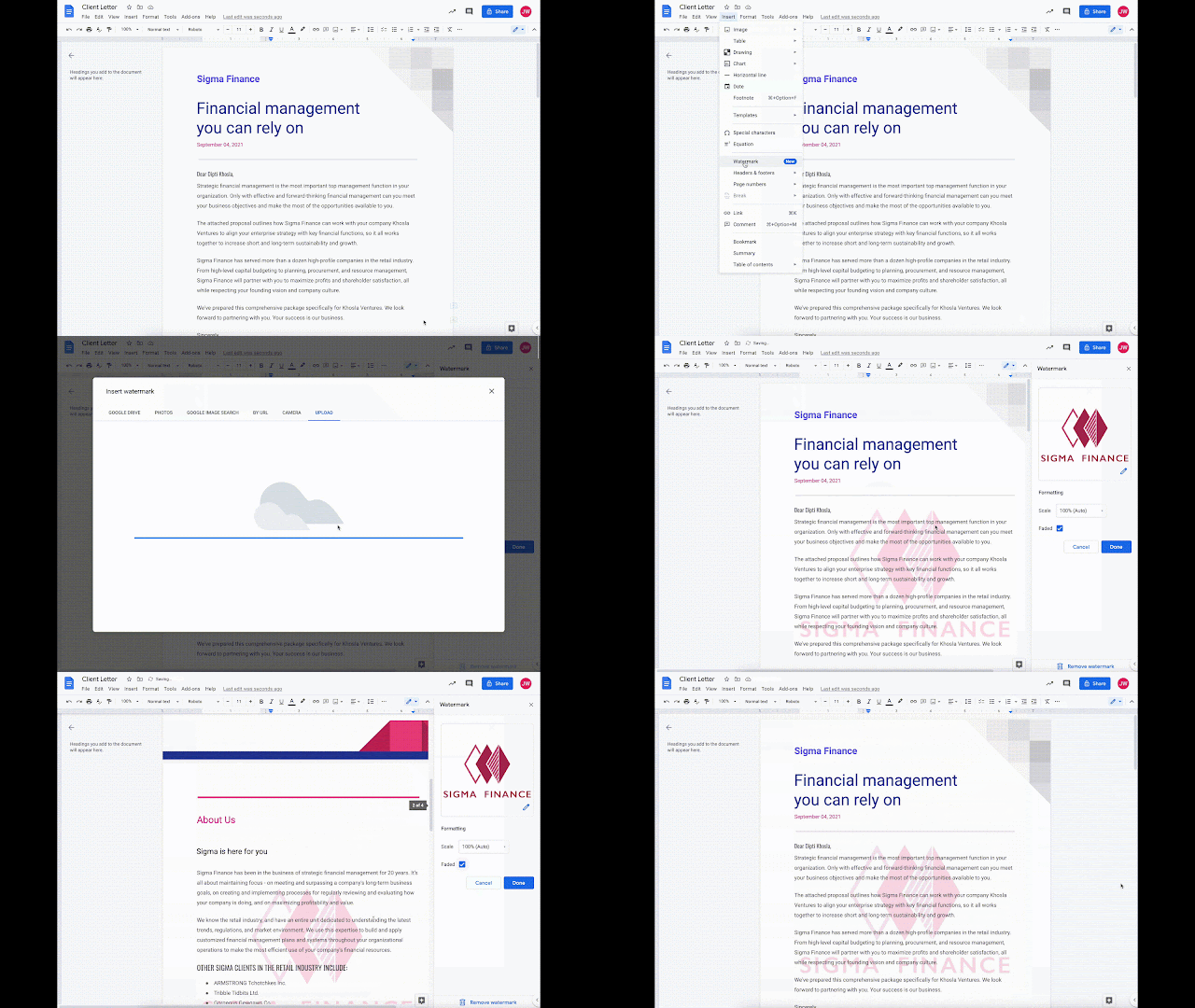
Add image watermarks directly into Google Docs.
Google Docs now allows users to insert image watermarks that repeat behind the text on every page of a document, which is ideal for company logos and branding. These watermarks are also preserved when importing or exporting documents from Microsoft Word.
Release: Both • Rapid: 2021-09-27 • Scheduled: 2021-10-11 -
2021-08-31Content & Collaboration
View embedded Microsoft Office files in Google Docs, Sheets, and Slides
Users can now view embedded Microsoft Office files when working with Office files in Google Docs, Sheets, and Slides. This feature allows users to preview embedded files, copy them directly to Google Drive, or download them, providing a more seamless experience when accessing embedded content within Office documents.
Release: Both • Rapid: 2021-08-31 • Scheduled: 2021-09-06 -
2021-08-24Content & Collaboration

Smart Reply is now available for comments in Google Docs.
Google Docs has introduced Smart Reply for comment threads in English, providing users with suggested relevant responses to save time. This feature complements Smart Compose and spelling autocorrect, allowing users to either select a suggested reply or write their own. It is enabled by default but can be turned off via Tools > Preferences.
Release: Both • Rapid: 2021-08-24 • Scheduled: 2021-09-13 -
2021-07-26Content & Collaboration
Improvements for braille mode in Google Docs
Improved how suggestions are announced in braille mode in Google Docs. You’ll now hear detailed suggestion information inline with the rest of the text — this includes whether the suggestion is an insertion or deletion, and the author of the suggestion.
Release: Both • Rapid: 2021-07-26 • Scheduled: 2021-08-16 -
2020-08-31Content & Collaboration
Improving braille support in Google Docs
Making several improvements to braille support in Google Docs to make it easier for users of assistive technologies, including refreshable braille displays, to work on documents. These changes will enhance the experience of reading documents with new keyboard shortcuts, improved navigation, and more reliable verbalizations.
Release: Both • Rapid: 2020-08-31 • Scheduled: 2020-09-17 -
2020-06-01Content & Collaboration

Smart Compose is now available for G Suite for Education and Nonprofits users in Google Docs.
Smart Compose helps users compose high-quality content faster by suggesting text to reduce repetitive writing and minimize the chance of spelling and grammatical errors. This feature is available for Google Docs on the web in English.
Release: Both • Rapid: 2020-06-01 • Scheduled: 2020-06-01 -
2020-06-01Content & Collaboration
Autocorrect is now available for G Suite for Education and Nonprofits users in Google Docs.
Autocorrect helps users compose documents more quickly and with confidence by automatically correcting misspelled words while typing in Google Docs on the web in English. Corrected words are denoted with a grey dashed underline that disappears as the user continues typing.
Release: Both • Rapid: 2020-06-01 • Scheduled: 2020-06-01 -
2020-03-09Content & Collaboration

Fix images to a certain location on a page in Google Docs
In Google Docs, you can now position an image in a fixed place, ensuring it stays in a certain spot on the page and is not disrupted by text and other elements.
Release: Both • Rapid: 2020-03-09 • Scheduled: 2020-03-30 -
2020-03-09Content & Collaboration
Improved image positioning and formatting options in Google Docs.
Google Docs now allows users to fix images to a specific location on a page, ensuring they remain in place regardless of text or other element changes. Additionally, a new image options sidebar has been introduced, providing quick access to formatting settings such as size, rotation, brightness, and contrast.
Release: Both • Rapid: 2020-03-09 • Scheduled: 2020-03-30 -
2020-03-03Content & Collaboration
Accessibility improvements for Google Docs
Making several improvements to accessibility features in Google Docs. Some enhancements you’ll notice are: Improvements in how screen readers verbalize content, including for non-text information like comments and suggestions. Improvements in how Braille displays render content, including symbols, emojis, and other glyphs. Improved support for navigating through elements such as tables, headers, and footers. Improved caret tracking.
Release: Both • Rapid: 2020-03-03 • Scheduled: 2020-03-26 -
2020-03-03Content & Collaboration
Accessibility improvements for Google Docs
Google Docs is implementing several accessibility enhancements to improve the experience for users of assistive technologies. These updates include better screen reader verbalization for non-text information like comments and suggestions, improved Braille display rendering for symbols and emojis, enhanced navigation for elements such as tables, headers, and footers, and improved caret tracking.
Release: Both • Rapid: 2020-03-03 • Scheduled: 2020-03-26 -
2020-02-18Content & Collaboration
Autocorrect now available for Google Docs on web
Improved as-you-type spelling and grammar corrections are now available in Google Docs on the web. Autocorrect helps you compose documents quickly and with confidence.
Release: Both • Rapid: 2020-02-18 • Scheduled: 2020-03-03 -
2020-02-18Content & Collaboration
Smart Compose in Google Docs now generally available
Smart Compose in Google Docs helps you compose high-quality content in Google Docs faster and more easily. Smart Compose saves you time by cutting back on repetitive writing, helps reduce the chance of spelling and grammatical errors, and can suggest relevant contextual phrases.
Release: Both • Rapid: 2020-02-18 • Scheduled: 2020-03-03 -
2020-02-18Content & Collaboration

Autocorrect is now available for Google Docs on the web.
Google Docs on the web now includes autocorrect functionality that automatically corrects misspelled words as you type, marking them with a grey dashed underline that disappears as you continue. Users can undo these corrections via backspace, a hover menu, or keyboard shortcuts. The feature is enabled by default and can be managed under Tools > Preferences.
Release: Both • Rapid: 2020-02-18 • Scheduled: 2020-03-03
