All Google Docs updates
216 updates to Google Docs tracked so far.
-
2019-11-21Content & Collaboration

Smart Compose for Google Docs launching in beta
Google is introducing a beta version of Smart Compose for Google Docs on the web. This AI-powered feature helps users draft high-quality content faster by suggesting relevant contextual phrases and reducing the likelihood of spelling and grammatical errors. The beta is available in English for all G Suite editions, and admins must sign up for the beta to have their domain whitelisted for access.
Release: Rapid • Rapid: 2019-11-21 -
2019-11-19Content & Collaboration

Customizable page numbers for different sections in Google Docs.
Google Docs now allows users to customize which sections of a document include page numbers and specify the starting number for those sections. This enables users to exclude cover pages or tables of contents from the page count and start numbering from the main body of the document. This feature can be accessed via Insert > Page Numbers > More options.
Release: Both • Rapid: 2019-11-18 • Scheduled: 2019-12-02 -
2019-10-07Content & Collaboration
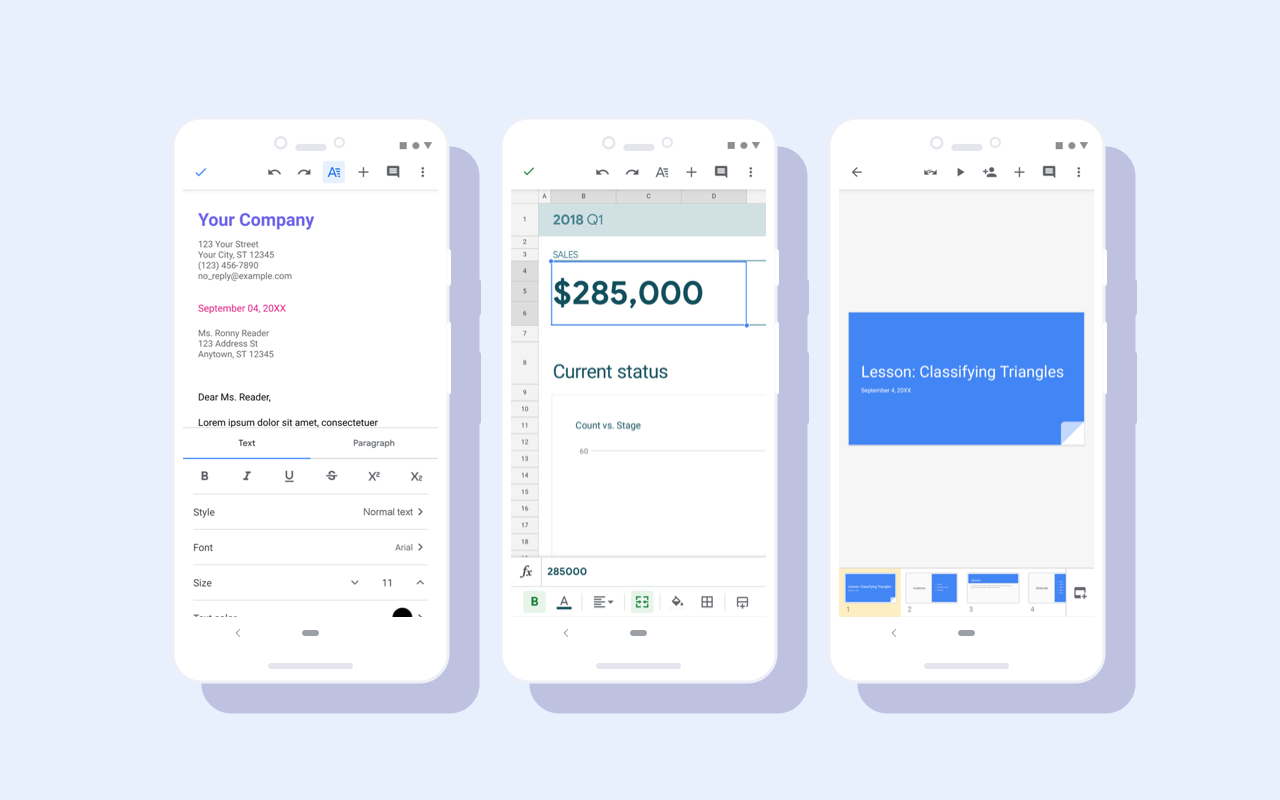
Material redesign for Google Docs, Sheets, and Slides Android apps
Google Docs, Sheets, and Slides Android apps have received a visual update as part of a Material redesign. While functionality remains the same, users will see visual improvements including a restyled document list, highly-legible typefaces, consistent controls, and updated iconography to bring consistency and ease-of-use to G Suite apps.
Release: Both • Rapid: 2019-10-07 • Scheduled: 2019-10-07 -
2019-09-18Other

Custom line spacing less than one is now available in Google Docs and Google Slides.
Google Docs and Google Slides now allow users to set custom line spacing to be less than one. This provides more detailed control over font appearance, helping users meet strict brand guidelines and create visually polished documentation. Additionally, this update improves the preservation of formatting when importing and exporting files in legacy formats.
Release: Both • Rapid: 2019-09-18 • Scheduled: 2019-10-07 -
2019-08-20Content & Collaboration
Improving real-time collaboration in Google Docs for assistive technology users
It’s now easier for users of assistive technologies, like screen readers and Braille displays, to keep track of real-time updates made by collaborators in a document. With live edits, you can view a periodically updated summary of collaborator changes in a convenient sidebar.
Release: Both • Rapid: 2019-08-20 • Scheduled: 2019-09-10 -
2019-02-27Content & Collaboration
Accessibility settings are now easier to access on Docs
It’s now easier to discover accessibility features like screen reader support, braille support, and screen magnifier support in Docs. This change will make these settings more readily available by placing the Accessibility settings in the Tools menu.
Release: Both • Rapid: 2019-02-27 • Scheduled: 2019-03-13 -
2018-05-31Content & Collaboration

New insights and collaboration features added to the Activity dashboard in Google Docs, Sheets, and Slides.
Google has introduced enhancements to the Activity dashboard across Google Docs, Sheets, and Slides to provide more actionable data. Users can now send follow-up emails to collaborators directly from the dashboard, with the ability to filter recipients based on whether they have viewed the file. Additionally, a new chart has been added to visualize viewing patterns over time, allowing users to adjust date ranges and hover over data points for more detailed insights.
Release: Both • Rapid: 2018-05-31 • Scheduled: 2018-06-14 -
2018-03-07Other
Menu and toolbar updates across Google Docs, Sheets, and Slides to improve item discoverability.
Google is updating the menus and toolbars in the web versions of Google Docs, Sheets, and Slides. Key changes include moving text formatting to a 'Text' submenu in Docs and Slides, removing the Table menu in Docs and Slides (moving options to Insert and Format), and adding a 'Move' submenu in Slides. Additionally, the Google Docs toolbar now features separate controls for text and highlight colors, and the Insert menu has been reordered across all three editors.
Release: Both • Rapid: 2018-03-07 • Scheduled: 2018-03-21 -
2018-03-07Content & Collaboration

Introducing Activity dashboard in Google Docs, Sheets, and Slides to track file views.
Google is introducing the Activity dashboard for Google Docs, Sheets, and Slides, allowing users with edit access to see who has viewed a file and when. G Suite administrators can control the visibility of this data at the domain or organizational unit level through the Admin console, and individual users can manage their own privacy settings to exclude their viewing data from the dashboard.
Release: Both • Rapid: 2018-03-21 • Scheduled: 2018-04-09 -
2018-02-28Content & Collaboration
Quick Access for Google Docs is now available.
Quick Access for Google Docs uses artificial intelligence to suggest relevant files based on signals like Drive activity and information within documents, helping users work with the most up-to-date information and create new material quickly. This feature is available to G Suite Business and Enterprise editions with Google Cloud Search enabled.
Release: Both • Rapid: 2018-02-28 • Scheduled: 2018-03-13 -
2018-02-14Other
Improvements to menus in the web versions of Google Docs editors.
Google is updating the menus in the web versions of Google Docs, Slides, and Sheets to make items easier to find. Changes across all editors include renaming 'Spelling' to 'Check Spelling' in the Tools menu and removing 'Select none' from the Edit menu. Specifically for Google Sheets, 'Filter' is renamed to 'Create a filter' and 'Validation' to 'Data validation' in the Data menu, with various reordering of items in the File, Edit, Tools, Data, and Format menus.
Release: Both • Rapid: 2018-02-14 • Scheduled: 2018-02-28 -
2018-01-18Content & Collaboration
Alt text for shapes moved to right-click menu in Google Docs and Slides.
The option to add alt text to a shape has been removed from the Format menu in both Google Docs and Google Slides. Users can now access this feature by right-clicking on the shape.
Release: Both • Rapid: 2018-01-18 • Scheduled: 2018-02-01 -
2018-01-18Content & Collaboration
Updated menu path for adding page and column breaks in Google Docs.
Google Docs has updated the menu structure for adding breaks. Users now find page and column break options under Insert > Break, rather than directly under the Insert menu.
Release: Both • Rapid: 2018-01-18 • Scheduled: 2018-02-01 -
2017-12-13Other

Improvements to menus and toolbars in Google Docs and Slides for better consistency and discoverability.
Google is updating the menus and toolbars in Google Docs and Slides on the web to make items easier to find and increase consistency. Key changes include renaming 'Lists' to 'Bullets and numbering', moving and renaming 'Show spelling suggestions' to 'Spelling' in the Tools menu, moving 'Document outline' to the View menu in Docs, and removing 'Import slides' from the Insert menu in Slides.
Release: Both • Rapid: 2017-12-13 • Scheduled: 2018-01-04 -
2017-12-13Content & Collaboration
Existing templates now available in additional languages
Existing templates in Google Docs, Sheets, and Slides on the web are now available in several additional languages, including Hindi (hi), German (de), Indonesian (in), Japanese (ja), Dutch (nl), and Chinese (zh-CN).
Release: Both • Rapid: 2017-12-13 • Scheduled: 2017-12-13